What Happens When You Type a URL? Page Load Explained
On this page
Learning Objective
Trace the full journey from typing a URL to seeing a rendered page: DNS lookup, connection setup, the HTTP request and response, HTML parsing, subresource loading and the first paint. Learn to read that journey in the browser's Network panel so every later concept in this course has a place on the timeline.
Concept Explanation
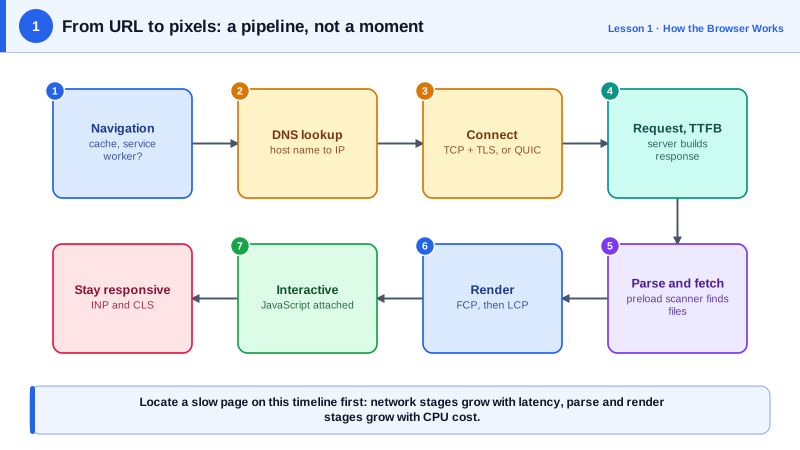
Every frontend concept you will learn in the next hundred days happens somewhere on a single timeline: the time between a user asking for a page and that page becoming useful. When you type a URL and press Enter, the browser first decides what you meant. It checks whether the text is a URL or a search, looks for a cached copy it can reuse, and checks whether a service worker has registered itself for that origin. If none of those shortcuts apply, it has to go to the network.
Going to the network has a fixed cost before a single byte of HTML arrives. The browser resolves the host name to an IP address through DNS, opens a TCP connection, and negotiates TLS so the connection is encrypted. With HTTP/3 the transport is QUIC over UDP, which merges the connection and encryption handshakes, but the idea is the same: a few network round trips happen before the request is even sent. This is why the distance between the user and the server matters so much, and why CDNs place copies of content close to users. The time until the first byte of the response arrives is called Time to First Byte, or TTFB.
The server answers with headers and then the HTML document. The browser does not wait for the whole document: it starts parsing as bytes stream in. As the parser meets tags for stylesheets, scripts, images and fonts, it requests them, often in parallel over the same connection. A preload scanner reads ahead in the raw HTML to discover these resources early, even while the main parser is blocked. Stylesheets and synchronous scripts can block rendering or parsing, which Day 4 covers in detail.
Once the browser has enough HTML and CSS, it builds the structures it needs to draw: the DOM, the CSSOM, the render tree, then layout, paint and compositing (Day 2). The first time anything appears is First Contentful Paint. The moment the largest visible element, usually a hero image or a headline, finishes rendering is Largest Contentful Paint. After that the page must stay responsive to input and visually stable, which is what the Core Web Vitals in Phase 9 measure.
The useful habit is to stop thinking of page load as one event. It is a pipeline of stages, each with its own costs, and each frontend technique attacks one stage: CDNs and caching shorten the network stages, preload and priority hints speed up discovery, code splitting shrinks what has to be downloaded and executed, and server rendering changes when meaningful HTML arrives.
| Stage | What happens | Typical lever |
|---|---|---|
| Navigation start | URL parsed, caches and service worker checked | HTTP caching, service workers |
| DNS lookup | Host name resolved to an IP address | DNS prefetch, fewer third-party origins |
| Connection | TCP and TLS handshakes, or QUIC with HTTP/3 | Preconnect, CDN edge close to the user |
| Request and TTFB | Server builds the response, first byte arrives | Server caching, edge rendering |
| Parse and fetch | HTML streams in, subresources discovered | Preload, fewer render-blocking files |
| Render | DOM, CSSOM, layout, paint, composite | Smaller CSS, less layout work |
| Interactive | JavaScript runs, handlers attached | Less JavaScript, code splitting |
Worked Example: Reading the Load Timeline from JavaScript
The Navigation Timing API exposes the same stages that the Network panel shows. Paste this into the console of any page after it has loaded to see where the time went.
// Break a page load into its stages using the Navigation Timing Level 2 API.
const [nav] = performance.getEntriesByType('navigation');

const stages = {
  redirect: nav.redirectEnd - nav.redirectStart,
  dns: nav.domainLookupEnd - nav.domainLookupStart,
  connect: nav.connectEnd - nav.connectStart,            // includes TLS
  tls: nav.secureConnectionStart ? nav.connectEnd - nav.secureConnectionStart : 0,
  ttfb: nav.responseStart - nav.requestStart,            // server think time plus one round trip
  download: nav.responseEnd - nav.responseStart,
  domInteractive: nav.domInteractive - nav.startTime,     // HTML fully parsed
  domContentLoaded: nav.domContentLoadedEventEnd - nav.startTime,
  load: nav.loadEventEnd - nav.startTime,
};

console.table(Object.fromEntries(
  Object.entries(stages).map(([k, v]) => [k, `${Math.round(v)} ms`])
));

// Paint milestones come from separate entry types.
for (const p of performance.getEntriesByType('paint')) {
  console.log(p.name, Math.round(p.startTime), 'ms');    // first-paint, first-contentful-paint
}

new PerformanceObserver((list) => {
  const last = list.getEntries().at(-1);                  // the final LCP candidate wins
  console.log('LCP', Math.round(last.startTime), 'ms', last.element);
}).observe({ type: 'largest-contentful-paint', buffered: true });
Run it on a page loaded over a fast connection, then open DevTools, enable network throttling, and reload. The DNS, connection and TTFB stages grow with latency while the parse and render stages grow with CPU cost, which shows you immediately whether a slow page is a network problem or a main thread problem.
Real-World Examples
- Google's research summarized on web.dev found that as mobile page load time rises from one second to three seconds, the probability of a visitor bouncing increases by 32 percent, which is why the whole pipeline, not just the server, is treated as a product concern.
- HTTP/3, standardized as RFC 9114 in 2022, runs over QUIC and combines the transport and TLS handshakes; Cloudflare and Google reported it reduces connection setup time, which helps most on high latency mobile networks where round trips dominate the early stages of the timeline.
Review Questions & Answers
Server time is only one stage. DNS, connection and TLS handshakes add round trips before the request, and after the HTML arrives the browser may be blocked by stylesheets and scripts, or busy executing large amounts of JavaScript. A fast TTFB with a slow LCP points at discovery, render blocking or main thread work rather than the server.
It reads ahead in the raw HTML while the main parser is blocked, for example by a synchronous script, and starts downloading resources it finds such as images, stylesheets and scripts. This hides much of the cost of blocking scripts. Resources the scanner cannot see, such as images injected by JavaScript or backgrounds set in CSS, are discovered late.
Time to First Byte is the time from the start of navigation, or from sending the request depending on the definition used, until the first byte of the response arrives. It includes any redirects, DNS, connection setup, the request travelling to the server, the server's processing time and the first bytes travelling back.
Mobile networks have high and variable latency, so each round trip is expensive. HTTP/3 over QUIC combines the transport and TLS handshakes, supports resuming connections quickly, and avoids head of line blocking at the transport layer, so fewer round trips are spent before useful data flows and lost packets do not stall unrelated streams.