localStorage vs sessionStorage vs Cookies vs IndexedDB
On this page
Learning Objective
Compare cookies, localStorage, sessionStorage, IndexedDB and the Cache API by capacity, lifetime, scope, synchronous or asynchronous access and security properties, and choose the right store for preferences, drafts, offline data and authentication state.
Concept Explanation
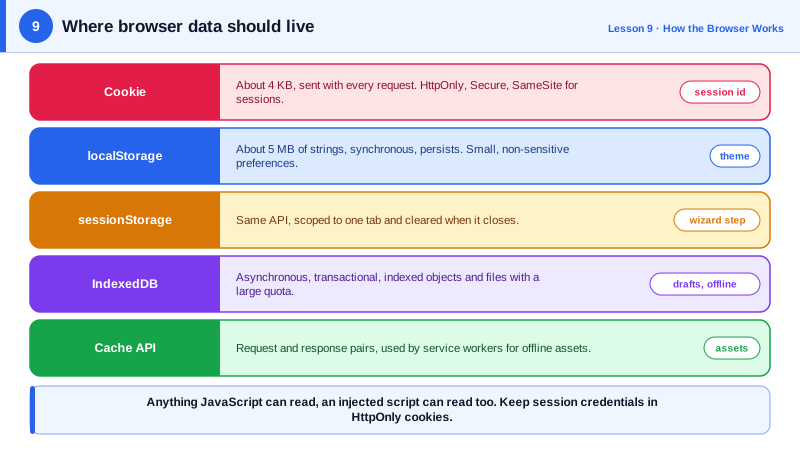
Browsers give a page several places to keep data, and each was designed for a different job. Cookies are the oldest. They are small, about four kilobytes each, and the browser sends them automatically with every matching HTTP request. That automatic sending is their purpose: they let the server recognize a session. It is also their cost, since every cookie adds bytes to every request, and their risk, because automatic sending is what cross-site request forgery exploits (Day 93). Cookies can be marked HttpOnly so JavaScript cannot read them, Secure so they travel only over HTTPS, and SameSite to control whether they are sent on cross-site requests.
localStorage and sessionStorage, together called Web Storage, store string key and value pairs, typically around five megabytes per origin. They are never sent to the server. localStorage persists until cleared; sessionStorage lasts for the lifetime of a single tab, survives reloads and is not shared with other tabs. Their API is synchronous, so reading or writing a large value blocks the main thread. They suit small, non-sensitive data such as a theme preference, a dismissed banner or a remembered tab.
IndexedDB is a real database in the browser: asynchronous, transactional, indexed, able to store structured objects including Blobs and files, and with much larger quotas, often a sizable share of free disk space. Its raw API is verbose, so most teams use a small wrapper such as idb or a library such as Dexie. IndexedDB is the right home for offline data, large caches of records and drafts of long content. The Cache API, usually used from service workers, stores HTTP request and response pairs and is the right home for offline assets and API responses (Day 70).
All these stores are scoped to the origin, the combination of scheme, host and port, so one site cannot read another's data. Browsers may evict storage under pressure unless the site requests persistence with navigator.storage.persist, and Safari's tracking prevention deletes script-written storage for sites a user has not interacted with in seven days. Storage is also partitioned in third-party contexts in modern browsers, so an embedded iframe gets separate storage per top-level site.
The most important security rule: anything readable by JavaScript can be stolen by any script that runs on your page, including a successful XSS payload or a compromised third-party library. That is why tokens that grant access to a user's account do not belong in localStorage. Session cookies with HttpOnly, Secure and SameSite, ideally issued by a backend-for-frontend, keep credentials out of reach of scripts.
| Store | Capacity | Lifetime | Access | Sent to server | Good for |
|---|---|---|---|---|---|
| Cookie | About 4 KB each | Session or expiry date | document.cookie unless HttpOnly | Yes, automatically | Session identifiers |
| localStorage | About 5 MB | Until cleared | Synchronous strings | No | Small preferences |
| sessionStorage | About 5 MB | One tab | Synchronous strings | No | Per-tab state, wizard steps |
| IndexedDB | Large quota | Until cleared or evicted | Asynchronous objects | No | Offline data, drafts, files |
| Cache API | Large quota | Until cleared or evicted | Asynchronous responses | No | Offline assets and responses |
Worked Example: Preferences in localStorage, Drafts in IndexedDB
Small preferences go through a defensive wrapper around localStorage. Long drafts go to IndexedDB through the idb library so typing never blocks on serialization.
// Preferences: tiny, non-sensitive, tolerate storage being unavailable.
const prefs = {
  get(key, fallback) {
    try {
      const raw = localStorage.getItem(`pref:${key}`);
      return raw === null ? fallback : JSON.parse(raw);
    } catch { return fallback; }                       // private mode, quota, blocked storage
  },
  set(key, value) {
    try { localStorage.setItem(`pref:${key}`, JSON.stringify(value)); } catch { /* ignore */ }
  },
};
document.documentElement.dataset.theme = prefs.get('theme', 'system');

// Drafts: larger, structured, asynchronous.
import { openDB } from 'idb';

const dbPromise = openDB('editor', 1, {
  upgrade(db) {
    const store = db.createObjectStore('drafts', { keyPath: 'id' });
    store.createIndex('byUpdated', 'updatedAt');
  },
});

export async function saveDraft(id, content) {
  const db = await dbPromise;
  await db.put('drafts', { id, content, updatedAt: Date.now() });
}

export async function recentDrafts(limit = 10) {
  const db = await dbPromise;
  const all = await db.getAllFromIndex('drafts', 'byUpdated');
  return all.reverse().slice(0, limit);
}

// Ask the browser not to evict our data under storage pressure.
if (navigator.storage?.persist) navigator.storage.persist();

// Never do this: any injected script could read the token.
// localStorage.setItem('access_token', token);
The wrapper catches exceptions because storage can be disabled or full, and the app must still work. The token line is commented out on purpose: authentication belongs in an HttpOnly cookie that scripts cannot read.
Real-World Examples
- WebKit's Intelligent Tracking Prevention, announced in 2020, caps script-writable storage including localStorage and IndexedDB to seven days of browser use without user interaction with the site, which is why offline-first apps on Safari ask users to install the app to the home screen for durable storage.
- The OWASP HTML5 Security Cheat Sheet recommends against storing session identifiers or sensitive data in localStorage, because any cross-site scripting flaw gives an attacker direct access to it, while HttpOnly cookies cannot be read by script.
Review Questions & Answers
Cookies are limited to about four kilobytes each, and the browser sends every matching cookie with every request to that site, including requests for images and scripts. Large cookies therefore add bandwidth and latency to every request and can even exceed header size limits on servers.
Both store strings per origin and are synchronous. localStorage persists across browser restarts and is shared by all tabs of the origin. sessionStorage is scoped to a single tab, survives reloads in that tab, is not shared with other tabs and is cleared when the tab is closed.
When the data is large, structured, needs indexes or querying, includes binary data such as files, or must be written frequently without blocking the main thread. IndexedDB is asynchronous and transactional, while localStorage is synchronous and limited to small strings.
Any JavaScript running on the page can read localStorage, including code injected through an XSS vulnerability or a compromised dependency. A stolen token can be used from anywhere until it expires. HttpOnly cookies cannot be read by scripts, which removes that exfiltration path.