Same-Origin Policy and CORS for Frontend Developers
On this page
Learning Objective
Define an origin, explain what the same-origin policy prevents and what it allows, understand how CORS lets a server relax it for specific origins, recognize simple and preflighted requests and credentialed requests, and debug CORS errors from the frontend without weakening security.
Concept Explanation
An origin is the combination of scheme, host and port. https://app.example.com and https://api.example.com are different origins because the hosts differ, and http://example.com and https://example.com differ by scheme. The same-origin policy is the browser rule that a script running on one origin cannot read responses or data belonging to another origin. Without it, any website you visit could use your logged-in cookies to read your email from another tab.
The policy is often misunderstood in one important way. It mainly restricts reading, not sending. A page can submit a form to another origin, load images and scripts from other origins, and even send a fetch request to another origin. What it cannot do, without permission, is read the response. That is why cross-site request forgery is possible despite the same-origin policy, and why it needs separate defenses.
Cross-Origin Resource Sharing is the mechanism by which a server grants that permission. When frontend code on app.example.com calls fetch on api.example.com, the browser adds an Origin header. If the response contains Access-Control-Allow-Origin matching that origin, the browser lets the script read the response. If not, the request may still have reached the server, but the browser hides the response and reports a CORS error. CORS is enforced by the browser on behalf of the user; tools like curl and servers calling servers ignore it entirely.
Some requests are preflighted. A simple request uses GET, HEAD or POST with only a few safe headers and a content type of plain text, form-urlencoded or multipart. Anything else, such as a JSON content type, a PUT or DELETE method, or a custom header like Authorization, triggers an OPTIONS preflight first. The browser asks the server which methods and headers it allows for that origin, and only sends the real request if the answer permits it. The server can let the browser cache that answer with Access-Control-Max-Age.
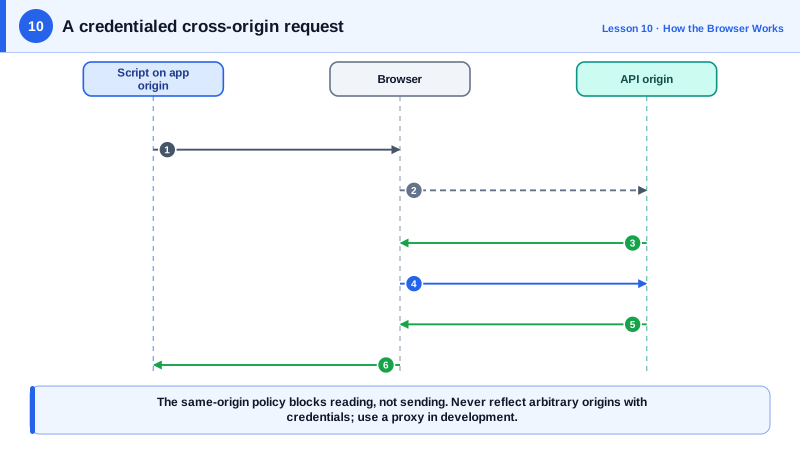
Credentials add another layer. By default a cross-origin fetch does not send cookies. With credentials: 'include', it does, but then the server must respond with Access-Control-Allow-Credentials: true and an exact origin; the wildcard star is not allowed. Reflecting any incoming Origin header back with credentials allowed is a serious vulnerability, because it lets every website read your users' data. During development, a proxy that makes the API same-origin is usually a better answer than loosening CORS.
| Situation | Preflight | Server must send |
|---|---|---|
| GET with no custom headers | No | Access-Control-Allow-Origin |
| POST with Content-Type application/json | Yes | Allow-Origin, Allow-Methods, Allow-Headers |
| Request with Authorization header | Yes | Allow-Headers listing Authorization |
| fetch with credentials include | Depends on request | Exact origin and Allow-Credentials true |
| Reading a custom response header | Not applicable | Access-Control-Expose-Headers |
| Same-origin request | No | Nothing, CORS does not apply |
Worked Example: Diagnosing a CORS Error and Fixing It Properly
The frontend on https://app.example.com calls the API on https://api.example.com with a cookie session. The first attempt fails; the comments trace why and what each side must do.
// Frontend on https://app.example.com
const res = await fetch('https://api.example.com/v1/orders', {
  method: 'POST',
  credentials: 'include',                              // send the session cookie cross-origin
  headers: { 'Content-Type': 'application/json' },     // JSON content type: preflight required
  body: JSON.stringify({ sku: 'A1', qty: 2 }),
});# 1. Browser sends the preflight automatically
OPTIONS /v1/orders HTTP/1.1
Origin: https://app.example.com
Access-Control-Request-Method: POST
Access-Control-Request-Headers: content-type
# 2. A correct server response: exact origin, credentials allowed, cached for 10 minutes
HTTP/1.1 204 No Content
Access-Control-Allow-Origin: https://app.example.com
Access-Control-Allow-Credentials: true
Access-Control-Allow-Methods: GET, POST
Access-Control-Allow-Headers: Content-Type
Access-Control-Max-Age: 600
Vary: Origin
# Wrong fixes to reject in code review:
# Access-Control-Allow-Origin: * (not allowed with credentials, and too broad)
# echoing any Origin header back (lets every site read users' data)// vite.config.js for development: make the API same-origin instead of loosening CORS
export default {
server: { proxy: { '/v1': { target: 'https://localhost:5001', changeOrigin: true, secure: false } } },
};The browser console error usually names the missing header, and the Network panel shows the OPTIONS request separately. Reading both tells you whether the preflight failed, the allowed headers were incomplete, or the credentials rules were violated.
Real-World Examples
- PortSwigger's Web Security Academy documents real vulnerability classes caused by CORS misconfiguration, including servers that reflect arbitrary Origin headers with credentials allowed and servers that trust the null origin, both of which let attacker pages read authenticated responses.
- The Fetch Standard, maintained by WHATWG, is the specification that defines CORS today; it replaced the older W3C CORS recommendation and specifies exactly which requests count as simple and which headers are safelisted.
Review Questions & Answers
No. An origin is the scheme, host and port together, and the ports differ (443 is implied for the first), so they are different origins and the same-origin policy applies between them.
Not necessarily. For simple requests, the request is sent and the server may process it; the browser only blocks the script from reading the response. For preflighted requests, a failed preflight does prevent the actual request from being sent.
application/json is not one of the content types allowed for simple requests, so the browser must first ask the server through a preflight whether this origin may send a request with that header and method. Only if the server approves does the browser send the real request.
A wildcard would let any website read responses made with the user's cookies, which would defeat the same-origin policy for authenticated data. The specification therefore requires the server to name the exact allowed origin when it allows credentials.