HTML Meta Tags, Open Graph and Structured Data
On this page
Learning Objective
Write a complete document head: charset, viewport, title and description, language, canonical URL, Open Graph and social card tags, icons, robots directives and JSON-LD structured data, and understand which tags affect browsers, which affect search engines and which affect link previews.
Concept Explanation
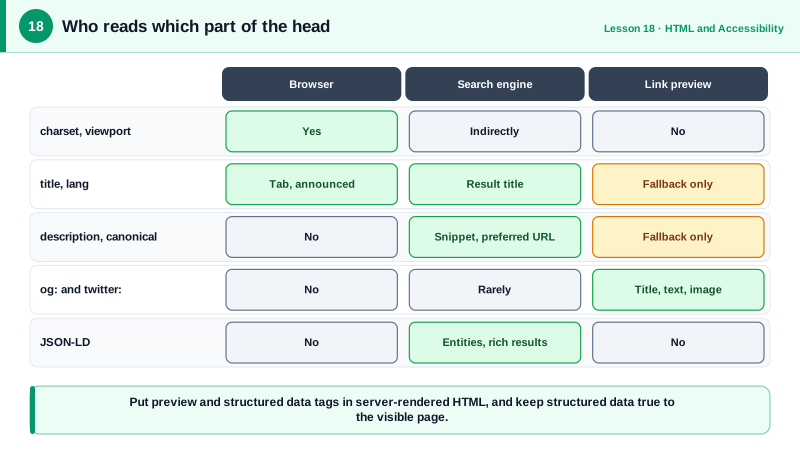
The head of an HTML document is invisible on the page but shapes almost everything about how the page is loaded, indexed and shared. The very first element should be the character encoding, meta charset="utf-8", within the first 1024 bytes so the browser does not have to guess and reparse. The viewport meta tag, width=device-width with initial-scale=1, tells mobile browsers to use the device width rather than rendering a desktop-sized page and shrinking it. The lang attribute on the html element tells screen readers which pronunciation rules to use and helps translation tools.
The title element is the single most visible piece of metadata. It appears in browser tabs, bookmarks, history, search results and screen reader announcements when the page loads. Good titles put the specific page topic first and the site name last, are unique per page, and stay around 50 to 60 characters so search results do not truncate them. The meta description does not affect ranking directly, but search engines often use it as the snippet under the title, so it should summarize the page in a sentence or two.
The canonical link tells search engines which URL is the authoritative version when the same content is reachable at several URLs, for example with tracking parameters or in sorted and filtered variants. The robots meta tag can mark a page noindex, which is useful for search results pages, staging copies and thin utility pages. In a single page application these values must update on each route change, which is one reason frameworks provide head management APIs and why server rendering matters for content sites.
Link previews come from a different vocabulary. When someone pastes a URL into Slack, LinkedIn, WhatsApp, iMessage or a social network, a crawler fetches the page and reads Open Graph tags such as og:title, og:description, og:image and og:url, plus twitter:card for X. These crawlers usually do not run JavaScript, so the tags must be in the server-rendered HTML. The share image should be 1200 by 630 pixels, with an absolute URL.
Structured data, usually written as JSON-LD in a script tag with type application/ld+json, describes the page's content using the schema.org vocabulary: an Article with author and dates, a Product with price and availability, a Course, an Organization, a BreadcrumbList. Search engines use it to understand entities and may show rich results. AI answer engines and assistants also benefit from clean, explicit structure. Structured data must match the visible content; marking up information that users cannot see violates search engine guidelines.
| Tag | Read by | Purpose |
|---|---|---|
| meta charset utf-8 | Browser | Decode the document correctly |
| meta viewport | Mobile browsers | Use device width, allow zoom |
| html lang | Screen readers, translators | Pronunciation and language |
| title | Everyone | Tab, search result, announcement |
| meta description | Search engines | Candidate snippet text |
| link rel canonical | Search engines | Preferred URL among duplicates |
| og: and twitter: tags | Link preview crawlers | Title, text and image in shares |
| JSON-LD | Search and answer engines | Explicit entities and rich results |
Worked Example: A Complete Head for an Article Page
This head covers the browser, accessibility, search, previews and structured data for one article. In a framework, the same values would come from the route's metadata.
<!doctype html>
<class="tok-k">html lang="en">
<class="tok-k">head>
  <class="tok-k">meta charset="utf-8">
  <class="tok-k">meta name="viewport" content="width=device-width, initial-scale=1">
  <class="tok-k">title>Responsive Images Explained: srcset, sizes and picture | Acme Learn</class="tok-k">title>
  <class="tok-k">meta name="description" content="Learn how browsers pick image files with srcset and sizes, when to use picture, and how width and height prevent layout shift.">
  <class="tok-k">link rel="canonical" href="https://learn.acme.dev/articles/responsive-images">

  class="tok-c"><!-- Link previews: must be in the server HTML -->
  <class="tok-k">meta property="og:type" content="article">
  <class="tok-k">meta property="og:title" content="Responsive Images Explained">
  <class="tok-k">meta property="og:description" content="srcset, sizes, picture and layout shift, with examples.">
  <class="tok-k">meta property="og:image" content="https://learn.acme.dev/og/responsive-images.png">
  <class="tok-k">meta property="og:url" content="https://learn.acme.dev/articles/responsive-images">
  <class="tok-k">meta name="twitter:card" content="summary_large_image">

  <class="tok-k">link rel="icon" href="/favicon.svg" type="image/svg+xml">
  <class="tok-k">link rel="apple-touch-icon" href="/apple-touch-icon.png">
  <class="tok-k">meta name="theme-color" content="#6b21a8">

  <class="tok-k">script type="application/ld+json">
  {
    "@context": "https://schema.org",
    "@type": "Article",
    "headline": "Responsive Images Explained: srcset, sizes and picture",
    "datePublished": "2026-03-03",
    "dateModified": "2026-04-10",
    "author": { "@type": "Person", "name": "Jordan Lee" },
    "image": "https://learn.acme.dev/og/responsive-images.png"
  }
  </class="tok-k">script>
</class="tok-k">head>
Validate the result with the Rich Results Test for structured data and a link preview debugger such as LinkedIn's Post Inspector. If a preview shows the wrong image, the usual causes are a relative image URL, tags injected by client-side JavaScript, or a cached older version on the platform.
Real-World Examples
- The Open Graph protocol was introduced by Facebook in 2010 and is now read by most messaging and social platforms, including LinkedIn, Slack, Discord and iMessage, which is why one set of og tags controls previews almost everywhere.
- Google Search Central documents that it may rewrite titles and generate snippets from page content when the provided title or description is missing, duplicated or unhelpful, and that structured data errors make a page ineligible for rich results.
Review Questions & Answers
The crawlers that build link previews for social networks and messaging apps usually fetch the raw HTML and do not execute JavaScript. Tags added by a client-side framework after load are never seen, so previews show missing or default information.
The same content is often reachable through several URLs, for example with tracking parameters, different sort orders or both www and non-www hosts. The canonical link names the preferred URL so search engines consolidate signals there instead of treating the variants as duplicates.
It is unique to the page, puts the specific topic first and the site name last, describes the content accurately and stays roughly within 50 to 60 characters so it is not truncated in search results. It is also what screen readers announce when the page loads.
Structured data must describe content that is visible to users on the page. Marking up hidden or misleading information, such as fake reviews or prices that do not appear on the page, violates search engine guidelines and can lead to manual actions.