React useState and Re-Renders Explained
On this page
Learning Objective
Explain how state updates trigger re-renders, why state behaves as a snapshot within one render, how updates are batched and when to use updater functions, why state must be replaced rather than mutated, and how React decides which components re-render.
Concept Explanation
State is a component's memory: data that persists between renders and changes over time in response to interaction. In React you declare it with useState, which returns the current value and a setter. Calling the setter does not change the variable you already have. It schedules a re-render, and on that next render React calls your component function again and useState returns the new value. Every render is therefore a complete snapshot: its props, its state and every handler created during it see the values of that render.
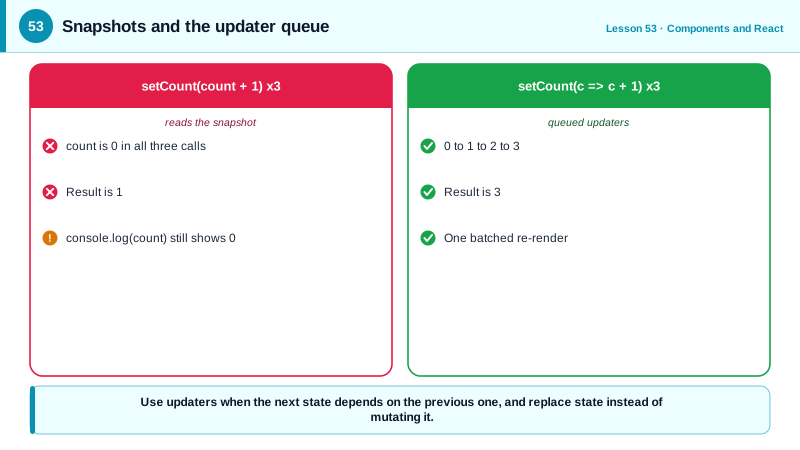
The snapshot model explains a classic surprise. Inside a click handler, calling setCount(count + 1) three times does not add three, because count is the same snapshot value in all three calls; each one asks for the same next value. When the next state depends on the previous one, pass an updater function, setCount((c) => c + 1). React queues updaters and applies them in order, each receiving the result of the previous one, so three updater calls add three. Reading the state variable right after calling the setter also still gives the old value, for the same reason.
React batches state updates. All updates made during one event handler, and since React 18 also in timeouts, promises and native event handlers, are collected and processed in a single re-render after the handler finishes. This avoids rendering intermediate states and keeps performance predictable. The render itself has two parts: React calls components to produce a new element tree, then commits the differences to the DOM. Effects run after the commit (Day 54).
State must be treated as immutable, exactly as Day 39 described. React decides whether to re-render by comparing the new state with the old using Object.is. If you mutate an array or object and pass the same reference to the setter, React sees no change and may skip the update; even when something else causes a render, mutated state makes behavior unpredictable. Always create a new object or array with the change.
When a component re-renders, React also re-renders its children by default, because their props may have changed. That is usually fast, since rendering only produces a description and the DOM changes only where output differs. Where it is not fast enough, memoization lets children skip rendering when their props are unchanged (Day 89). Where state lives decides how much re-renders: state held high in the tree re-renders a large subtree on every change, so state should live as close as possible to the components that use it, a principle called colocation. The React Compiler, released in 2025, can memoize automatically, but the mental model of snapshots and re-renders remains the same.
| Concept | Behavior | Practical rule |
|---|---|---|
| useState setter | Schedules a re-render | Does not change the current variable |
| Snapshot | Each render sees its own values | Handlers read the render's state |
| Updater function | setCount(c => c + 1) | Use when next state depends on previous |
| Batching | Updates in one event render once | No intermediate renders |
| Object.is comparison | Same reference means no change | Never mutate state |
| Child re-renders | Children render with the parent | Usually cheap, memoize when measured |
| Colocation | State near its users | Smaller re-render scope |
Worked Example: Snapshots, Updaters and Immutable Updates
The counter shows why repeated setter calls with a snapshot value do not add up. The tag editor shows the mutation bug and the immutable fix.
function Counter() {
  const [count, setCount] = useState(0);

  function addThreeBroken() {
    setCount(count + 1);
    setCount(count + 1);
    setCount(count + 1);          // all three request 0 + 1: result is 1
    console.log(count);           // still 0: this render's snapshot
  }

  function addThree() {
    setCount((c) => c + 1);
    setCount((c) => c + 1);
    setCount((c) => c + 1);       // queued updaters: 0 -> 1 -> 2 -> 3, one re-render
  }

  return (
    <>
      <p>{count}</p>
      <button onClick={addThreeBroken}>+3 (broken)</button>
      <button onClick={addThree}>+3</button>
    </>
  );
}

function TagEditor() {
  const [tags, setTags] = useState(['react']);

  function addTagBroken(tag) {
    tags.push(tag);               // mutation: same array reference
    setTags(tags);                // Object.is(old, new) is true: the update can be skipped
  }

  function addTag(tag) {
    setTags((prev) => (prev.includes(tag) ? prev : [...prev, tag]));   // new array
  }

  function removeTag(tag) {
    setTags((prev) => prev.filter((t) => t !== tag));
  }

  return (
    <ul>
      {tags.map((t) => <li key={t}>{t} <button onClick={() => removeTag(t)} aria-label={`Remove ${t}`}>x</button></li>)}
      <li><button onClick={() => addTag('typescript')}>Add typescript</button></li>
    </ul>
  );
}
Open React DevTools with "Highlight updates when components render" enabled: clicking +3 produces one highlighted render showing 3, which demonstrates both the updater queue and batching.
Real-World Examples
- React 18 introduced automatic batching for updates inside promises, timeouts and native event handlers, which previously caused one render per setState call, and the React team's announcement highlighted it as a free performance improvement for existing apps.
- React Compiler 1.0, released in 2025, automatically memoizes components and values based on static analysis, and its documentation notes that it relies on components following the rules of React, pure rendering and immutable state, to do so safely.
Review Questions & Answers
count is a constant snapshot for the current render, so all three calls request the same value, the old count plus one. Using the updater form, setCount(c => c + 1), queues functions that each receive the latest pending value, so three calls add three.
The setter does not change the variable in the current render; it schedules a new render in which useState returns the new value. The current function keeps running with its snapshot.
React collects all state updates made during one event or task and processes them in a single re-render afterward, instead of rendering after each update. This avoids wasted renders and showing intermediate states.
React compares the old and new state with Object.is. Mutating the existing array and passing it to the setter gives the same reference, so React considers the state unchanged and can skip rendering, leaving the screen out of date.