CSS :has(), :is(), :where() and Native Nesting
On this page
Learning Objective
Use relational and logical pseudo-classes to select elements by what they contain or what surrounds them, write forgiving selector lists, understand the specificity rules of :is(), :where() and :not(), and organize component CSS with native nesting and @scope.
Concept Explanation
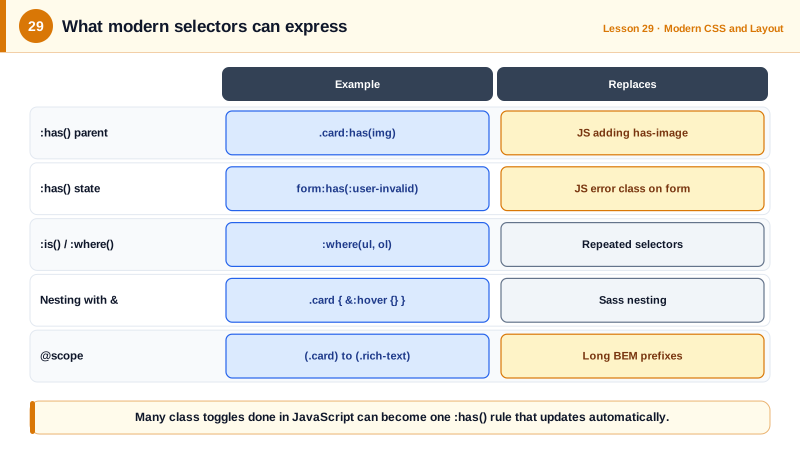
For most of CSS's history, selectors could only look down and forward: from ancestors to descendants and from earlier siblings to later ones. Styling a parent based on its children, or an element based on what came after it, required JavaScript to add classes. The :has() relational pseudo-class changed that. A selector such as .card:has(img) matches cards that contain an image, form:has(:user-invalid) matches forms with an invalid field, and h2:has(+ p) matches headings immediately followed by a paragraph. Because :has() can take any relative selector, it works as a parent selector, a previous sibling selector and a general "if this exists" condition.
:has() turns many state-driven class toggles into pure CSS. A label can be styled when its checkbox is checked, a page can disable scrolling when an open dialog exists with html:has(dialog[open]), and a grid can change columns based on how many items it contains with :has(> :nth-child(5)). It should be used thoughtfully: very broad selectors such as body:has(.x) on large, frequently changing pages make the browser do more invalidation work, though engines have optimized it heavily.
:is() and :where() take a selector list and match any element that matches one of them, reducing repetition: :is(h1, h2, h3) a instead of three selectors. Both are forgiving: an invalid selector in the list is ignored instead of invalidating the whole rule, which is useful when mixing in newer selectors. They differ only in specificity. :is() takes the specificity of its most specific argument, while :where() is always zero, which is why Day 21 recommended it for resets and defaults. :not() accepts a selector list too, such as button:not(.primary, .danger), and like :is() takes its most specific argument's specificity.
Native CSS nesting lets you write rules inside rules, a feature that used to require Sass or Less. Inside a parent rule, a nested selector applies to descendants, and the & character refers to the parent selector so you can write states and modifiers such as &:hover or &.is-active. Media and container queries can be nested inside a rule too, keeping a component's responsive styles next to its base styles. Nesting behaves like wrapping the parent in :is(), so specificity follows the :is() rule.
@scope adds explicit boundaries. @scope (.card) to (.card-content) applies styles to elements inside a card but stops at a nested content area, so a card's link styles do not leak into user-provided rich text. It also adds scoping proximity to the cascade, so the closer scope root wins when two scoped rules conflict. Support for @scope has reached Chromium and Safari, with Firefox following, so check support before relying on it.
| Selector or feature | Example | Use |
|---|---|---|
| :has() as parent selector | .card:has(img) | Style a container by its content |
| :has() as previous sibling | h2:has(+ p) | Style an element by what follows |
| :has() as a page condition | html:has(dialog[open]) | Global state without JavaScript |
| :is() | :is(h1, h2, h3) a | Shorter lists, specificity of the most specific |
| :where() | :where(ul, ol) | Same, with zero specificity |
| :not() with a list | button:not(.primary, .danger) | Exclude several cases |
| Nesting | .card { &:hover { } } | Group component rules |
| @scope | @scope (.card) to (.content) | Bounded component styles |
Worked Example: A Form That Styles Itself and a Nested Card Component
The form highlights invalid fields, enables a summary when errors exist and styles a label when its checkbox is checked, all without JavaScript class toggling. The card is written with native nesting.
/* Field wrapper reacts to its input's state */
.field:has(input:user-invalid) {
  & label { color: #b91c1c; }
  & input { border-color: #b91c1c; }
}

/* Show the error summary only when the form has an invalid field */
.form-errors { display: none; }
form:has(:user-invalid) .form-errors { display: block; }

/* Style a label whose checkbox is checked */
label:has(input[type="checkbox"]:checked) { font-weight: 700; }

/* Lock page scroll while any modal dialog is open */
html:has(dialog[open]:modal) { overflow: hidden; }

/* Native nesting for a card component */
.card {
  padding: 1rem;
  border: 1px solid var(--color-border, #ddd);
  border-radius: 12px;

  &:hover { border-color: var(--color-accent); }
  &.is-featured { outline: 2px solid var(--color-accent); }

  & :is(h2, h3) { margin-block: 0 0.5rem; }           /* any heading inside */

  &:has(> img:first-child) { padding-block-start: 0; } /* image-led cards */

  @media (width >= 48rem) { padding: 1.5rem; }
}

/* Keep card link styles out of user-written rich text */
@scope (.card) to (.rich-text) {
  a { color: var(--color-accent); text-decoration-thickness: 2px; }
}
None of these rules require script, and they stay correct when the DOM changes dynamically, because the browser re-evaluates :has() whenever the matched content changes.
Real-World Examples
- :has() became Baseline in December 2023 when Firefox 121 shipped it, following Safari 15.4 in 2022 and Chrome 105, completing support in all major engines for what developers had requested as a parent selector for more than a decade.
- Native CSS nesting reached all major browsers in 2023, and the 2023 relaxed syntax update removed the requirement that nested selectors begin with a symbol, which made it practical for teams to migrate component styles from Sass without rewriting every selector.
Review Questions & Answers
Use .card:has(img), or .card:has(> img) for direct children only. The rule applies whenever the card contains a matching element and updates automatically as content is added or removed.
Both match any element matching one of the selectors in their list and both ignore invalid selectors in the list. :is() takes the specificity of its most specific argument, while :where() always has zero specificity, making its rules easy to override.
It refers to the parent rule's selector. &:hover means the parent element when hovered and &.is-active means the parent element that also has the class. Without &, a nested selector refers to descendants of the parent.
Nesting only groups rules; the resulting selectors still match every descendant. @scope can set a lower boundary, so styles apply inside a component but stop at a nested region such as user content or another component, and it adds proximity to the cascade so the nearest scope wins.