Client-Side Routing and the History API
On this page
Learning Objective
Explain how a single page application changes URLs without full page loads using the History API or the newer Navigation API, how routers match URLs to nested layouts, what the server must do for deep links, and how to keep client-side navigation accessible, scroll-correct and fast.
Concept Explanation
In a traditional multi-page site, every link click asks the server for a new HTML document, and the browser tears down the old page and builds the new one. A single page application keeps the page alive and swaps its content in JavaScript, which preserves state such as an audio player or an open sidebar and avoids reloading shared code. To keep URLs meaningful, so that links can be shared, bookmarked and reopened, the app must change the address bar without triggering a page load. That is the job of client-side routing.
The History API makes this possible. history.pushState adds a new entry to the session history with a new URL, without loading anything; replaceState changes the current entry instead, which suits updating filters without filling the back stack. When the user presses back or forward, the browser fires a popstate event and the app renders the matching screen. A router wraps these primitives: it intercepts clicks on internal links, calls pushState, matches the new URL against a table of routes and renders the right components. Chromium browsers also implement the newer Navigation API, which other engines are adding, and whose navigate event intercepts every kind of navigation in one place, which routers are beginning to use.
Routes are usually nested. A URL such as /settings/billing matches a root layout with the header, a settings layout with a sidebar and a billing page. Nested routing renders each level inside an outlet of its parent, so navigating from billing to profile replaces only the innermost part while the layouts stay mounted with their state. Route definitions also carry parameters, such as :productId, loaders that fetch data (Day 62), error boundaries per segment and lazy loading of each route's code (Day 48). File-based routing in meta-frameworks generates the same table from the folder structure (Day 77).
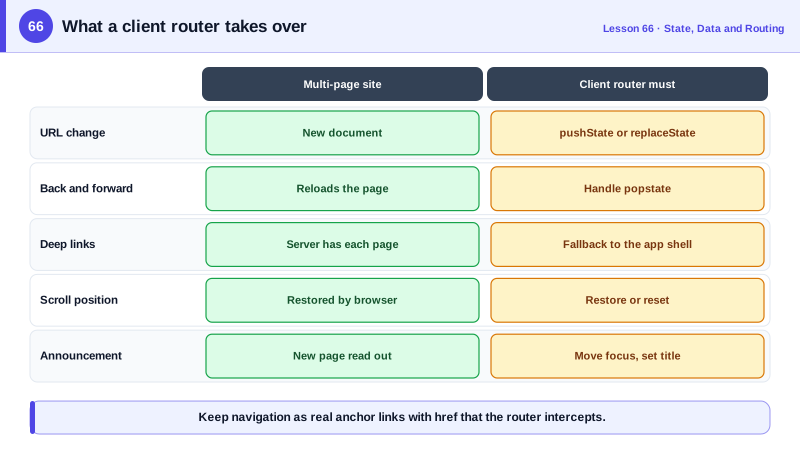
Client-side routing creates responsibilities the browser used to handle. Deep links must work: when someone opens /settings/billing directly, the server must return the application's HTML for that path, not a 404, which for static hosting means a fallback rule to index.html. Real 404s must still be signaled, ideally with a proper status from the server or a noindex not-found page. Scroll position must be restored on back and forward and reset to the top on new navigations. Focus and announcements must be managed, because screen readers no longer hear a page load; move focus to the new heading and update the title, as Day 14 described. Pending navigation should show progress, since slow loaders otherwise make clicks feel ignored.
Links must stay real links. Rendering navigation as anchor elements with href attributes, which routers intercept, keeps middle click, open in new tab, copy link, prefetching and crawlers working. Navigating with onClick on a button or div breaks all of those. Programmatic navigation, such as redirecting after a form submit, is fine as long as user-facing navigation uses links.
| Concern | Browser default in multi-page sites | Client router must |
|---|---|---|
| URL change | New document load | pushState or replaceState |
| Back and forward | Reload previous page | Handle popstate, render the match |
| Deep links | Server serves each page | Server falls back to the app shell |
| Scroll | Restored automatically | Restore on back, reset on new pages |
| Focus and announcement | New page announced | Move focus, update title |
| Loading feedback | Browser spinner | Pending UI during loaders |
| Links | Native anchors | Keep anchors with href, intercept clicks |
Worked Example: A Minimal Router, Then a Real One
A tiny router shows the primitives; the React Router configuration shows the same ideas with nested layouts, lazy routes, scroll restoration and accessible updates.
// The primitives in about 25 lines
const routes = [
  { pattern: new URLPattern({ pathname: '/' }), render: () => homePage() },
  { pattern: new URLPattern({ pathname: '/products/:id' }), render: ({ id }) => productPage(id) },
];

function render(url) {
  const match = routes.map((r) => ({ r, m: r.pattern.exec(url) })).find((x) => x.m);
  const main = document.querySelector('main');
  main.replaceChildren(match ? match.r.render(match.m.pathname.groups) : notFound());
  document.title = main.querySelector('h1')?.textContent ?? 'Acme';
  main.querySelector('h1')?.setAttribute('tabindex', '-1');
  main.querySelector('h1')?.focus();                         // announce the new page
}

document.addEventListener('click', (e) => {
  const a = e.target.closest('a[href]');
  if (!a || a.origin !== location.origin || e.metaKey || e.ctrlKey || e.shiftKey || a.target) return;
  e.preventDefault();                                          // let modified clicks open new tabs
  history.pushState({}, '', a.href);
  render(location.href);
  window.scrollTo(0, 0);
});
window.addEventListener('popstate', () => render(location.href));
render(location.href);// React Router: nested layouts, lazy routes and scroll restoration
const router = createBrowserRouter([
{
path: '/', Component: RootLayout, errorElement: <RootError />,
children: [
{ index: true, lazy: () => import('./routes/home') },
{ path: 'products/:productId', lazy: () => import('./routes/product') },
{ path: 'settings', Component: SettingsLayout, children: [
{ path: 'profile', lazy: () => import('./routes/settings-profile') },
{ path: 'billing', lazy: () => import('./routes/settings-billing') },
] },
{ path: '*', Component: NotFound },
],
},
]);
function RootLayout() {
const navigation = useNavigation();
return (
<>
<Header />
{navigation.state === 'loading' && <ProgressBar />}
<main><Outlet /></main>
<ScrollRestoration />
</>
);
}The minimal router skips modified clicks and links with a target, so users can still open links in new tabs. On the server or CDN, a rewrite from any unknown path to index.html makes deep links work for both versions.
Real-World Examples
- The HTML5 History API, with pushState and popstate, replaced the hash-based routing of early single page apps, where URLs looked like /#!/products/42; Twitter's 2012 move away from hashbang URLs was widely cited as an example of the performance and linking problems that hash routing caused.
- The Navigation API shipped in Chrome 102 in 2022 and was made an Interop 2025 focus area so the other engines would implement it, giving routers a single navigate event that covers link clicks, form submissions and back and forward navigation, along with better information about in-progress navigations.
Review Questions & Answers
pushState adds a new entry to the session history, so the back button returns to the previous URL. replaceState changes the current entry's URL without adding one, which suits updates such as changing filters where each change should not create a separate back step.
When a user opens a URL such as /settings/billing directly or reloads it, the browser requests that path from the server. If the server has no file there, it returns a 404. A fallback rule must serve the application shell for application routes so the client router can render the right screen.
Because there is no page load, screen readers are not told the page changed. The app must update the document title and move focus to the new content, usually the main heading, or announce the change through a live region, and restore or reset scroll appropriately.
Anchors with href support opening in a new tab, middle click, copying the link address, status bar previews, prefetching and crawling. A router can intercept their clicks for client-side navigation while preserving all of that behavior; buttons and divs lose it.