Event Bubbling, Capturing and Delegation in JavaScript
On this page
Learning Objective
Describe the three phases of DOM event propagation, use target, currentTarget, stopPropagation and preventDefault correctly, apply event delegation to handle events for many or dynamic elements with one listener, and choose listener options such as passive, once and signal.
Concept Explanation
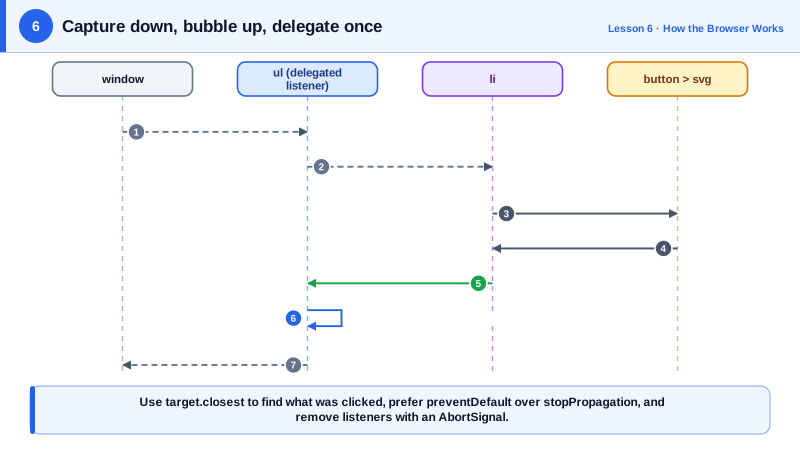
When a user clicks a button, the click does not happen to the button alone. The browser dispatches the event along a path through the DOM tree in three phases. In the capturing phase the event travels from the window down through each ancestor toward the target. In the target phase it reaches the element that was actually clicked. In the bubbling phase it travels back up through the same ancestors to the window. A listener added with addEventListener runs during bubbling by default, or during capturing if you pass the capture option.
Two properties tell you where you are on that path. event.target is the element where the event originated, the innermost element under the pointer, such as a span inside a button. event.currentTarget is the element whose listener is currently running. Mixing them up is a common bug: a click listener on a button may receive a target that is the icon inside the button, so code that reads target.dataset can find nothing. Using currentTarget, or calling target.closest to find the element you care about, fixes it.
Event delegation uses bubbling deliberately. Instead of attaching a listener to every row in a table of a thousand rows, you attach one listener to the table and inspect event.target.closest('tr') to find which row was clicked. Delegation uses less memory, avoids attaching and detaching listeners as rows are added and removed, and works automatically for elements created later. Most frameworks use the same idea internally; React, for example, attaches its listeners at the root container and dispatches to components itself.
Two methods control what happens next. stopPropagation stops the event from continuing along the path, so ancestors never see it. Use it sparingly: it breaks delegation and analytics that rely on bubbling, and it is often a sign that two handlers should be reorganized instead. preventDefault cancels the browser's default action, such as following a link, submitting a form or scrolling on a wheel event, without affecting propagation. Some events are not cancelable, and a few, such as focus and blur, do not bubble, which is why focusin and focusout exist.
Listener options matter for performance and cleanup. passive: true promises you will not call preventDefault, which lets the browser start scrolling immediately for touch and wheel events instead of waiting for your handler; browsers already treat touch and wheel listeners on the window, document and body as passive by default. once: true removes the listener after it runs. signal accepts an AbortSignal, so aborting one controller removes every listener registered with it, a clean way to tear down a component.
| Concept | Meaning | Typical use |
|---|---|---|
| Capturing phase | Window down to the target's parent | Intercept before children, rare |
| Bubbling phase | Target's parent up to the window | Default listeners, delegation |
| event.target | Where the event started | Find the clicked item with closest |
| event.currentTarget | Element whose listener runs now | Read data from the element you bound |
| preventDefault | Cancel the browser's default action | Custom form submission, links |
| stopPropagation | Stop travel along the path | Rarely, breaks delegation |
| passive option | Promise not to call preventDefault | Smooth scroll with touch and wheel |
| signal option | Remove listeners when aborted | Component teardown |
Worked Example: One Delegated Listener for a Dynamic Todo List
A single listener on the list handles toggling and deleting for any item, including items added later. An AbortController removes everything at teardown.
<ul id="todos">
  <li data-id="1"><label><input type="checkbox"> Write lesson</label>
    <button class="delete" aria-label="Delete Write lesson"><svg aria-hidden="true">...</svg></button></li>
</ul>const list = document.querySelector('#todos');
const controller = new AbortController();
list.addEventListener('click', (event) => {
const del = event.target.closest('button.delete'); // the click may land on the svg inside
if (!del || !list.contains(del)) return;
const item = del.closest('li');
removeTodo(item.dataset.id);
item.remove();
}, { signal: controller.signal });
list.addEventListener('change', (event) => {
if (!event.target.matches('input[type=checkbox]')) return;
const id = event.target.closest('li').dataset.id;
setDone(id, event.target.checked);
}, { signal: controller.signal });
// Items added later need no extra listeners.
function addTodo(todo) {
const li = document.createElement('li');
li.dataset.id = todo.id;
// ... build label, checkbox and button as above
list.append(li);
}
// Capturing example: log every click in the app before any handler can stop it.
document.addEventListener('click', (e) => track(e.target), { capture: true, signal: controller.signal });
// Teardown: one call removes all three listeners.
function destroy() { controller.abort(); }The closest call is what makes delegation robust: whether the user clicks the button's padding or the SVG icon inside it, the handler finds the button. Checking list.contains guards against matching an element outside the list.
Real-World Examples
- React 17 changed its event system to attach listeners to the root container instead of the document, so that multiple React versions and non-React code on the same page could coexist; the React blog post explaining the change describes its delegation model in detail.
- Chrome introduced passive event listeners and later made touch listeners on document-level targets passive by default, citing measurements that blocking touch handlers delayed the start of scrolling on a large share of mobile page views.
Review Questions & Answers
event.target is the innermost element clicked, which may be an icon or span inside the button that has no data attribute. Reading event.currentTarget, the element the listener is bound to, or calling event.target.closest('button') returns the button reliably.
One listener replaces many, which uses less memory and setup time. It automatically handles elements added after the listener was registered, and there is nothing to remove when individual elements are deleted. It also centralizes the logic for a group of similar elements.
preventDefault cancels the browser's default action for the event, such as navigating for a link or submitting a form, but the event keeps propagating. stopPropagation stops the event from reaching further listeners along the propagation path but does not cancel the default action.
For touch and wheel events the browser must normally wait for listeners to finish in case one calls preventDefault to cancel scrolling. Marking a listener passive promises it will not, so the browser can start scrolling on the compositor immediately, even if the main thread is busy.