JavaScript Event Loop Explained: Microtasks vs Tasks
On this page
Learning Objective
Explain how a single JavaScript thread handles timers, network responses, user input and rendering through the event loop, distinguish tasks from microtasks, predict the order in which callbacks run, and recognize code that blocks rendering or starves the loop.
Concept Explanation
JavaScript in the browser runs on one main thread, which it shares with style, layout and paint. There is only one call stack, so only one piece of JavaScript runs at a time. Everything asynchronous, a timer firing, a network response arriving, a click, is queued and handled later by the event loop. Understanding the loop explains why a long calculation freezes the page and why some callbacks always run before others.
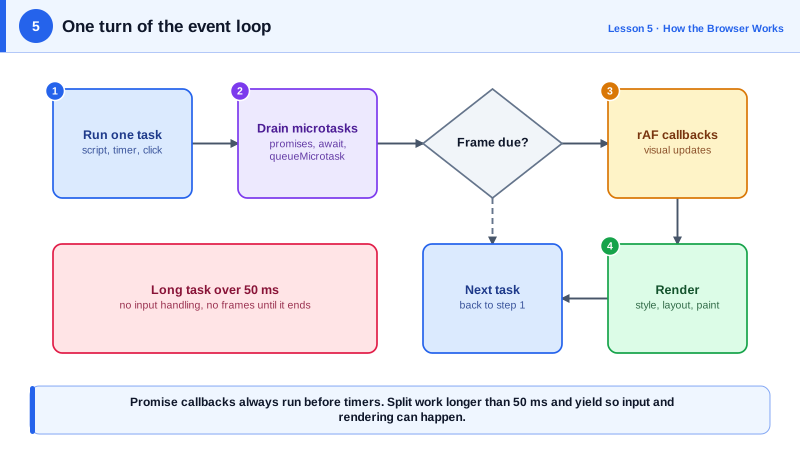
The loop works in cycles. It takes one task from a task queue and runs it to completion. Tasks, sometimes called macrotasks, include running a script, a setTimeout or setInterval callback, an input event, and a message from a worker. When the task finishes and the call stack is empty, the browser drains the microtask queue: it runs every queued microtask, including microtasks queued by other microtasks, until the queue is empty. Promise reactions, which run then, catch, finally and the code after an await, are microtasks, as are queueMicrotask callbacks and MutationObserver callbacks.
After microtasks, the browser may render. It does not render after every task; it renders when a new frame is due, roughly every 16.7 milliseconds on a 60 Hz screen, and only if something changed. Before rendering it runs requestAnimationFrame callbacks, which makes requestAnimationFrame the right place for visual updates that must line up with frames. Then it runs style, layout, paint and composite. Then the next task is picked up.
This ordering has practical consequences. A setTimeout with zero delay does not run immediately; it waits for the current task, all microtasks and possibly a render. A resolved promise's then callback runs before that timeout, because microtasks are drained before the next task. And because microtasks are drained completely, an endless chain of microtasks can starve rendering as badly as an infinite loop: the browser never reaches the render step.
The most important consequence is about responsiveness. If one task runs for 300 milliseconds, nothing else can happen in that time: no clicks are processed and no frames are painted. Tasks longer than 50 milliseconds are called long tasks, and they are the main cause of poor Interaction to Next Paint (Day 84). The cure is to keep each task short by splitting work, yielding back to the loop between chunks, or moving heavy computation to a Web Worker (Day 90).
| Queue or step | Examples | When it runs |
|---|---|---|
| Task | Script, setTimeout, click, message | One per loop turn |
| Microtask | Promise then, await continuation, queueMicrotask | All of them, after each task |
| requestAnimationFrame | Visual updates for the next frame | Just before rendering, once per frame |
| Rendering | Style, layout, paint, composite | When a frame is due and something changed |
| Long task | Any task over 50 ms | Blocks input and painting while it runs |
Worked Example: Predicting the Order of Callbacks
Read the code and predict the output before running it. The comments give the answer and the reason.
console.log('1 script start');                         // part of the current task

setTimeout(() => console.log('timeout'), 0);           // new task, runs on a later turn

requestAnimationFrame(() => console.log('rAF'));     // before the next render, timing varies

Promise.resolve()
  .then(() => console.log('3 microtask A'))
  .then(() => console.log('4 microtask B'));           // queued when A finishes, still drained now

queueMicrotask(() => console.log('3b queueMicrotask'));

console.log('2 script end');

// Output:
// 1 script start
// 2 script end
// 3 microtask A
// 3b queueMicrotask
// 4 microtask B
// then 'timeout' and 'rAF' in an order that depends on when the next frame is due

// A long task blocks everything, including the click handler and painting:
document.querySelector('#busy').addEventListener('click', () => {
  const end = performance.now() + 2000;
  while (performance.now() < end) {}                   // two seconds of frozen UI
});

// The same work split into chunks keeps the page responsive:
async function processInChunks(items, handle) {
  for (let i = 0; i < items.length; i++) {
    handle(items[i]);
    if (i % 200 === 0) await new Promise((r) => setTimeout(r, 0));   // yield to the loop
  }
}
Note that microtask B is logged before the timeout even though it was queued later: the microtask queue is drained completely before the loop moves on to the next task. Yielding with a promise alone would not help responsiveness for the same reason; the chunked version yields with setTimeout so a new task boundary lets input and rendering in.
Real-World Examples
- Chrome's Long Tasks API and the Long Animation Frames API report tasks and frames longer than 50 milliseconds with attribution to the scripts responsible, and these are the data sources behind INP debugging in tools such as the web-vitals library and real user monitoring products.
- The scheduler.yield API, shipped in Chrome in 2024, was added because developers commonly used setTimeout to yield and lost their place in the queue; scheduler.yield lets a long task pause for input and rendering and then continue ahead of other queued tasks.
Review Questions & Answers
The then callback is a microtask and the timeout callback is a task. After the current task finishes, the event loop drains the entire microtask queue before taking the next task, so all pending promise callbacks run before the timer's task, regardless of the zero delay.
Yes. Microtasks are drained completely before rendering or the next task, and microtasks queued while draining are also run. A chain that keeps queuing new microtasks never lets the loop reach rendering or input handling, which freezes the page just like a synchronous infinite loop.
In a requestAnimationFrame callback. It runs once per frame just before style and layout, so updates are applied in sync with the display refresh, are not wasted on frames that will never be shown, and pause automatically in background tabs.
A task that occupies the main thread for more than 50 milliseconds. While it runs, the browser cannot process input or paint frames, so clicks and key presses feel delayed and animations stutter. Long tasks are the main cause of poor Interaction to Next Paint scores.