URL State in React: Search Params as State
On this page
Learning Objective
Decide which application state belongs in the URL, encode filters, sorting, pagination and selection in path segments and search parameters, read and write them with validation and sensible defaults, choose between push and replace, and avoid putting sensitive or excessive data in URLs.
Concept Explanation
The URL is the most durable and shareable state an application has. It survives reloads, it can be bookmarked, pasted into a chat, opened on another device or by a colleague, and it drives the back and forward buttons. Yet many applications keep filters, sort order and the selected tab only in memory, so a reload resets everything and a shared link shows something different from what the sender saw. Treating the URL as a first-class state store fixes this class of problems.
A practical rule decides what goes in the URL: if a user would reasonably expect to share, bookmark or return to a view with the same configuration, that configuration belongs in the URL. Search queries, filters, sort order, pagination, the active tab, the selected item in a master-detail layout, map position and zoom, and date ranges qualify. Transient interaction state such as hover, focus, a half-typed form or whether a tooltip is open does not.
Path segments identify resources: /products/42 or /teams/acme/projects. Search parameters configure a view of them: ?category=shoes&sort=price&page=2. Keep parameter names short and readable, encode values with URLSearchParams rather than string concatenation, and omit parameters that equal their defaults so URLs stay clean and stable. Represent multiple values consistently, either repeated keys such as ?tag=a&tag=b or a comma list, and pick one convention across the app.
Reading URL state means parsing untrusted input. Anyone can edit a URL, old links persist for years and attackers craft links on purpose, so parse and validate every parameter, coerce types, clamp numbers, fall back to defaults on invalid values and never let a bad parameter crash the page, exactly as Day 45 showed. Because the URL is now the source of truth for that state, components should read from it rather than copying it into component state, which would create two sources of truth that drift.
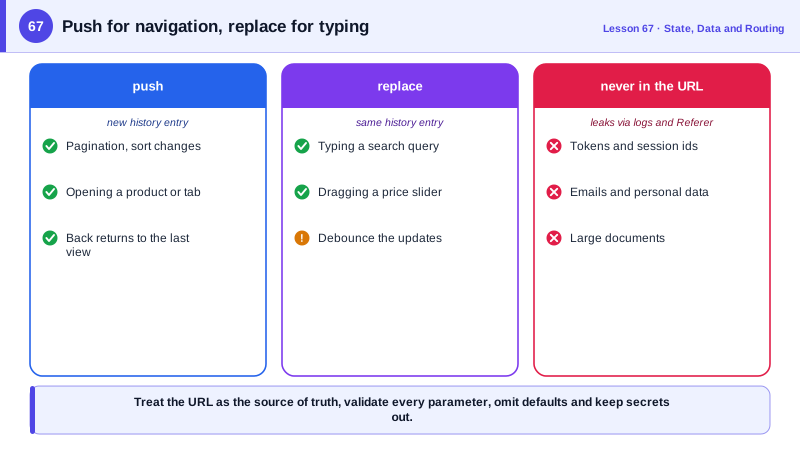
Writing URL state needs one more decision: push or replace. A deliberate navigation, such as opening a product or moving to page 3, should push, so back returns to the previous view. Rapid, incremental changes, such as typing into a search box or dragging a price slider, should replace, often debounced, so the back button is not filled with one entry per keystroke. Finally, keep sensitive data out of URLs: they are stored in browser history, sent in the Referer header to other sites, recorded in server and proxy logs and visible over shoulders. Tokens, email addresses, personal data and anything confidential belong in request bodies or server sessions. Very large state, such as a full spreadsheet, also does not belong in a URL; store it on the server and put its id in the URL.
| State | In the URL? | Form |
|---|---|---|
| Resource identity | Yes | Path: /products/42 |
| Search, filters, sort | Yes | ?q=boots&sort=price |
| Pagination | Yes | ?page=3 |
| Active tab or selected item | Usually | ?tab=reviews or /inbox/123 |
| Map position, date range | Yes | ?lat=..&lng=..&z=12 |
| Hover, focus, open tooltip | No | Component state |
| Tokens, emails, personal data | Never | Request body or session |
| Large documents | No | Store on server, put its id in the URL |
Worked Example: A Validated, Typed Search Params Hook
The hook reads filters from the URL with validation and defaults, writes only non-default values, pushes for deliberate changes and replaces while typing.
import { z } from 'zod';
import { useSearchParams } from 'react-router';

const SORTS = ['relevance', 'price-asc', 'price-desc', 'newest'] as const;
const Schema = z.object({
  q: z.string().trim().max(100).catch(''),
  category: z.string().regex(/^[a-z-]{1,30}$/).optional().catch(undefined),
  sort: z.enum(SORTS).catch('relevance'),
  page: z.coerce.number().int().min(1).max(500).catch(1),
});
type Filters = z.infer<typeof Schema>;
const DEFAULTS: Filters = { q: '', category: undefined, sort: 'relevance', page: 1 };

export function useFilters() {
  const [params, setParams] = useSearchParams();
  const filters = Schema.parse(Object.fromEntries(params));      // invalid values fall back to defaults

  function update(changes: Partial<Filters>, { replace = false } = {}) {
    const next = { ...filters, ...changes };
    if (!('page' in changes)) next.page = 1;                     // any filter change returns to page 1
    const out = new URLSearchParams();
    for (const [k, v] of Object.entries(next)) {
      if (v !== undefined && v !== DEFAULTS[k as keyof Filters]) out.set(k, String(v));   // omit defaults
    }
    setParams(out, { replace });
  }
  return [filters, update] as const;
}

function SearchPage() {
  const [filters, update] = useFilters();
  const [text, setText] = useState(filters.q);
  const debounced = useDebouncedValue(text, 300);
  useEffect(() => { if (debounced !== filters.q) update({ q: debounced }, { replace: true }); }, [debounced]);

  return (
    <>
      <input value={text} onChange={(e) => setText(e.target.value)} aria-label="Search" />
      <select value={filters.sort} onChange={(e) => update({ sort: e.target.value as Filters['sort'] })}>
        {SORTS.map((s) => <option key={s} value={s}>{s}</option>)}
      </select>
      <Results filters={filters} />
      <Pagination page={filters.page} onPage={(page) => update({ page })} />   {/* push: back works */}
    </>
  );
}
Typing replaces the history entry so the back button skips the keystrokes, while changing the sort or page pushes a new entry. A link such as ?sort=cheap&page=-4 renders the default sort and page 1 instead of breaking.
Real-World Examples
- Google Maps encodes the map's center, zoom and selected place in its URL path, so copying the address bar shares exactly the view the user sees, and e-commerce sites such as Amazon encode search terms, filters and sorting in query parameters so result pages can be shared and indexed.
- The OWASP guidance on information exposure through query strings warns that sensitive data in URLs is stored in browser history, server logs and proxy logs and can leak to third parties through the Referer header, which is why session tokens moved out of URLs and into cookies.
Review Questions & Answers
Ask whether a user would expect to share, bookmark, reload or return with the back button to the same configuration. Filters, sort, pagination, tabs and selected items pass this test; transient interaction states such as hover or an open tooltip do not.
Users edit URLs, old links outlive changes to your parameters and attackers craft links deliberately. Every parameter is untrusted input that must be parsed, coerced, clamped and defaulted so a bad value never breaks the page or causes unsafe behavior.
For rapid, incremental changes such as typing a search query or dragging a slider, where adding a history entry per change would make the back button step through every keystroke. Deliberate navigations such as changing page or opening an item should push.
URLs are saved in browser history, logged by servers, proxies and analytics, sent to other sites in the Referer header and visible on screen. Tokens or personal data in a URL can leak through any of these paths.