Streaming SSR and React Suspense Explained
On this page
Learning Objective
Explain how streaming server rendering sends HTML in chunks as data becomes available, how Suspense boundaries define loading states on the server and the client, how to place boundaries for good perceived performance, and what streaming means for status codes, headers, SEO and caching.
Concept Explanation
Classic server rendering is all or nothing. The server fetches every piece of data the page needs, renders the complete HTML and only then sends the first byte. A page with a fast header, a medium product section and a slow recommendations service waits for the slowest dependency before the user sees anything. Time to first byte and first contentful paint are held hostage by the worst query.
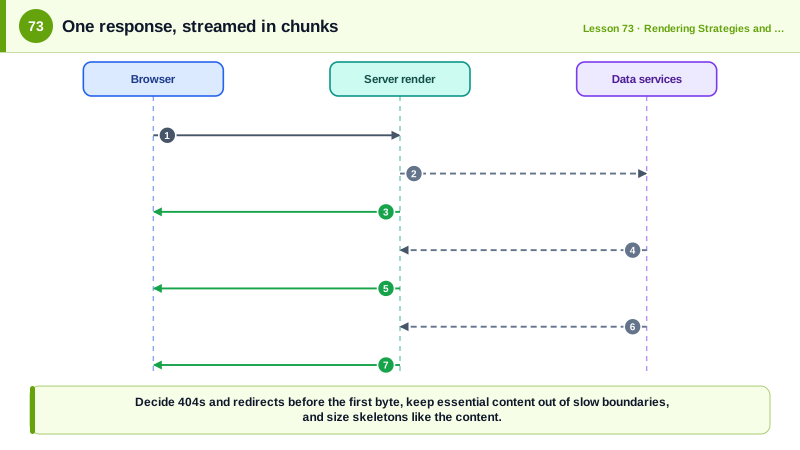
Streaming server rendering removes that coupling. HTTP responses can be sent in chunks, and browsers render HTML progressively as it arrives. With streaming, the server immediately sends the parts of the page it can render, the document head, the layout, the header, and placeholders where data is still loading. As each slow part finishes, the server sends its HTML in a later chunk along with a tiny inline script that moves it into place, replacing the placeholder, all in the same response. The browser can also begin downloading CSS and JavaScript referenced in the early chunks while the server is still working.
In React, Suspense boundaries define the units of streaming. A Suspense component wraps part of the tree and provides a fallback. On the server, if something inside the boundary is waiting for data, React sends the fallback in the initial HTML and streams the real content later. On the client, the same boundaries show fallbacks during navigations and hydrate independently (Day 72). Next.js exposes this through loading files that wrap route segments in Suspense, and through async server components that suspend while awaiting data. SvelteKit and other frameworks offer similar streamed promises.
Boundary placement is a design decision. Too few boundaries recreate the all-or-nothing problem; too many produce a page that pops in piece by piece, which feels chaotic and causes layout shift. Good boundaries follow meaningful sections: show the primary content as early as possible, stream secondary and slow sections such as reviews, recommendations and personalized widgets, and make fallbacks skeletons with the same dimensions as the final content so nothing moves. Data that the main content needs, such as the product title and price, should not be behind a boundary that delays it.
Streaming has operational consequences. Once the first chunk is sent, the HTTP status code and headers are fixed, so a not-found or redirect decision must happen before streaming begins; frameworks handle this by resolving such cases in the shell or by sending meta-based redirects later. Crawlers generally receive the complete streamed response, since it is still one HTTP response, but they may stop waiting at some point, so important content should not depend on very slow boundaries. Some proxies and older infrastructure buffer responses, which removes the benefit, so streaming must be verified end to end. And full-page caching becomes harder, which is why combining a static shell with streamed dynamic parts, known as partial prerendering in Next.js, is attractive: the shell comes from a CDN instantly and the dynamic holes stream from the server.
| Aspect | Without streaming | With streaming |
|---|---|---|
| First byte | After all data is ready | Immediately with the shell |
| Slow dependency | Delays the whole page | Delays only its boundary |
| Asset downloads | Start after HTML arrives | Start with the first chunk |
| Loading states | Client-side only | Server-sent fallbacks |
| Status code and headers | Decided at the end | Fixed by the first chunk |
| Caching | Whole page | Static shell plus dynamic parts |
Worked Example: A Product Page That Streams Its Slow Parts
The product details are needed immediately, so they render in the shell. Reviews and personalized recommendations stream in behind boundaries with matching skeletons.
// app/products/[slug]/page.tsx (React Server Components with streaming)
export default async function ProductPage({ params }: { params: Promise<{ slug: string }> }) {
  const { slug } = await params;
  const product = await getProduct(slug);              // fast and essential: awaited before streaming starts
  if (!product) notFound();                            // decided before the first byte, so a real 404 status

  return (
    <article>
      <ProductHero product={product} />                 {/* in the first chunk: likely the LCP element */}
      <AddToCart productId={product.id} />

      <Suspense fallback={<ReviewsSkeleton rows={3} />}>
        <Reviews productId={product.id} />              {/* streams when the reviews service answers */}
      </Suspense>

      <Suspense fallback={<RecommendationsSkeleton />}>
        <Recommendations productId={product.id} />     {/* slow, personalized, streams last */}
      </Suspense>
    </article>
  );
}

async function Reviews({ productId }: { productId: string }) {
  const reviews = await getReviews(productId);         // suspends this boundary only
  return <ReviewList reviews={reviews} />;
}What the browser receives in one response, over time:
0 ms <html> head, CSS and JS links, header, product hero, add to cart, two skeletons
180 ms <template> with the reviews HTML + inline script that swaps it into place
650 ms <template> with the recommendations HTML + scriptThrottle the network and watch the page load: the product appears almost immediately, the reviews skeleton is replaced first, and recommendations arrive last, all without client-side fetching or layout shift, because each skeleton reserves the final size.
Real-World Examples
- React 18 added renderToPipeableStream and renderToReadableStream to support streaming server rendering with Suspense, replacing the older renderToString approach, which had to wait for the entire tree before sending any HTML.
- eBay's engineering team described progressive HTML flushing years before modern frameworks adopted it, sending the page's above-the-fold content early so users saw it while slower parts of the page were still being generated, and reported measurable improvements in perceived speed.
Review Questions & Answers
Without streaming, the server waits for all data before sending any HTML, so the slowest dependency determines when the user sees anything. Streaming sends what is ready immediately and fills in slower sections later in the same response.
When content inside a boundary is waiting for data, the server sends the boundary's fallback in the initial HTML. When the data resolves, the server streams the rendered content with a small script that replaces the fallback in place.
The HTTP status code and headers are sent with the first chunk and cannot change afterward. If the page might be a 404 or a redirect, that must be determined before the shell is sent so the response carries the correct status.
Around meaningful secondary sections that depend on slower data, such as reviews or recommendations, keeping essential above-the-fold content outside so it arrives in the first chunk, with skeleton fallbacks sized like the final content to avoid layout shift and too much pop-in.