Next.js vs SvelteKit: How Meta-Frameworks Work
On this page
Learning Objective
Describe what meta-frameworks such as Next.js, Remix and React Router, Nuxt, SvelteKit and Astro add on top of a UI library: file-based routing, nested layouts, data loading and mutations, rendering strategies per route, build and deployment adapters, and evaluate when a meta-framework is worth adopting.
Concept Explanation
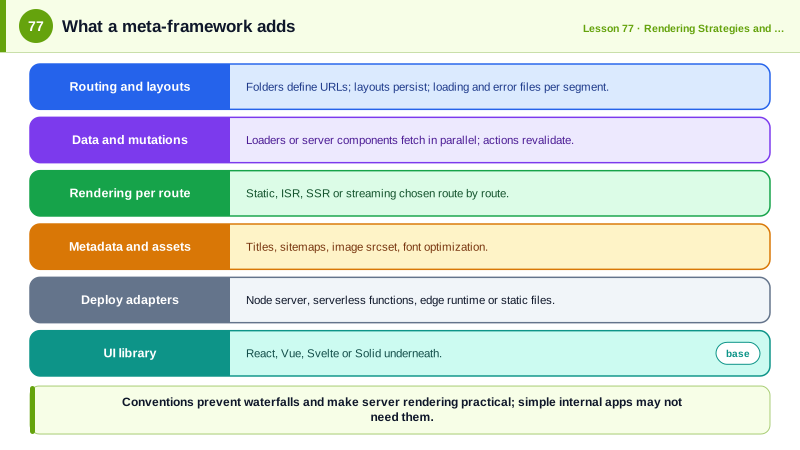
React, Vue, Svelte and Solid render components. A production application needs much more: routing with code splitting, data loading without waterfalls, server rendering and static generation, mutations and forms, head management for SEO, image and font optimization, environment handling and a build that deploys to a server, serverless functions or the edge. Teams used to assemble these from separate libraries. Meta-frameworks package them into one coherent system with conventions: Next.js and React Router in framework mode for React, Nuxt for Vue, SvelteKit for Svelte, SolidStart for Solid, and Astro across frameworks.
File-based routing is the most visible convention. The folder structure under a routes or app directory defines the URLs. A file at app/products/[slug]/page.tsx in Next.js, or src/routes/products/[slug]/+page.svelte in SvelteKit, handles /products/anything, with the dynamic segment available as a parameter. Special files define layouts that wrap child routes and stay mounted during navigation, loading states that become Suspense boundaries, error boundaries per segment and not-found pages. The convention makes the route table visible in the file tree and lets the framework split code per route automatically.
Data loading is built into routing. Each route declares what data it needs, through loader functions in React Router and SvelteKit, async server components in Next.js, or useFetch and useAsyncData in Nuxt. Because the framework knows every route segment's data needs before rendering, it can fetch them in parallel on the server or as soon as client-side navigation starts, avoiding the waterfalls of Day 62. Mutations are handled by actions or server functions tied to forms, which revalidate the affected data afterward, so most create, update and delete flows need no hand-written client state.
Rendering strategy becomes a per-route setting, as Day 71 described: static, incrementally regenerated, server-rendered per request or streamed. Meta-frameworks also handle the head and metadata per route, generate sitemaps, optimize images with automatic srcset and modern formats, optimize fonts to avoid layout shift and set caching headers. Deployment adapters turn the same app into output for Node servers, serverless platforms, edge runtimes or fully static hosting.
The costs are real too. A meta-framework is a large dependency with its own concepts, and upgrades between major versions can be significant, as the move from the Next.js pages router to the app router showed. Server rendering introduces servers to operate, or a platform to pay for, and new classes of bugs and security concerns. For an internal dashboard behind a login, a plain client-rendered single page app with a router and a query library may be simpler. For public, content-rich or SEO-sensitive sites, and for teams that want conventions instead of assembling a stack, a meta-framework is usually the better default, which is why React's own documentation recommends starting new React apps with a framework.
| Capability | What the meta-framework provides | Example |
|---|---|---|
| Routing | Folders and files define URLs | app/products/[slug]/page.tsx |
| Layouts | Persistent wrappers per segment | layout.tsx, +layout.svelte |
| Data loading | Loaders or async components per route | loader, +page.server.ts |
| Mutations | Actions or server functions | form action, use server |
| Rendering | Static, ISR, SSR, streaming per route | revalidate, dynamic, prerender |
| Head and SEO | Metadata per route, sitemaps | generateMetadata, svelte:head |
| Assets | Image and font optimization | next/image, @nuxt/image |
| Deployment | Adapters for targets | Node, serverless, edge, static |
Worked Example: The Same Route in Next.js and SvelteKit
A product route with a dynamic segment, server-side data loading, metadata and a mutation through a form, written in two meta-frameworks to show the shared concepts.
Next.js App Router                         SvelteKit
app/                                       src/routes/
  layout.tsx            root layout          +layout.svelte
  products/                                  products/
    [slug]/                                    [slug]/
      page.tsx          the page                 +page.svelte
      loading.tsx       Suspense fallback        +page.server.ts   load + actions
      error.tsx         error boundary           +error.svelte
actions.ts server functions// Next.js: app/products/[slug]/page.tsx
export async function generateMetadata({ params }: { params: Promise<{ slug: string }> }) {
const product = await getProduct((await params).slug);
return { title: product?.name ?? 'Product not found', description: product?.summary };
}
export default async function Page({ params }: { params: Promise<{ slug: string }> }) {
const product = await getProduct((await params).slug);
if (!product) notFound();
return (
<form action={addToCart}> {/* server function: works before JS loads */}
<h1>{product.name}</h1>
<input type="hidden" name="productId" value={product.id} />
<button>Add to cart</button>
</form>
);
}// SvelteKit: src/routes/products/[slug]/+page.server.ts
import { error, fail } from '@sveltejs/kit';
export async function load({ params }) {
const product = await getProduct(params.slug);
if (!product) error(404, 'Product not found');
return { product }; // available as data in +page.svelte
}
export const actions = {
default: async ({ request, locals }) => {
if (!locals.user) return fail(401, { message: 'Please sign in' });
const form = await request.formData();
await addToCart(locals.user.id, String(form.get('productId')));
return { added: true };
},
};Both frameworks map a folder to a URL, load data on the server before rendering, set metadata per route and handle the form post on the server with progressive enhancement. The vocabulary differs; the architecture is the same.
Real-World Examples
- The React documentation's guide to creating a React app recommends starting new projects with a framework such as Next.js or React Router, and the React team deprecated Create React App in February 2025, describing frameworks as the way to get routing, data fetching and rendering strategies working together.
- Remix merged into React Router with version 7 in late 2024, bringing loaders, actions and file-based route conventions to React Router's very large user base as an optional framework mode, which illustrates how meta-framework ideas have spread across the ecosystem.
Review Questions & Answers
A convention in which the folder and file structure under a routes or app directory defines the application's URLs, with special file names for pages, layouts, loading and error states and bracketed names for dynamic segments. The framework builds the route table and code splitting from the file tree.
Each route segment declares its data needs in a loader, server component or similar function that the framework knows about before rendering. The framework can therefore start all segments' requests in parallel, on the server or as soon as navigation starts, instead of waiting for nested components to render and fetch.
They are ordinary HTML form submissions to a server endpoint. Without JavaScript the browser posts the form and the server handles it and returns a page; with JavaScript the framework intercepts the submission for a smoother experience. This is progressive enhancement.
For an internal, logged-in, highly interactive application with no SEO needs and simple hosting requirements, where a client-rendered app with a router and a data library is simpler to operate and avoids running and securing server rendering infrastructure.