Islands Architecture and Partial Hydration (Astro)
On this page
Learning Objective
Describe the islands architecture, in which pages are static HTML with isolated interactive components that hydrate independently, use hydration directives to control when each island loads, share state between islands, and decide when islands suit a site better than a single page application.
Concept Explanation
Many websites are mostly content: a blog post, a documentation page, a product listing, a marketing page. Only a few parts are interactive, such as a search box, an image carousel, an add to cart button or a newsletter form. Rendering such a page as a full single page application ships and hydrates JavaScript for the entire page, including thousands of words of static text that will never change. The islands architecture inverts the default: the page is static HTML, and only the interactive components, the islands, ship JavaScript and hydrate, each on its own.
Each island is an independent application root. Its server-rendered HTML is part of the page, and its code is loaded and hydrated separately from every other island. The static sea around the islands never hydrates, so it costs no JavaScript at all. Because islands are independent, a slow or broken island does not block others, and hydration work is naturally split into small pieces instead of one long task. The idea was described by Katie Sylor-Miller and popularized by Jason Miller, and Astro made it the default model, with Fresh, Eleventy with WebC and others offering similar approaches.
Islands also control when they hydrate, which is partial and progressive hydration in practice. In Astro, client directives choose the strategy per component: client:load hydrates immediately for critical interactive parts, client:idle waits until the browser is idle, client:visible waits until the component scrolls into view, client:media hydrates only when a media query matches, such as a mobile menu, and client:only skips server rendering for components that depend on browser APIs. Components without a directive render to HTML and ship no JavaScript at all. A comments section at the bottom of a long article with client:visible costs nothing for readers who never scroll that far.
Islands can be written in different frameworks on the same page, React for one and Svelte or plain web components for another, although for maintainability most teams pick one. Sharing state between islands needs care because they are separate roots: lightweight framework-agnostic stores such as nanostores, custom events or the URL are the usual tools, rather than a React context spanning the whole page.
Islands fit content-heavy sites with pockets of interactivity: marketing sites, blogs, documentation, e-commerce catalogs and news. They fit poorly with highly interactive applications where almost everything is dynamic and shared, such as editors, dashboards and chat, where a client-rendered or server component application is more natural. Server components (Day 74) reach a similar goal from the opposite direction: they start from an application and keep non-interactive parts on the server. Both reflect the same lesson: interactivity should be paid for only where it is used.
| Directive in Astro | Hydrates | Use for |
|---|---|---|
| none | Never, HTML only | Static content, layout, text |
| client:load | Immediately | Critical controls above the fold |
| client:idle | When the main thread is idle | Secondary widgets |
| client:visible | When scrolled into view | Comments, carousels lower down |
| client:media | When a media query matches | Mobile-only menus |
| client:only | Client only, no server HTML | Components needing browser APIs |
Worked Example: An Article Page with Three Islands
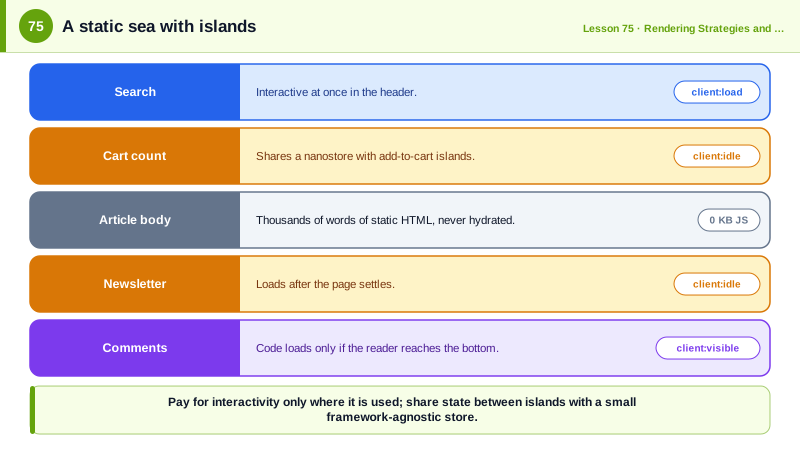
The article is static HTML. The search box hydrates immediately, the newsletter form when idle and the comments only when scrolled into view. A small shared store connects two islands.
---
// src/pages/blog/[slug].astro: runs at build time or on the server, ships no JS by itself
import Layout from '../../layouts/Layout.astro';
import Search from '../../components/Search.tsx';
import Newsletter from '../../components/Newsletter.svelte';
import Comments from '../../components/Comments.tsx';
import CartCount from '../../components/CartCount.tsx';
import { getEntry, render } from 'astro:content';

const post = await getEntry('blog', Astro.params.slug);
const { Content } = await render(post);
---
<Layout title={post.data.title}>
  <header>
    <Search client:load />                       <!-- interactive immediately -->
    <CartCount client:idle />
  </header>
  <article>
    <h1>{post.data.title}</h1>
    <Content />                                  <!-- static HTML: zero JavaScript -->
  </article>
  <Newsletter client:idle />
  <Comments client:visible postId={post.id} />  <!-- loads only if the reader scrolls here -->
</Layout>// src/stores/cart.ts: a tiny framework-agnostic store shared by separate islands
import { atom } from 'nanostores';
export const cartCount = atom(0);
// In CartCount.tsx: const count = useStore(cartCount);
// In an AddToCart island on product pages: cartCount.set(cartCount.get() + 1);Load the page with the Network panel open: only the search island's code arrives immediately, the cart counter and newsletter scripts load after the page settles, and the comments bundle loads only when you scroll to the bottom.
Real-World Examples
- Astro's documentation describes islands architecture as its core design and reports that pages ship zero client-side JavaScript by default unless a component is given a client directive, which is why many documentation and marketing sites migrated to it for performance.
- Deno's Fresh framework adopted islands as its rendering model from its 1.0 release in 2022, sending no JavaScript to the browser except for components placed in its islands directory, and the State of JavaScript survey has ranked Astro at or near the top of meta-frameworks for developer satisfaction.
Review Questions & Answers
An interactive component within an otherwise static HTML page that is server-rendered, then loaded and hydrated independently as its own application root, so only it costs JavaScript.
Static content is never hydrated and ships no component code, and each island hydrates separately, often later according to its directive. The total JavaScript is smaller and the hydration work is split into small tasks instead of one long task for the whole page.
For interactive components below the fold that many users never reach, such as comments, carousels or embedded maps. Their code is loaded and hydrated only when they scroll into view, saving bandwidth and main thread time for everyone else.
For highly interactive applications where most of the interface is dynamic and shares state, such as editors, dashboards or chat applications. There, nearly everything would be an island, and a client-rendered or server component application handles shared state and navigation more naturally.