CSS z-index and Stacking Context Explained
On this page
Learning Objective
Understand block and inline formatting contexts, what creates a new block formatting context and why that contains floats and margins, how positioned elements find their containing block, and how stacking contexts determine painting order so z-index behaves predictably.
Concept Explanation
CSS lays out boxes according to formatting contexts. In a block formatting context, block boxes stack vertically, one after another, and vertical margins between them can collapse. In an inline formatting context, inline boxes such as text, links and spans flow horizontally into line boxes and wrap. Flex and grid containers establish their own flex and grid formatting contexts with entirely different rules for their children. Knowing which context an element participates in tells you which layout rules apply.
Some elements create a new block formatting context, an isolated region whose internal layout does not interact with the outside. The root element creates one, and so do floats, absolutely positioned elements, inline-blocks, table cells, elements with overflow other than visible, flex and grid items, elements with contain layout or paint, and, most explicitly, display: flow-root. A new block formatting context contains its floats, so the parent grows to wrap floated children, stops margins collapsing through its edges, and does not overlap adjacent floats. display: flow-root exists precisely to create one without side effects such as the clipping that overflow hidden causes.
Positioning depends on the containing block. A position absolute element is placed relative to its nearest positioned ancestor, one with position relative, absolute, fixed or sticky, or the initial containing block if there is none. A position fixed element is normally relative to the viewport, except that an ancestor with a transform, filter or perspective becomes its containing block, which is why a fixed modal inside a transformed card suddenly scrolls with the card. position sticky behaves like relative until its scroll container would scroll it past a threshold, and it fails silently if an ancestor has overflow hidden.
Stacking contexts determine paint order along the z axis. Within one stacking context, the browser paints the background, then negative z-index children, block content, floats, inline content, z-index auto and zero positioned elements, and finally positive z-index children. A new stacking context is created by the root, by positioned elements with a z-index other than auto, by flex and grid items with a z-index, and by many other properties: opacity below 1, transform, filter, isolation isolate, will-change for those properties, and mix-blend-mode among them. The crucial rule is that z-index only competes within the same stacking context. A child with z-index 9999 inside a parent whose stacking context is z-index 1 can never appear above a sibling of that parent with z-index 2.
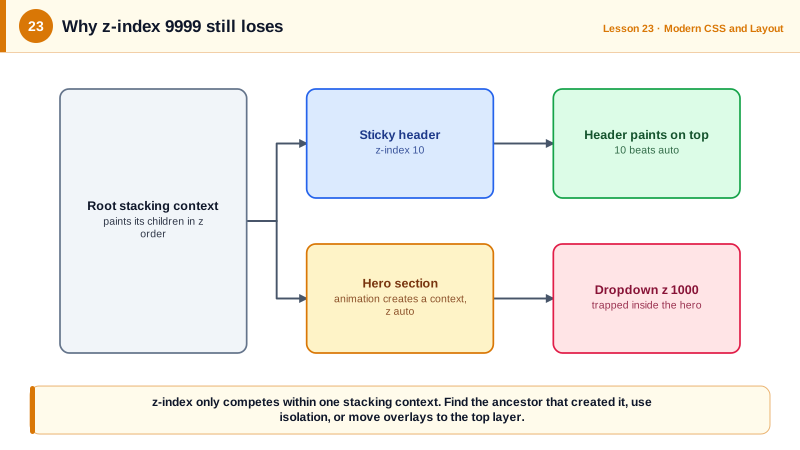
Most "z-index does not work" bugs are stacking context bugs: an ancestor with a transform or opacity has silently created a new context. The fix is rarely a bigger number. Instead, find the ancestor that created the context, restructure so the element is not trapped, use isolation isolate deliberately on components to keep their internal z-indexes local, or move overlays into the top layer with dialog and popover (Day 19).
| Concept | Created by | Effect |
|---|---|---|
| Block formatting context | flow-root, overflow not visible, floats, flex and grid items | Contains floats, stops margin collapse |
| Inline formatting context | Runs of inline content | Text flows into line boxes |
| Containing block for absolute | Nearest positioned ancestor | Origin for top, left, right, bottom |
| Containing block for fixed | Viewport, or a transformed ancestor | Fixed elements trapped by transforms |
| Stacking context | z-index on positioned, opacity, transform, isolation | Children's z-index stays inside it |
| isolation: isolate | Explicit new stacking context | Keeps component z-index local |
Worked Example: Debugging a Dropdown Hidden Behind a Header
A dropdown with z-index 1000 appears behind a sticky header with z-index 10. The cause is a stacking context created by an animated ancestor.
<class="tok-k">header class="site-header">...</class="tok-k">header>
<class="tok-k">main>
  <class="tok-k">section class="hero">                        class="tok-c"><!-- has an entrance animation -->
    <class="tok-k">div class="menu">
      <class="tok-k">button>Options</class="tok-k">button>
      <class="tok-k">ul class="dropdown">...</class="tok-k">ul>
    </class="tok-k">div>
  </class="tok-k">section>
</class="tok-k">main>.site-header { position: sticky; top: 0; z-index: 10; }
.hero { animation: fade-up 400ms both; } /* "both" keeps the animation applied after it ends */
@keyframes fade-up { from { opacity: 0; transform: translateY(8px); } to { opacity: 1; transform: none; } }
.menu { position: relative; }
.dropdown { position: absolute; top: 100%; z-index: 1000; } /* trapped inside .hero's context */
/* Diagnosis: an animation of transform and opacity that is still applied (fill mode both)
makes .hero behave as if will-change were set, so it creates a stacking context that sits
at z-index auto in the root context. The header at z-index 10 paints above the whole
.hero context, including the dropdown, no matter how large the dropdown's z-index is. */
/* Fix 1: stop applying the animation once it ends, so no stacking context remains */
.hero { animation-fill-mode: backwards; }
/* Fix 2: render the dropdown in the top layer with the Popover API, outside every context */
/* <ul class="dropdown" popover id="opts"> with <button popovertarget="opts"> */
/* Prevention: components keep their internal z-index local */
.card { isolation: isolate; }Chrome's Layers panel and the third-party "z-context" DevTools extension both show which element created a stacking context, which turns a guessing game into a lookup.
Real-World Examples
- MDN's guide to the stacking context lists more than a dozen properties that create one, including opacity, transform, filter, contain, will-change and container-type size, which is why apparently unrelated style changes such as adding a fade animation can break an overlay elsewhere.
- Atlassian's design system publishes a fixed, named layering scale with levels such as card, navigation, dialog, blanket, modal, flag, spotlight and tooltip, so teams pick a semantic layer instead of escalating z-index numbers.
Review Questions & Answers
It makes the element a block container that establishes a new block formatting context without other side effects. It contains floated children so the parent wraps them, and prevents children's margins from collapsing through the parent's edges.
z-index is only compared within a stacking context. If the child's ancestor forms a stacking context that, as a whole, sits below the other element in their shared parent context, everything inside it, whatever its z-index, paints below that element.
Any four of: z-index other than auto on a positioned element or a flex or grid item, opacity less than 1, transform other than none, filter other than none, isolation isolate, mix-blend-mode other than normal, will-change for one of these properties, or contain with layout or paint.
If one of its ancestors has a transform, filter or perspective, that ancestor becomes the containing block for fixed descendants, so the element is fixed relative to the ancestor instead of the viewport and moves when the ancestor scrolls.