JavaScript async/await and AbortController
On this page
Learning Objective
Write asynchronous code with async functions and await, handle errors with try, catch and finally, keep independent work concurrent, cancel requests and listeners with AbortController and AbortSignal, and avoid race conditions where stale responses overwrite newer ones.
Concept Explanation
async and await are syntax over promises. An async function always returns a promise: returning a value fulfills it and throwing rejects it. Inside, await pauses the function until a promise settles, then resumes with its value, or throws its rejection reason at that line. The rest of the program keeps running while the function is paused, because the continuation is scheduled as a microtask. The result is asynchronous code that reads top to bottom, uses ordinary loops and conditions, and handles errors with ordinary try and catch.
Error handling becomes structured. A try block around awaited calls catches network failures, HTTP errors you throw yourself and bugs in your own code. finally runs cleanup such as hiding a spinner whatever happens. One important habit: fetch only rejects on network failure, not on HTTP error statuses, so a 404 or 500 resolves normally. Checking response.ok and throwing is your job. Errors should be caught where you can do something useful with them, such as showing a message or retrying, and allowed to propagate otherwise.
The biggest performance mistake with await is accidental serialization. Writing const a = await getA(); const b = await getB(); waits for A before starting B even when they are independent. Start both first and await them together with Promise.all. Similarly, await inside a for loop runs iterations one after another, which is correct when order or rate limits matter and wrong when it does not. Top-level await is allowed in ES modules, which is convenient for configuration loading but blocks modules that import the awaiting module, so use it sparingly.
Cancellation is handled by AbortController. You create a controller, pass controller.signal to cancellable operations and call controller.abort() to cancel them all. fetch rejects with an AbortError, event listeners registered with the signal are removed, and your own functions can check signal.aborted or listen for its abort event. AbortSignal.timeout(ms) creates a signal that aborts automatically after a delay, and AbortSignal.any combines several, such as a user cancel and a timeout. Cancelling is not only about saving bandwidth: it prevents work for screens the user has already left.
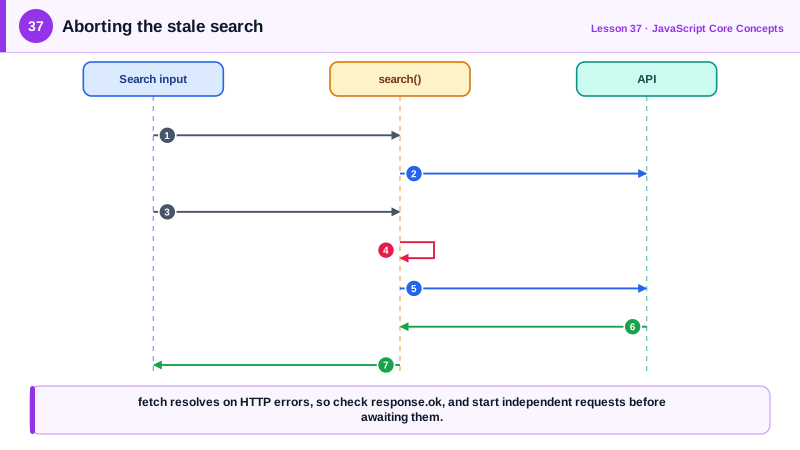
Cancellation also solves race conditions. In a search box, the user types "re", then "rea", then "react". If the request for "rea" is slow and finishes after the one for "react", naive code shows the wrong results. Aborting the previous request when a new one starts, or ignoring responses that are not the latest, guarantees the screen matches the latest input. Data libraries do this for you (Day 62), but you should recognize the bug in hand-written code.
| Concern | Tool | Note |
|---|---|---|
| Sequential readable code | async and await | Returns a promise, throws on rejection |
| HTTP error statuses | Check response.ok | fetch only rejects on network errors |
| Cleanup | finally | Runs after success or failure |
| Independent work | Start first, then Promise.all | Avoid accidental serialization |
| Cancel requests and listeners | AbortController and signal | One abort cancels many operations |
| Timeouts | AbortSignal.timeout(ms) | Also cancels the request itself |
| Combine signals | AbortSignal.any([...]) | User cancel or timeout |
| Stale responses | Abort the previous request | Prevents out-of-order results |
Worked Example: A Search Box Without Race Conditions
Each keystroke aborts the previous request, every request has a timeout, and the UI handles HTTP errors, aborts and network failures differently.
const input = document.querySelector('#search');
const output = document.querySelector('#results');
let current;                                          // controller for the in-flight request

async function search(query) {
  current?.abort();                                   // cancel the older request
  current = new AbortController();
  const signal = AbortSignal.any([current.signal, AbortSignal.timeout(5000)]);

  output.setAttribute('aria-busy', 'true');
  try {
    const res = await fetch(`/api/search?q=${encodeURIComponent(query)}`, { signal });
    if (!res.ok) throw new Error(`Search failed (${res.status})`);
    const { items } = await res.json();
    renderResults(items);
  } catch (err) {
    if (err.name === 'AbortError') return;            // superseded by a newer query: ignore
    if (err.name === 'TimeoutError') renderMessage('Search is taking too long. Try again.');
    else renderMessage('Something went wrong. Please try again.');
    reportError(err);
  } finally {
    if (!current.signal.aborted) output.removeAttribute('aria-busy');   // a newer search still owns it
  }
}

input.addEventListener('input', debounce((e) => {
  const q = e.target.value.trim();
  if (q.length >= 2) search(q);
}, 200));

// Independent requests: start both, then await together
async function loadProfile(id) {
  const userPromise = fetch(`/api/users/${id}`).then((r) => r.json());
  const ordersPromise = fetch(`/api/users/${id}/orders`).then((r) => r.json());
  const [user, orders] = await Promise.all([userPromise, ordersPromise]);
  return { user, orders };
}
AbortSignal.timeout rejects with a TimeoutError rather than an AbortError, which lets the code tell a slow server apart from a request that was deliberately superseded.
Real-World Examples
- AbortController was originally added for cancelling fetch, and the DOM standard later extended AbortSignal to addEventListener, streams and many other APIs, so that one controller can tear down every request and listener belonging to a component.
- React's documentation on fetching data in effects shows an "ignore" flag set in the cleanup function to prevent race conditions when responses arrive out of order, and recommends data fetching libraries that handle cancellation and deduplication automatically.
Review Questions & Answers
No. fetch only rejects when the request cannot be completed, for example on network failure, CORS failure or abort. Any HTTP response, including 404 and 500, fulfills the promise, so code must check response.ok or the status and throw if needed.
The second call does not start until the first has finished, so the total time is the sum of both. Starting both and awaiting Promise.all of the two promises runs them concurrently.
Each new search aborts the controller of the previous request, so the slow earlier request rejects with an AbortError and its results are never rendered. Only the latest request can complete and update the screen.
AbortSignal.timeout aborts with a TimeoutError, while controller.abort() without a reason produces an AbortError. Checking the error's name lets the code show a message for timeouts and silently ignore superseded requests.