React Custom Hooks Tutorial
On this page
Learning Objective
Extract reusable stateful logic into custom hooks, follow the rules of hooks and understand why they exist, design hook APIs with clear inputs and outputs, and recognize what hooks share between components and what they do not.
Concept Explanation
Components share UI through composition, but they often also need to share behavior: tracking whether the network is online, debouncing a value, reading and writing a URL parameter, subscribing to window size, managing a disclosure's open state. Custom hooks are functions whose names start with use and that call other hooks. They let you extract that stateful logic from a component into a named, reusable, testable unit. A component then reads like a description of what it needs: useOnlineStatus, useDebouncedValue, useSearchParam.
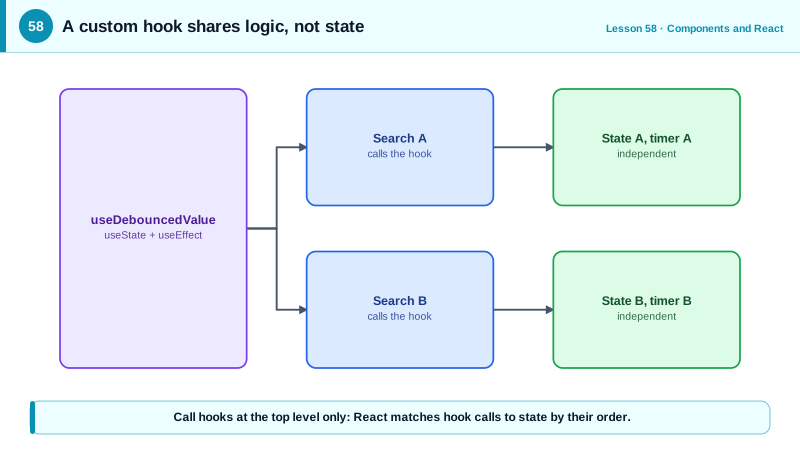
The most important fact about custom hooks is what they share. A hook shares logic, not state. Each component that calls useCounter gets its own independent count, exactly as if it had called useState directly. If you need several components to share the same state, the state must live above them, in a parent, a context or a store, and the hook can then read it. This distinction prevents a common misunderstanding where developers expect a hook to work like a global singleton.
Hooks rely on call order. React identifies each hook call in a component by its position in the sequence of calls during render, which is why the rules of hooks exist: call hooks only at the top level of components and custom hooks, never inside conditions, loops, nested functions or after an early return, and call them only from React functions. Breaking the rules shifts the positions between renders, so state attaches to the wrong hook. The eslint-plugin-react-hooks rules enforce this automatically. React 19's use API is the one exception: it can be called conditionally because it does not store state by position.
Good hooks have clear contracts. Inputs are parameters, outputs are a return value, a tuple for a single value and setter like useState, an object for several named values. Keep side effects inside the hook's effects and expose results, not internals. Make dependencies explicit, accept options objects for configuration, and avoid hooks that do several unrelated things. Name them for what they provide, not how they work. A hook that fetches data should still handle cleanup and races, or better, wrap a data library.
Custom hooks also make testing easier. Logic that lives in a hook can be tested with renderHook from Testing Library without rendering any UI, and components that use the hook become thin and declarative. Many teams start their component design by writing the hook that holds a feature's logic, then the presentational component that renders its result.
| Hook | Provides | Built from |
|---|---|---|
| useDebouncedValue | A value that updates after a pause | useState, useEffect with cleanup |
| useOnlineStatus | Whether the browser is online | useSyncExternalStore |
| useLocalStorage | State persisted per key | useState, try and catch around storage |
| useDisclosure | open, onOpen, onClose, onToggle | useState, stable callbacks |
| useMediaQuery | Whether a media query matches | useSyncExternalStore with matchMedia |
| useSearchParam | One URL parameter as state | Router hooks, validation |
| Rule | Top level only, React functions only | Call order identifies hooks |
Worked Example: useDebouncedValue and useLocalStorage
Two hooks extracted from a search page: one debounces the query before it is used for fetching, the other persists a preference with safe storage access and cross-tab updates.
export function useDebouncedValue<T>(value: T, delay = 250): T {
  const [debounced, setDebounced] = useState(value);
  useEffect(() => {
    const id = setTimeout(() => setDebounced(value), delay);
    return () => clearTimeout(id);                       // restart the timer on every change
  }, [value, delay]);
  return debounced;
}

export function useLocalStorage<T>(key: string, initial: T) {
  const [value, setValue] = useState<T>(() => {           // lazy initializer: read storage once
    try {
      const raw = localStorage.getItem(key);
      return raw === null ? initial : (JSON.parse(raw) as T);
    } catch { return initial; }
  });

  useEffect(() => {
    try { localStorage.setItem(key, JSON.stringify(value)); } catch { /* full or blocked */ }
  }, [key, value]);

  useEffect(() => {                                       // keep tabs in sync
    const onStorage = (e: StorageEvent) => {
      if (e.key === key && e.newValue !== null) setValue(JSON.parse(e.newValue));
    };
    window.addEventListener('storage', onStorage);
    return () => window.removeEventListener('storage', onStorage);
  }, [key]);

  return [value, setValue] as const;
}

// The component reads like a description of its needs
function ProductSearch() {
  const [query, setQuery] = useState('');
  const debouncedQuery = useDebouncedValue(query, 300);
  const [view, setView] = useLocalStorage<'grid' | 'list'>('search:view', 'grid');
  const results = useProductSearch(debouncedQuery);       // e.g. wraps a query library

  return (
    <>
      <input value={query} onChange={(e) => setQuery(e.target.value)} aria-label="Search products" />
      <ViewSwitch value={view} onChange={setView} />
      <Results items={results.data ?? []} view={view} />
    </>
  );
}

// Each caller gets independent state: these two searches do not share a query
<><ProductSearch /><ProductSearch /></>;// Testing a hook without UI
const { result, rerender } = renderHook(({ v }) => useDebouncedValue(v, 300), { initialProps: { v: 'a' } });
rerender({ v: 'ab' });
await waitFor(() => expect(result.current).toBe('ab'));The lazy initializer passed to useState reads localStorage only on the first render instead of on every render, and the try blocks keep the hook working when storage is unavailable, as Day 9 recommended.
Real-World Examples
- Hooks were introduced in React 16.8 in February 2019, and the React team presented custom hooks as the replacement for patterns such as higher-order components and render props, which had been the main ways to share stateful logic and tended to create deeply nested component trees.
- Libraries such as usehooks-ts, react-use and TanStack Query are distributed largely as custom hooks, and Vue's Composition API and its VueUse collection follow the same idea of composable functions that encapsulate reactive logic.
Review Questions & Answers
No. Each call creates its own independent state, exactly as calling useState directly would. To share state, it must live in a common parent, a context or a store, which the hook can then read.
React matches each hook call with its stored state by the order of calls during render. A condition or loop can change that order between renders, so state would be attached to the wrong hook, causing incorrect values and errors.
A function passed to useState is a lazy initializer called only on the first render. Reading and parsing localStorage is relatively slow and synchronous, so doing it once instead of on every render avoids wasted work.
A clear name describing what it provides, explicit parameters or an options object as inputs, a return value shaped like useState for single values or an object for several, internal handling of effects and cleanup, and a single focused responsibility.