JavaScript ES Modules: import, export, Dynamic Import
On this page
Learning Objective
Use named and default exports, understand live bindings, static analysis and the module graph, load code on demand with dynamic import, use import maps and import attributes, and recognize the differences between ES modules and CommonJS that still affect frontend tooling.
Concept Explanation
ES modules are JavaScript's standard module system. Each file is a module with its own scope. It exposes values with export and uses other modules' values with import. Named exports, export function formatPrice, are imported by name inside braces and can be renamed with as. A module can also have one default export, imported under any name you choose. Many teams prefer named exports because the names stay consistent across the codebase, editors can auto-import them reliably and renames are easier to track.
Imports are live bindings, not copies. If a module exports a let variable and later changes it, every importer sees the new value. Importers cannot assign to an imported binding; it is read-only from their side. Modules are also singletons: however many files import a module, it is evaluated once and all importers share the same instance. This makes modules a natural place for shared configuration or a single API client.
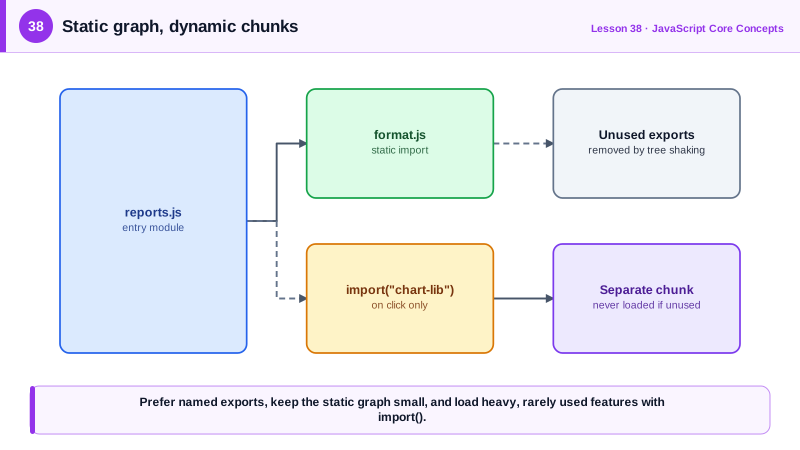
Static import declarations must appear at the top level with literal string specifiers. That restriction is deliberate: tools and browsers can determine the entire module graph by reading the code without running it. The browser can fetch dependencies in parallel, bundlers can remove exports nobody imports, which is tree shaking (Day 48), and editors can follow definitions. Module loading happens in phases: the graph is fetched and parsed, then instantiated by linking imports to exports, then evaluated with dependencies running first. Modules always run in strict mode and are deferred by default in the browser, as Day 4 described.
Dynamic import, written import('./module.js'), is a function-like expression that returns a promise of the module's namespace object. It can be called anywhere, with computed paths, so it is the foundation of code splitting: loading a chart library only when the user opens the reports tab, or loading a locale's messages only when it is selected. Bundlers turn each dynamic import into a separate chunk.
In the browser, a bare specifier such as import React from 'react' needs to be mapped to a URL, which is normally a bundler's job. Import maps, a script with type importmap, let the browser do it natively by mapping names to URLs, which is enough for small apps without a build step. Import attributes, such as with { type: 'json' }, let you import JSON and CSS modules safely by stating the expected type, so a server cannot trick the page into executing a script where data was expected.
CommonJS, Node's original system with require and module.exports, still appears in older packages. It loads synchronously at run time, exports are copies of values rather than live bindings, and its dynamic nature makes it harder to tree shake. Bundlers handle the interop, but mixing the two causes classic problems such as a default import that arrives as an object with a default property. Prefer packages that ship ES modules.
| Feature | Syntax | Note |
|---|---|---|
| Named export | export function f() {} | Imported with the same name |
| Default export | export default function () {} | One per module, any import name |
| Rename | import { f as g } from './a.js' | Avoid name clashes |
| Namespace import | import * as utils from './utils.js' | Object of all named exports |
| Dynamic import | await import('./chart.js') | Promise of the module, enables splitting |
| Import map | script type="importmap" | Bare names to URLs without a bundler |
| Import attributes | import data from './d.json' with { type: 'json' } | Safe non-JavaScript modules |
| CommonJS | require and module.exports | Synchronous, harder to tree shake |
Worked Example: Loading a Heavy Feature on Demand
The reports page imports a small module statically and loads the charting code only when the user opens the chart. The import map lets the demo run without a bundler.
<class="tok-k">script type="importmap">
{
  "imports": {
    "chart-lib": "https://cdn.jsdelivr.net/npm/chart.js@4.4.4/+esm"
  }
}
</class="tok-k">script>
<class="tok-k">script type="module" src="/js/reports.js"></class="tok-k">script>// format.js: small, named exports, safe to import everywhere
export const formatCurrency = (cents, currency = 'USD') =>
new Intl.NumberFormat(undefined, { style: 'currency', currency }).format(cents / 100);
export let lastFormatted = null; // live binding example
export function remember(value) { lastFormatted = value; }
// reports.js
import { formatCurrency } from './format.js'; // static: part of the initial graph
const button = document.querySelector('#show-chart');
button.addEventListener('click', async () => {
button.disabled = true;
try {
const [{ Chart, registerables }, { default: data }] = await Promise.all([
import('chart-lib'), // separate chunk, loaded on demand
import('./sales.json', { with: { type: 'json' } }),
]);
Chart.register(...registerables);
new Chart(document.querySelector('#chart'), {
type: 'bar',
data: { labels: data.months, datasets: [{ label: 'Sales', data: data.cents }] },
options: { plugins: { tooltip: { callbacks: { label: (c) => formatCurrency(c.raw) } } } },
});
} catch (err) {
showError('The chart could not be loaded.');
reportError(err);
} finally {
button.disabled = false;
}
});The chart library is not downloaded at all for users who never click the button. In a bundled app, the same import call produces a separate chunk, and the Network panel shows it loading on the first click only.
Real-World Examples
- ES modules were standardized in ECMAScript 2015, but native browser support only arrived in 2017 and 2018, and Vite's development server was built around serving source files as native modules so that the browser, not a bundler, resolves the graph during development.
- Import maps reached all major browsers when Safari 16.4 added support in 2023, enabling build-free setups such as the default Rails 7 JavaScript approach, which pins packages through an import map instead of bundling them.
Review Questions & Answers
An imported name refers to the exporting module's variable itself, not a copy. If the exporting module changes the variable, importers see the new value. Importers cannot reassign it, because the binding is read-only on their side.
So that the module graph can be determined by reading the code without executing it. That lets browsers fetch dependencies in parallel and lets tools tree shake unused exports, follow definitions and detect missing modules at build time.
For code that is not needed immediately or for every user, such as a heavy chart or editor library, a rarely visited route, an admin feature or locale data. It returns a promise and bundlers place the imported module in a separate chunk loaded on demand.
They declare the expected type of a non-JavaScript module, such as JSON or CSS. Without them, a compromised or misconfigured server could return JavaScript for a URL the page expected to be data, and it would execute. With type json, the browser refuses anything that is not JSON.