What Is Hydration? Fixing Hydration Mismatches
On this page
Learning Objective
Explain what hydration does after server rendering, why server-rendered pages can look ready before they are interactive, what causes hydration mismatches and how to avoid them, and which techniques reduce hydration cost: less JavaScript, selective and progressive hydration, islands, resumability and server components.
Concept Explanation
Server rendering gives the browser complete HTML, but HTML alone is not interactive: buttons have no click handlers and components have no state. Hydration is the process that makes it interactive. The browser downloads the same component code that ran on the server, the framework renders the component tree again in memory, walks the existing DOM to match it, and attaches event listeners and state, adopting the server's DOM instead of recreating it. In React this is done with hydrateRoot.
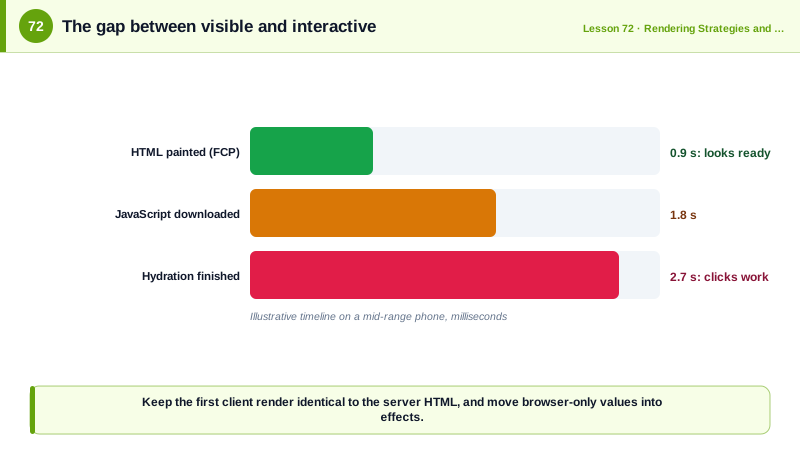
That means server rendering does not remove the cost of client-side JavaScript; it moves the visible part earlier. The user sees content quickly, but until hydration finishes, the page looks ready while clicks do nothing, or are queued, and the main thread is busy executing component code. This gap between looking interactive and being interactive is sometimes called the uncanny valley. On a mid-range phone, hydrating a large page can take hundreds of milliseconds to seconds, producing long tasks that hurt Interaction to Next Paint (Day 84). Hydration also requires the data used on the server, which is usually serialized into the HTML as JSON, so the same data travels twice: once as HTML and once as JSON.
Hydration mismatches happen when the client's first render produces different output from the server's HTML. Common causes are rendering the current time or a random value, reading window, localStorage or screen width during render, locale and time zone differences in date formatting, browser extensions that modify the DOM, and invalid HTML nesting such as a div inside a p, which the browser's parser repairs differently from the framework's expectations. React reports mismatches and, depending on the version and severity, patches text differences or re-renders the subtree on the client, which is slower and can cause flicker. The fixes are to make the first client render match the server, move browser-only values into effects that run after hydration, pass time zones and locales explicitly, and use suppressHydrationWarning only for unavoidable cases such as timestamps.
The broader solution is to hydrate less. Ship less JavaScript in total, through the techniques of Phase 5. Hydrate in pieces: React 18's selective hydration hydrates Suspense boundaries independently and prioritizes the part the user interacts with, so a click on the header is handled before the comments section hydrates. Hydrate only what is interactive: islands architecture (Day 75) leaves static content as plain HTML and hydrates only interactive widgets. Avoid sending component code for non-interactive parts at all: React Server Components (Day 74) render on the server only, so their code never reaches the browser. Resumability, used by Qwik, goes furthest: it serializes enough state into the HTML that the client never re-executes components on load and instead loads event handler code lazily when an interaction occurs.
Measuring tells you whether hydration is a problem. In a performance trace, look for a long task right after the main script loads, labeled with your framework's hydrate function, and compare the time between first contentful paint and the end of that task. Total blocking time in the lab and INP in the field are the metrics that hydration cost shows up in.
| Topic | Problem | Remedy |
|---|---|---|
| Uncanny valley | Page looks ready, ignores clicks | Less JavaScript, earlier hydration of key parts |
| Double data | HTML plus serialized JSON | Server components, smaller payloads |
| Long tasks | Hydrating a big tree at once | Selective hydration with Suspense boundaries |
| Mismatch from time or random | Server and client differ | Render in effects after hydration |
| Mismatch from browser APIs | window undefined on server | Read browser state after mount |
| Invalid nesting | Parser repairs HTML differently | Valid HTML structure |
| Static content | Hydrated for nothing | Islands or server components |
Worked Example: Fixing Two Mismatches and Splitting Hydration
The component renders a relative time and a theme-dependent icon, both of which differ between server and client. The fixes keep the first client render identical, and Suspense lets parts hydrate separately.
// Before: mismatches, because the server and the browser compute different values during render
function PostMeta({ publishedAt }: { publishedAt: string }) {
  const ago = formatDistanceToNow(new Date(publishedAt));          // differs by the time each side renders
  const dark = window.matchMedia('(prefers-color-scheme: dark)').matches;   // window is undefined on the server
  return <p>{dark ? <MoonIcon /> : <SunIcon />} Posted {ago} ago</p>;
}

// After: identical first render, browser-only details applied after hydration
function PostMetaFixed({ publishedAt }: { publishedAt: string }) {
  const absolute = new Intl.DateTimeFormat('en-US', { dateStyle: 'medium', timeZone: 'UTC' })
    .format(new Date(publishedAt));                                  // deterministic on both sides
  const [relative, setRelative] = useState<string | null>(null);
  useEffect(() => setRelative(formatDistanceToNow(new Date(publishedAt))), [publishedAt]);   // client only

  return (
    <p>
      <ThemeIcon />                                                  {/* theme handled with CSS media queries */}
      <time dateTime={publishedAt}>{relative ? `${relative} ago` : absolute}</time>
    </p>
  );
}

// Selective hydration: each boundary hydrates on its own and interaction raises its priority
export default function ArticlePage({ article }: { article: Article }) {
  return (
    <>
      <Header />                                                     {/* small, hydrates first */}
      <ArticleBody html={article.html} />
      <Suspense fallback={<CommentsSkeleton />}><Comments postId={article.id} /></Suspense>
      <Suspense fallback={null}><Recommendations /></Suspense>
    </>
  );
}/* Theme icon without JavaScript, so server and client markup are identical */
.icon-moon { display: none; }
@media (prefers-color-scheme: dark) { .icon-sun { display: none; } .icon-moon { display: inline; } }After the fix, the console shows no hydration warnings, and a performance trace shows hydration split into several shorter tasks rather than one long task for the whole page.
Real-World Examples
- React 18 introduced selective hydration together with streaming server rendering, and the React working group's architecture discussion explained that hydration no longer has to finish for the whole page before any part becomes interactive, with user interactions raising the priority of the boundary being clicked.
- The Qwik framework, created by Miško Hevery, the original author of AngularJS, was designed around resumability so that an application's startup JavaScript stays roughly constant regardless of its size, because components are not re-executed on the client at load.
Review Questions & Answers
It loads the component code in the browser, renders the component tree in memory, matches it against the server-rendered DOM and attaches event listeners and state, adopting the existing DOM so the page becomes interactive without rebuilding it.
The HTML is visible as soon as it arrives, but handlers are only attached when hydration finishes, which requires downloading and executing the JavaScript. Until then, interactions are ignored or queued, and the busy main thread delays responses.
Rendering values that differ between server and client such as the current time or random numbers, reading browser-only APIs like window or localStorage during render, and formatting dates or numbers with different locales or time zones. Invalid HTML nesting and browser extensions are other causes.
Components inside separate Suspense boundaries hydrate independently instead of in one long task. If the user interacts with a part that is not yet hydrated, React prioritizes hydrating that boundary first, so the interaction is handled sooner.