How to Improve LCP: Preload and fetchpriority
On this page
Learning Objective
Improve Largest Contentful Paint by attacking each of its parts: reduce time to first byte, make the LCP resource discoverable in the HTML, raise its priority with fetchpriority and preload, connect early to critical origins, remove render blocking and avoid client-side rendering delays for the main content.
Concept Explanation
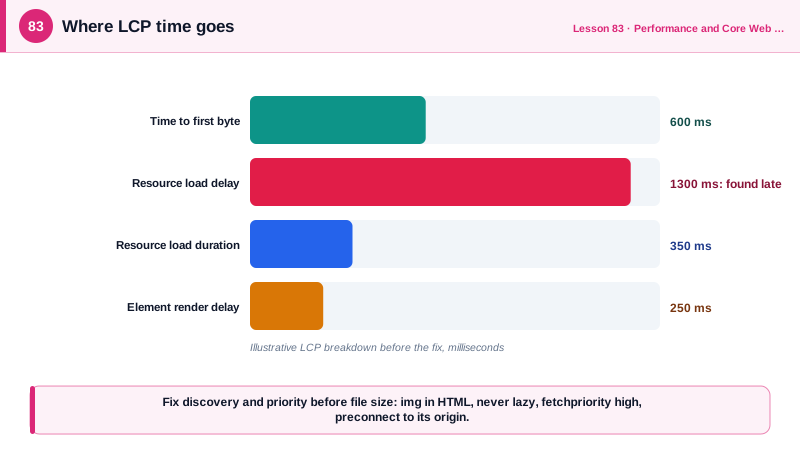
Day 81 split LCP into four parts, and optimizing it means finding which part dominates and fixing that. Web.dev's analysis of field data found that many sites with poor LCP spend surprisingly little time actually downloading the LCP image and a lot of time before the download even starts, the resource load delay. That points to a discovery and priority problem rather than a file size problem, and it is the first thing to check.
Time to first byte is the foundation. Nothing else can start until the HTML arrives. Serve HTML from a CDN where possible, cache server-rendered pages, stream the response so the head arrives early (Day 73), avoid redirect chains and keep server rendering fast. A one second TTFB leaves only 1.5 seconds for everything else in a 2.5 second budget.
Discovery is next. The preload scanner (Day 1) finds resources in the HTML early, so the LCP image should be an img element in the initial HTML with its src or srcset present. Images set as CSS background images, inserted by JavaScript, or lazily loaded with data-src patterns are discovered late. If the LCP image genuinely cannot be in the HTML, for example a background image, a link rel=preload with as=image, and imagesrcset for responsive images, tells the browser about it immediately. Never lazy load the LCP image.
Priority comes after discovery. Browsers initially fetch images at low priority until layout reveals they are in the viewport. fetchpriority="high" on the LCP image raises its priority from the start, so it competes successfully with scripts and stylesheets. Lowering the priority of less important resources, such as below-the-fold carousel images or non-critical scripts, frees bandwidth for it. For resources on other origins, such as an image CDN or a font host, preconnect opens the DNS, TCP and TLS connection early, and dns-prefetch is a lighter fallback; use them sparingly for the one or two most critical origins, since unused connections waste resources.
Load duration and render delay complete the picture. Make the LCP image small: the right dimensions with srcset and sizes, modern formats such as AVIF and WebP and appropriate compression (Day 87). For text LCP elements, ensure the web font does not hide text, using font-display: swap or optional and preloading the critical font. Render delay comes from render-blocking CSS and scripts (Day 4) and from client-side rendering, where the LCP element only exists after JavaScript runs and data arrives. Server rendering or static generation of the main content, inlining critical CSS and deferring scripts all shorten it. Finally, speculation rules can prerender likely next pages so their LCP is nearly instant when the user navigates.
| LCP part | Common cause | Fix |
|---|---|---|
| TTFB | Slow server, no caching, redirects | CDN, caching, streaming, fewer redirects |
| Load delay | Image not in HTML, lazy loaded, low priority | img in HTML, fetchpriority high, preload |
| Load delay, other origin | Connection setup | preconnect to that origin |
| Load duration | Oversized image | srcset and sizes, AVIF or WebP, compression |
| Render delay | Render-blocking CSS and scripts | Critical CSS, defer scripts |
| Render delay | Content rendered by client JavaScript | SSR or SSG for the main content |
| Text LCP | Invisible text while fonts load | font-display swap, preload the font |
| Next navigation | Full load on click | Speculation rules prerender |
Worked Example: A Hero Page Before and After
The original page hides its LCP image in CSS and loads it late at low priority. The fixed head makes it discoverable and high priority, connects early to the image CDN and stops blocking rendering.
<!-- Before: LCP image is a CSS background set by a class that JavaScript adds -->
<head>
  <link rel="stylesheet" href="/css/all.css">                       <!-- 180 KB, render blocking -->
  <script src="/js/app.js"></script>                                 <!-- parser blocking -->
</head>
<body><section class="hero js-hero"></section></body>              <!-- background-image in CSS -->

<!-- After -->
<head>
  <link rel="preconnect" href="https://img.example-cdn.com" crossorigin>
  <style>/* critical CSS for the header and hero, about 8 KB */</style>
  <link rel="stylesheet" href="/css/rest.css" media="print" onload="this.media='all'">
  <script type="module" src="/js/app.js"></script>                   <!-- deferred by default -->
  <link rel="preload" href="/fonts/inter-var.woff2" as="font" type="font/woff2" crossorigin>
</head>
<body>
  <section class="hero">
    <img src="https://img.example-cdn.com/hero-1280.avif"
         srcset="https://img.example-cdn.com/hero-640.avif 640w, https://img.example-cdn.com/hero-1280.avif 1280w, https://img.example-cdn.com/hero-1920.avif 1920w"
         sizes="100vw" width="1920" height="900" alt="Hikers on a ridge at sunrise"
         fetchpriority="high" decoding="async">                      <!-- discoverable, high priority -->
    <h1>Gear for every trail</h1>
  </section>
  <img src="/promo-1.avif" loading="lazy" fetchpriority="low" width="600" height="400" alt="...">
</body>

<!-- Prerender the most likely next page -->
<script type="speculationrules">
  { "prerender": [{ "where": { "href_matches": "/products/*" }, "eagerness": "moderate" }] }
</script>
In a trace, the before version shows the hero request starting only after the CSS and JavaScript finish, a large resource load delay. After the change, the hero request starts within the first few hundred milliseconds alongside the CSS, and LCP moves earlier by the same amount.
Real-World Examples
- Google's web.dev guidance on optimizing LCP, based on CrUX and HTTP Archive analysis, reported that for the median site with poor LCP the image download itself was a small fraction of the total, while the delay before the download started was the largest share, and that many LCP images were not discoverable from the HTML.
- Etsy published a case study reporting that adding fetchpriority="high" to its listing page's main image improved LCP by four percent in field data, one of several companies whose results led browsers to support the attribute broadly, which became Baseline in 2024.
Review Questions & Answers
The preload scanner cannot see it in the HTML, so the browser only discovers it after downloading and parsing the stylesheet and matching the rule, often after JavaScript adds a class. The download starts late, creating a large resource load delay.
It tells the browser to fetch the resource at high priority from the start instead of the default low priority for images. It should be used on the LCP image, and sparingly, since raising many resources defeats the purpose.
For one or two third-party origins that serve critical resources early in the load, such as the image CDN that hosts the LCP image or a font host. It performs DNS, TCP and TLS setup in advance. Adding it for many or unused origins wastes connections.
The LCP element only exists after the JavaScript bundle downloads and executes and the data request completes, so the render delay part grows by all of that time. Rendering the main content on the server or at build time puts it in the initial HTML.