Declarative vs Imperative UI Explained
On this page
Learning Objective
Contrast imperative DOM manipulation with declarative rendering, explain the idea that the user interface is a function of state, identify the minimal state an interface needs and what should be derived from it, and recognize how this model shapes React, Vue, Svelte, Solid and Angular alike.
Concept Explanation
In the first phases of this course you changed the DOM directly: find an element, set its text, toggle a class, append a child. That is imperative code, a sequence of commands describing how to get from the current screen to the next one. It works for small pages, but as an interface grows, the number of possible transitions explodes. A todo list with filters, editing, a counter and an empty state has many paths between screens, and every handler must remember to update every affected element. Forgetting one produces the classic bug where the counter says three while the list shows two.
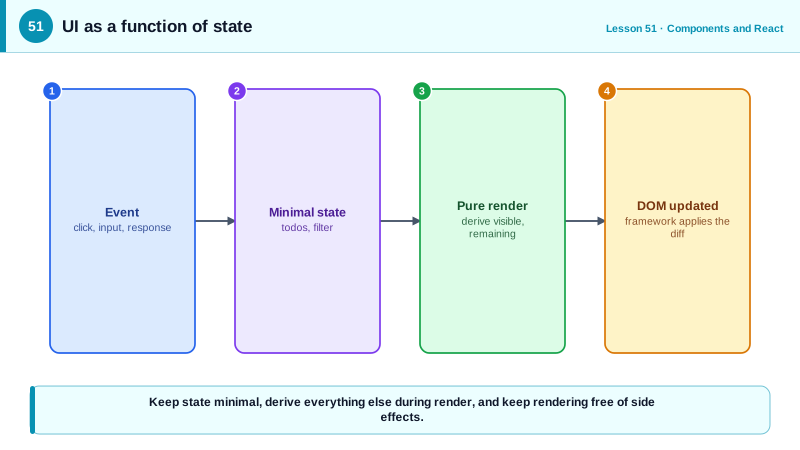
Declarative UI flips the approach. Instead of describing transitions, you describe what the screen should look like for any given state, and a framework works out the DOM operations needed to get there. The model is often summarized as UI = f(state): the view is a function of the data. When state changes, the function runs again and the framework reconciles the new description with the current DOM. You write one description instead of many transitions, and the counter can never disagree with the list because both are computed from the same data.
The key design skill this model demands is choosing the right state. State should be minimal: the smallest set of values from which everything else can be computed. In a todo list, the todos and the selected filter are state; the visible todos, the remaining count and whether to show the empty message are derived values computed during rendering. Storing derived values as separate state creates duplication that can drift out of sync, which is exactly the bug declarative UI is meant to remove. A useful test: if a value can be computed from other state or props, it is not state.
Rendering should be pure. Given the same state and props, a component should return the same description and have no side effects while doing so: no network requests, no DOM mutations, no subscriptions during the render itself. Side effects belong in event handlers, which run in response to user actions, or in effects, which synchronize with external systems after rendering (Day 54). Purity lets frameworks render components more than once, pause and resume rendering, render on the server, and skip rendering when inputs have not changed.
All major frameworks share this model even though their mechanics differ. React re-runs component functions and compares the resulting virtual tree with the previous one. Vue and Solid track which state each part of the output reads and update just those parts, and Svelte compiles components into code that updates the DOM directly. Angular uses templates with change detection and, more recently, signals. Day 76 compares these reactivity strategies; the shared idea is that you describe the result and let the framework handle the transitions.
| Aspect | Imperative | Declarative |
|---|---|---|
| You describe | Steps between screens | The screen for a given state |
| Updates | Each handler edits the DOM | Change state, framework updates DOM |
| Consistency | Every handler must remember everything | Derived from one source |
| Complexity growth | With the number of transitions | With the number of states |
| Rendering | Mixed with side effects | Pure, side effects elsewhere |
| Typical tools | DOM APIs, jQuery | React, Vue, Svelte, Solid, Angular |
Worked Example: A Todo Counter, Imperative and Declarative
The imperative version must update the list, the counter and the empty message in every handler. The declarative version stores minimal state and derives everything else.
// Imperative: each handler edits several parts of the DOM
let todos = [];
function addTodo(text) {
  todos.push({ id: crypto.randomUUID(), text, done: false });
  const li = document.createElement('li');
  li.textContent = text;
  list.append(li);
  counter.textContent = `${todos.filter((t) => !t.done).length} left`;
  empty.hidden = true;
  // toggleTodo, deleteTodo and the filter buttons must repeat all of this correctly
}// Declarative: minimal state, everything else derived during render
function TodoApp() {
const [todos, setTodos] = useState([]);
const [filter, setFilter] = useState('all'); // 'all' | 'active' | 'done'
// Derived values: computed, never stored
const visible = todos.filter((t) => filter === 'all' || (filter === 'done') === t.done);
const remaining = todos.filter((t) => !t.done).length;
const add = (text) => setTodos((ts) => [...ts, { id: crypto.randomUUID(), text, done: false }]);
const toggle = (id) => setTodos((ts) => ts.map((t) => (t.id === id ? { ...t, done: !t.done } : t)));
return (
<section>
<NewTodo onAdd={add} />
{visible.length === 0 ? (
<p>Nothing here yet.</p>
) : (
<ul>
{visible.map((t) => (
<li key={t.id}>
<label><input type="checkbox" checked={t.done} onChange={() => toggle(t.id)} /> {t.text}</label>
</li>
))}
</ul>
)}
<p>{remaining} left</p>
<FilterButtons value={filter} onChange={setFilter} />
</section>
);
}Adding a delete feature to the declarative version means writing one function that updates todos. The list, the counter and the empty message stay correct automatically, because they are all computed from that one array.
Real-World Examples
- React was introduced by Facebook in 2013 with the explicit pitch that re-rendering the whole view when data changes, and letting the library compute the minimal DOM changes, would make complex interfaces such as Facebook's chat and notifications easier to keep consistent.
- The React documentation's "Thinking in React" guide teaches finding the minimal but complete representation of UI state and deriving everything else, using the same three-question test: is it passed in, does it change over time, can it be computed from other state.
Review Questions & Answers
The interface is produced by a function of the current data. Instead of writing code that edits the DOM for each change, you write a description of the screen for any state, and when the state changes, the framework re-evaluates that description and applies the necessary DOM updates.
If it is passed in from a parent, it is a prop. If it never changes, it is a constant. If it can be computed from other state or props, it is derived and should be calculated during rendering. Only values that change over time and cannot be computed are state.
Frameworks may render a component several times, pause, discard or repeat renders, render on the server and skip renders when inputs are unchanged. Side effects during rendering would then run unpredictably or repeatedly. Pure rendering makes all of these optimizations safe.
The derived value and its source become two copies of the same information, and every update must keep both in sync. When one code path forgets to update the derived copy, the interface shows contradictory information, such as a count that does not match the list.