React List Virtualization and Memoization
On this page
Learning Objective
Identify unnecessary re-renders with profiling, apply memoization with memo, useMemo and useCallback where it pays off, understand what the React Compiler automates, virtualize long lists and tables, and keep accessibility, search and scroll behavior working with virtualized content.
Concept Explanation
Two different problems make interfaces slow to update: rendering too often and rendering too much. Rendering too often happens when components re-render although nothing they display changed, typically because a parent re-rendered or a context changed (Days 53 and 57). Rendering too much happens when a single update must create or update thousands of DOM nodes, such as a table with ten thousand rows. The fixes differ, so measure first: the React DevTools Profiler shows which components rendered, why and how long they took, and the Performance panel shows the cost of style, layout and paint.
Memoization addresses rendering too often. React.memo wraps a component so it skips re-rendering when its props are shallowly equal to the previous ones. That only works if the props are stable, so objects, arrays and functions created during the parent's render must keep their identity between renders: useMemo caches a computed value and useCallback caches a function until their dependencies change. useMemo also avoids repeating expensive calculations such as sorting or filtering large arrays on every render. Memoization has its own cost and complexity, so apply it where profiling shows a benefit: expensive components, components rendered many times in lists and values passed to memoized children or used as effect dependencies.
The React Compiler, which reached version 1.0 in 2025, analyzes components at build time and inserts this memoization automatically and more granularly than people usually write by hand, as long as code follows the rules of React. In codebases that adopt it, most manual useMemo, useCallback and memo calls become unnecessary. It does not solve rendering too much, and it does not fix state placed too high in the tree; colocating state (Day 53) and splitting contexts (Day 57) remain the first fixes.
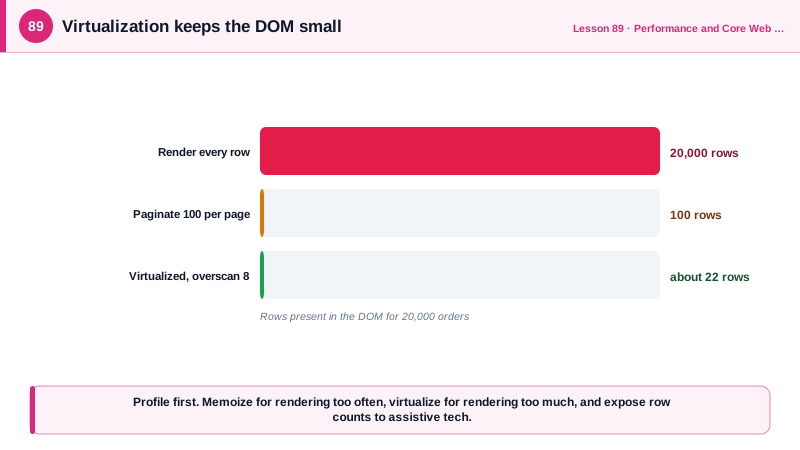
Virtualization, also called windowing, addresses rendering too much. Instead of rendering all ten thousand rows, a virtualized list renders only the rows visible in the viewport plus a small overscan buffer, and positions them inside a container sized to the full list height, so the scrollbar behaves as if every row existed. As the user scrolls, rows are recycled. The DOM stays at perhaps fifty rows whatever the data size, so initial render, memory and every update stay fast. Libraries such as TanStack Virtual and react-window handle the math, including dynamic row heights measured after render. For simpler cases, CSS content-visibility: auto (Day 7) skips rendering offscreen sections without JavaScript, and pagination or infinite loading with a sensible page size avoids loading huge datasets at all.
Virtualization changes behavior in ways to plan for. The browser's find in page cannot find rows that are not rendered, so provide in-app search. Screen readers only see rendered rows, so expose the total with aria-rowcount and each row's position with aria-rowindex in grids, or aria-setsize and aria-posinset in lists. Keyboard focus must not be lost when the focused row is recycled. Scroll restoration needs the virtualizer's own APIs. For lists of a few hundred simple items, virtualization often adds more complexity than it saves.
| Problem | Symptom in profiler | Fix |
|---|---|---|
| Parent re-renders children needlessly | Many components render with same props | React.memo with stable props |
| New objects or functions each render | memo children still re-render | useMemo, useCallback, or React Compiler |
| Expensive calculation each render | Long render time in one component | useMemo with correct dependencies |
| State too high in the tree | Large subtree renders per keystroke | Colocate state, split contexts |
| Thousands of rows in the DOM | Slow mount, slow style and layout | Virtualization |
| Long static sections | Slow initial rendering | content-visibility: auto |
| Huge datasets | Slow requests and memory | Pagination or infinite loading |
Worked Example: A Memoized, Virtualized, Accessible Orders Table
The table renders 20,000 orders with only visible rows in the DOM, exposes the total count and row positions to assistive technology and keeps row rendering stable with memoization.
import { useVirtualizer } from '@tanstack/react-virtual';

const OrderRow = memo(function OrderRow({ order, index, onOpen }: { order: Order; index: number; onOpen: (id: string) => void }) {
  return (
    <div role="row" aria-rowindex={index + 2} className="row">       {/* +2: header is row 1, aria is 1-based */}
      <div role="gridcell">{order.number}</div>
      <div role="gridcell">{order.customer}</div>
      <div role="gridcell">{formatCents(order.totalCents)}</div>
      <div role="gridcell"><button onClick={() => onOpen(order.id)}>Open</button></div>
    </div>
  );
});

export function OrdersTable({ orders, onOpen }: { orders: Order[]; onOpen: (id: string) => void }) {
  const [sort, setSort] = useState<'number' | 'total'>('number');
  const sorted = useMemo(
    () => orders.toSorted((a, b) => (sort === 'total' ? b.totalCents - a.totalCents : a.number - b.number)),
    [orders, sort],
  );
  const handleOpen = useCallback((id: string) => onOpen(id), [onOpen]);   // stable for memo rows

  const scrollRef = useRef<HTMLDivElement>(null);
  const virtualizer = useVirtualizer({
    count: sorted.length,
    getScrollElement: () => scrollRef.current,
    estimateSize: () => 44,
    overscan: 8,
  });

  return (
    <div role="grid" aria-rowcount={sorted.length + 1} aria-label="Orders">
      <div role="row" aria-rowindex={1} className="row header">
        <button role="columnheader" onClick={() => setSort('number')}>Number</button>
        <div role="columnheader">Customer</div>
        <button role="columnheader" onClick={() => setSort('total')}>Total</button>
        <div role="columnheader">Actions</div>
      </div>
      <div ref={scrollRef} style={{ height: 600, overflow: 'auto' }}>
        <div style={{ height: virtualizer.getTotalSize(), position: 'relative' }}>
          {virtualizer.getVirtualItems().map((v) => (
            <div key={sorted[v.index].id} style={{ position: 'absolute', top: 0, left: 0, right: 0, transform: `translateY(${v.start}px)` }}>
              <OrderRow order={sorted[v.index]} index={v.index} onOpen={handleOpen} />
            </div>
          ))}
        </div>
      </div>
    </div>
  );
}
The DOM contains about 22 rows whatever the data size, so sorting 20,000 orders costs one array sort and a re-render of the visible rows. Keys come from order ids, not virtual indexes, so row state follows the data when the sort changes.
Real-World Examples
- The React team announced React Compiler 1.0 in October 2025 and reported results from Meta's production apps, including faster initial loads and interactions in the Meta Quest Store, attributing the gains to automatic, fine-grained memoization that would be impractical to write by hand.
- Brian Vaughn, a former React core team member, created react-window and react-virtualized, and virtualization is the approach behind the large tables and feeds of products such as spreadsheet-style data grids, where rendering every row would make even scrolling unusable.
Review Questions & Answers
memo compares props shallowly by reference. If the parent creates new objects, arrays or functions on every render and passes them as props, the references differ each time, so memo sees changed props and re-renders. Stabilizing them with useMemo and useCallback, or using the React Compiler, fixes it.
It renders only the items in or near the viewport, positioned inside a container sized to the full list height so scrolling behaves normally, and swaps which items are rendered as the user scrolls. The number of DOM nodes stays small regardless of the total number of items.
Assistive technologies only see the rendered rows, so the list must expose the total count and each item's position with aria-rowcount and aria-rowindex, or aria-setsize and aria-posinset, keep focus stable when rows are recycled and offer in-app search, since find in page cannot see unrendered rows.
It automatically memoizes components and values at build time, removing most manual memo, useMemo and useCallback. It does not fix rendering too much, such as thousands of rows in the DOM, or architectural issues such as state placed too high in the tree.