Micro-Frontends and Module Federation Explained
On this page
Learning Objective
Explain why organizations split a frontend into independently built and deployed micro-frontends, compare integration approaches such as build-time packages, server-side composition, iframes, web components and Module Federation, and manage the costs: shared dependencies, consistent design, routing, communication and performance.
Concept Explanation
A micro-frontend architecture divides one user-facing application into parts owned by different teams, each built, tested and deployed independently. The motivation is organizational more than technical. When dozens of teams work in one frontend repository with one release pipeline, they block each other: a broken test in checkout holds back a release of search, upgrades must happen everywhere at once and ownership blurs. Splitting along business domains, such as catalog, checkout and account, lets each team move at its own pace, the frontend equivalent of microservices.
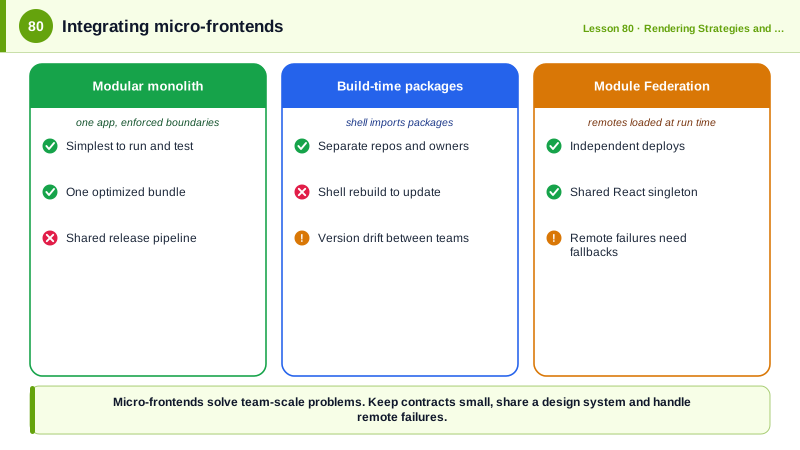
There are several ways to integrate the parts, each with trade-offs. Build-time integration publishes each part as a package that a shell application imports; it is simple and performs well, but it reintroduces coupled releases, because the shell must rebuild to pick up changes, so it is not truly independent deployment. Server-side composition assembles a page from fragments rendered by different services, through edge-side includes, a composition server or a framework's multi-zone feature, which keeps pages fast and works without JavaScript. Iframes give the strongest isolation of code, styles and failures but make layout, accessibility, routing and communication awkward, so they fit embedded tools and third-party content best. Web components (Day 20) give each part a framework-neutral custom element with encapsulated styles.
Module Federation, introduced in webpack 5 and now available for Rspack, Vite and others, enables run-time integration of JavaScript modules. A remote application exposes modules, such as a checkout widget, and a host application loads them at run time from the remote's deployed URL, without rebuilding the host. Shared dependencies such as React can be declared as singletons, so the page loads one copy instead of one per micro-frontend. That makes independent deployment possible within a single client-rendered experience, at the cost of version coordination for shared libraries and run-time failure modes when a remote is unavailable.
The costs are significant and often underestimated. Users can end up downloading several frameworks or several versions of one, harming performance. Visual consistency requires a shared design system and tokens (Day 79). Navigation across parts needs a shared routing contract. Communication between parts should be minimal and explicit, through URL state, custom events or a small shared contract, never by reaching into another part's internals or global state. Cross-cutting concerns such as authentication, analytics, error monitoring and feature flags need a shared platform layer. Local development and end-to-end testing get harder.
Micro-frontends are therefore a solution for organizational scale, not a default. A small or medium team usually does better with a well-structured modular monolith: one deployable application with clear module boundaries, enforced import rules and code owners, perhaps in a monorepo with tools such as Nx or Turborepo. Many organizations evolve to micro-frontends only when the number of teams makes coordinated releases the main bottleneck.
| Integration | How | Strengths | Weaknesses |
|---|---|---|---|
| Build-time packages | Shell imports versioned packages | Simple, optimized bundle | Not independent deployment |
| Server-side composition | Assemble HTML fragments | Fast, SEO friendly, no JS required | Shared state and interactivity harder |
| Iframes | Embed separate documents | Strong isolation | Layout, a11y and routing friction |
| Web components | Custom elements per part | Framework neutral, encapsulated | Duplicate runtimes, SSR effort |
| Module Federation | Load remote modules at run time | Independent deploys, shared singletons | Version coordination, runtime failures |
| Modular monolith | One app, enforced boundaries | Simplest operations | Shared release pipeline |
Worked Example: A Host Loading a Federated Checkout with a Fallback
The checkout team deploys its remote independently. The shell loads it at run time, shares React as a singleton and degrades gracefully if the remote fails.
// checkout/rsbuild.config.ts (the remote, owned and deployed by the checkout team)
import { pluginModuleFederation } from '@module-federation/rsbuild-plugin';
export default {
  plugins: [pluginModuleFederation({
    name: 'checkout',
    exposes: { './CheckoutWidget': './src/CheckoutWidget.tsx' },
    shared: { react: { singleton: true, requiredVersion: '^19.0.0' }, 'react-dom': { singleton: true, requiredVersion: '^19.0.0' } },
  })],
};

// shell/rsbuild.config.ts (the host)
export default {
  plugins: [pluginModuleFederation({
    name: 'shell',
    remotes: { checkout: 'checkout@https://checkout.example.com/mf-manifest.json' },   // resolved at run time
    shared: { react: { singleton: true }, 'react-dom': { singleton: true } },
  })],
};// shell/src/routes/cart.tsx
const CheckoutWidget = lazy(() =>
import('checkout/CheckoutWidget').catch(() => ({ default: CheckoutUnavailable }))); // remote down: degrade
export function CartPage() {
const { cart } = useCartContract(); // a small, versioned shared contract
return (
<ErrorBoundary fallback={<CheckoutUnavailable />}>
<Suspense fallback={<CheckoutSkeleton />}>
<CheckoutWidget cartId={cart.id} onComplete={(orderId) => navigate(`/orders/${orderId}`)} />
</Suspense>
</ErrorBoundary>
);
}
function CheckoutUnavailable() {
return <p role="alert">Checkout is temporarily unavailable. Your cart is saved; please try again in a few minutes.</p>;
}The host only knows the widget's props, a cart id and a completion callback, which is the whole contract between the teams. The checkout team can ship a new version at any time, and if their deployment is down the cart page still works and explains the situation.
Real-World Examples
- Martin Fowler's site published Cam Jackson's 2019 article on micro-frontends, which describes the integration approaches and warns about payload size, operational complexity and inconsistent user experience, and ThoughtWorks' Technology Radar has listed micro-frontends while cautioning against using them where team scale does not justify the overhead.
- Module Federation was created by Zack Jackson and released with webpack 5 in 2020, and companies including large retailers and enterprise software vendors have described using it to let many teams deploy parts of a single frontend independently, while the newer Module Federation 2.0 runtime added type sharing and support for Rspack and Vite.
Review Questions & Answers
Organizational scaling. When many teams share one frontend codebase and release pipeline, they block each other and ownership is unclear. Splitting the frontend by business domain lets each team build, test and deploy its part independently.
The shell application must update its dependency and rebuild to include a new version of a package, so releases remain coupled to the shell's release, even if the code lives in separate repositories.
It ensures the page loads one copy of React shared by the host and all remotes, avoiding duplicate downloads and the bugs of multiple React instances. The risk is version coordination: every part must be compatible with the shared version, so upgrades need cross-team agreement.
When the organization has a small or moderate number of teams for whom a shared release pipeline is not a major bottleneck. A single application with enforced module boundaries and code ownership gives most of the structure without the run-time complexity, performance costs and operational overhead of micro-frontends.