package-lock.json, npm ci and Semantic Versioning
On this page
Learning Objective
Understand how npm, pnpm and Yarn resolve and install a dependency tree, read semantic version ranges, explain why the lockfile must be committed and installed with a clean install in CI, and reduce supply chain risk from install scripts, typosquatting and compromised packages.
Concept Explanation
A modern frontend project depends on hundreds or thousands of packages, most of them transitive: dependencies of your dependencies. package.json lists the ones you chose directly, split into dependencies, needed at run time, and devDependencies, needed only to build and test. The package manager resolves the whole tree, downloads the packages from a registry, usually npmjs.com, and arranges them in node_modules. npm, pnpm and Yarn all do this, with different strategies: npm and classic Yarn hoist packages into a flat node_modules, while pnpm stores each version once in a global content-addressed store and links to it, which saves disk space and prevents code from importing packages it never declared.
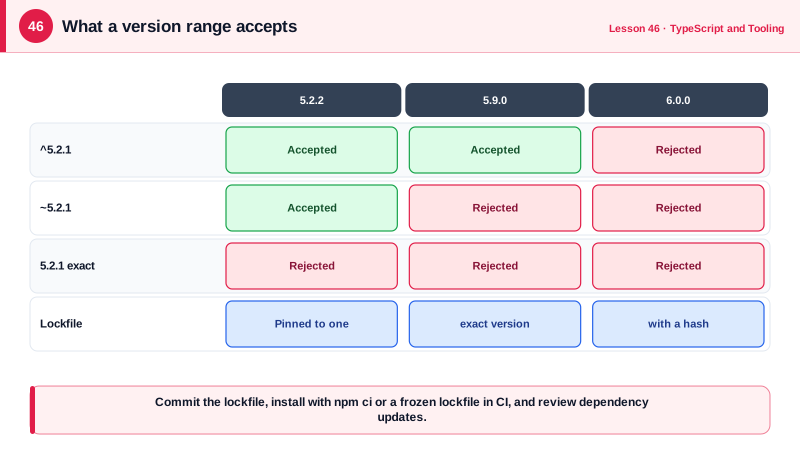
Version ranges follow semantic versioning: MAJOR.MINOR.PATCH. A patch release fixes bugs, a minor release adds features without breaking anything, and a major release may break existing code. Ranges in package.json say which versions you accept. A caret, ^5.2.1, accepts any 5.x.y at or above 5.2.1; a tilde, ~5.2.1, accepts only 5.2.x patches; an exact version accepts only itself. For versions below 1.0.0, the caret is stricter, because 0.x releases are allowed to break on minor bumps. Semantic versioning is a promise made by humans, so a minor release can still break you.
Ranges mean that two installs at different times could produce different trees. The lockfile, package-lock.json, pnpm-lock.yaml or yarn.lock, records the exact version and integrity hash of every package in the resolved tree. Committing it and installing from it makes every developer machine, CI run and production build use identical code. In CI, use the clean install commands, npm ci or pnpm install --frozen-lockfile, which fail if package.json and the lockfile disagree instead of silently updating the lockfile. Updates then happen deliberately, through a pull request that changes the lockfile, often opened by Dependabot or Renovate.
Every dependency is code you run with full trust, so the supply chain is a security concern. Packages can run install scripts that execute on your machine and in CI the moment you install. Attackers publish typosquatted names that differ from popular ones by one character, take over maintainer accounts and publish malicious versions, or inject code into build tooling. Defenses include reviewing new dependencies before adding them, preferring well-maintained packages with few dependencies, disabling install scripts where not needed, running npm audit or a scanner in CI, enabling two-factor authentication for publishing, and delaying adoption of brand-new releases for a few days, which several package managers now support as a minimum release age setting.
Size and duplication matter for the frontend specifically, because dependencies end up in the bundle users download. Before adding a package, check its size and its own dependencies on a site such as bundlephobia or pkg-size, look for a smaller alternative or a native browser API that does the job, and watch for several versions of the same library ending up in the tree.
| Concept | Example | Meaning |
|---|---|---|
| Caret range | ^5.2.1 | 5.2.1 up to but not including 6.0.0 |
| Tilde range | ~5.2.1 | 5.2.1 up to but not including 5.3.0 |
| Caret below 1.0 | ^0.4.2 | 0.4.2 up to but not including 0.5.0 |
| Lockfile | package-lock.json | Exact versions and integrity hashes |
| Clean install | npm ci, pnpm install --frozen-lockfile | Fails if lockfile and manifest disagree |
| devDependencies | Vite, TypeScript, test tools | Build time only |
| Install scripts | postinstall | Run code at install time |
| Automated updates | Dependabot, Renovate | Reviewed lockfile changes |
Worked Example: A Safer Dependency Setup
The configuration pins the toolchain, installs reproducibly in CI, blocks install scripts by default and audits dependencies on every pull request.
{
  "name": "storefront",
  "private": true,
  "packageManager": "pnpm@9.12.0",
  "engines": { "node": ">=20.11" },
  "scripts": {
    "dev": "vite",
    "build": "tsc --noEmit && vite build",
    "audit": "pnpm audit --prod --audit-level high"
  },
  "dependencies": {
    "react": "^19.0.0",
    "react-dom": "^19.0.0",
    "zod": "^3.23.8"
  },
  "devDependencies": {
    "typescript": "~5.6.3",
    "vite": "^5.4.10"
  }
}# .github/workflows/ci.yml (excerpt)
- uses: pnpm/action-setup@v4 # version comes from packageManager
- uses: actions/setup-node@v4
with: { node-version: 20, cache: pnpm }
- run: pnpm install --frozen-lockfile --ignore-scripts # exact tree, no install scripts
- run: pnpm audit --prod --audit-level high
- run: pnpm build# .npmrc
ignore-scripts=true # opt specific packages back in only when they need native buildsTypeScript is pinned with a tilde because its minor releases sometimes introduce stricter checks that break builds. The frozen lockfile install means a pull request that forgot to update the lockfile fails in CI rather than shipping an untested tree.
Real-World Examples
- In 2018 the popular event-stream package was handed to a new maintainer who added a dependency, flatmap-stream, containing an obfuscated payload targeting a specific Bitcoin wallet application, and it was downloaded millions of times before being discovered.
- In September 2025, attackers phished an npm maintainer and published malicious versions of widely used packages including chalk and debug, which together had billions of weekly downloads; the code tried to hijack cryptocurrency transactions in browsers, and the versions were removed within hours, illustrating why lockfiles and delayed adoption of new releases matter.
Review Questions & Answers
^2.3.4 allows any version from 2.3.4 up to but not including 3.0.0. ^0.3.4 allows only 0.3.x from 0.3.4 up to but not including 0.4.0, because below 1.0.0 the minor version is treated as potentially breaking.
Version ranges allow different installs to resolve different versions over time. The lockfile records the exact resolved version and integrity hash of every package, so every machine and every build installs the identical tree, making builds reproducible and changes reviewable.
npm install resolves ranges and may update the lockfile. npm ci installs exactly what the lockfile specifies, deletes any existing node_modules first, and fails if package.json and the lockfile are out of sync, which is what CI needs.
They run arbitrary code with your user's permissions as soon as a package is installed, on developer machines and in CI, before you have run or reviewed anything. A compromised or malicious package can use them to steal tokens or modify files.