CSS Specificity, Cascade and @layer Explained
On this page
Learning Objective
Explain how the cascade decides which declaration wins: origin and importance, cascade layers, specificity, scope proximity and source order. Calculate specificity, understand inheritance and the default keywords, and organize a stylesheet with @layer so that order of intent, not selector weight, controls the outcome.
Concept Explanation
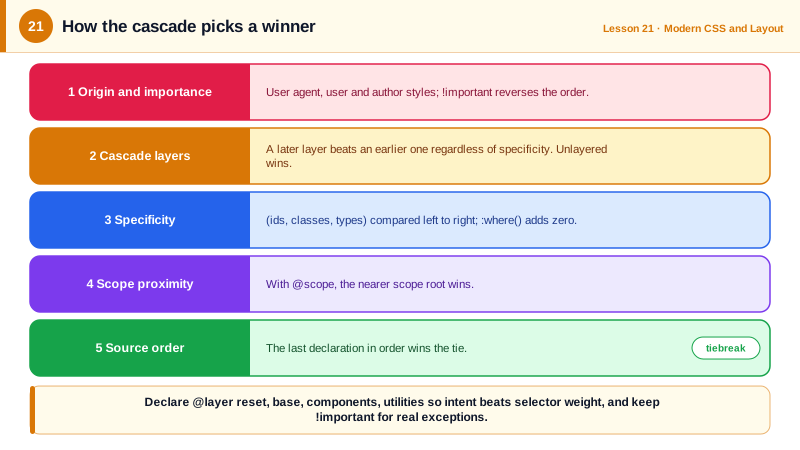
When several CSS declarations set the same property on the same element, the browser does not pick at random. The cascade sorts competing declarations by a fixed list of criteria and the first criterion that differs decides the winner. First comes origin and importance: user agent styles, user styles and author styles, with !important reversing the normal order. Then come cascade layers, then specificity, then scoping proximity for @scope rules, and finally source order, where the later declaration wins.
Specificity is the criterion most developers meet first. It is a three-part value often written as (A, B, C). A counts id selectors, B counts classes, attribute selectors and pseudo-classes, and C counts type selectors and pseudo-elements. The values are compared left to right, so one id beats any number of classes. Inline styles beat all selectors. The universal selector and combinators add nothing. The :is() and :not() pseudo-classes take the specificity of their most specific argument, while :where() always contributes zero, which makes it perfect for low-specificity defaults that are easy to override.
Specificity wars are the most common way stylesheets become unmaintainable: a component rule is overridden by a more specific page rule, which is then overridden with an id, and finally with !important. Cascade layers, declared with @layer, fix this structurally. You declare an order of layers, such as reset, base, components, utilities, and every rule inside a later layer beats every rule in an earlier layer regardless of specificity. A single class in utilities beats a long selector with an id in components. Unlayered styles beat all layered styles, which is useful for one-off overrides and for keeping third-party CSS in a low layer. For !important declarations the layer order is reversed, so an important rule in an early layer such as reset wins.
Inheritance is a separate mechanism. Some properties, mostly text-related ones like color, font-family and line-height, inherit from the parent when an element has no declared value. Others, such as border, margin and background, do not. The global keywords let you control this explicitly: inherit takes the parent's value, initial resets to the specification default, unset acts as inherit for inherited properties and initial otherwise, and revert rolls back to the user agent style, which is often what people actually want when they reach for initial.
DevTools makes the cascade visible: the Styles pane lists every matching rule in winning order, strikes through overridden declarations, shows the layer each rule belongs to and computes specificity when you hover a selector. When a style does not apply, the answer is almost always there.
| Criterion | Rule | Example |
|---|---|---|
| Origin and importance | Author over user agent; !important reverses order | Reset beats browser defaults |
| Cascade layers | Later layer wins; unlayered beats layered | utilities over components |
| Specificity | (ids, classes, types) compared left to right | #nav a (1,0,1) beats .menu .link (0,2,0) |
| :where() | Always zero specificity | Defaults that are easy to override |
| :is() and :not() | Most specific argument | :is(#a, .b) counts as an id |
| Source order | Later declaration wins | Last rule in the file |
| Inheritance | Only when no value is declared | color and font inherit, margin does not |
Worked Example: Ending a Specificity War with Layers
A design system's button is styled with a fairly specific selector. A utility class should be able to override its margin without !important. Layers make that true by declaration.
/* Declare the order once, at the top of the entry stylesheet */
@layer reset, base, vendor, components, utilities;

@layer reset {
  *, *::before, *::after { box-sizing: border-box; }
  :where(ul, ol)[role="list"] { list-style: none; padding: 0; }   /* zero specificity */
}

@layer base {
  body { font-family: system-ui, sans-serif; line-height: 1.5; color: #1f2937; }
  a { color: #6b21a8; }
}

/* Third-party CSS goes into a low layer so our components always win */
@import url("datepicker.css") layer(vendor);

@layer components {
  .card .actions button.btn-primary {            /* specificity (0,3,1) */
    margin-top: 1rem;
    background: #6b21a8;
    color: white;
  }
}

@layer utilities {
  .mt-0 { margin-top: 0; }                        /* specificity (0,1,0), still wins: later layer */
}<class="tok-k">div class="card"><class="tok-k">div class="actions">
<class="tok-k">button class="btn-primary mt-0">Save</class="tok-k">button> class="tok-c"><!-- margin-top is 0 -->
</class="tok-k">div></class="tok-k">div>Without layers, .mt-0 would lose to the more specific component selector and someone would add !important. With layers, intent is encoded in the layer order, and the Styles pane shows each rule's layer so the outcome is easy to explain.
Real-World Examples
- Cascade layers shipped in Chrome 99, Firefox 97 and Safari 15.4 within a few weeks of each other in early 2022, one of the fastest coordinated rollouts of a CSS feature, and are now used by frameworks such as Tailwind CSS version 4, which organizes its output into theme, base, components and utilities layers.
- The MDN documentation on the cascade lists the full sorting order, including the reversal of layer order for important declarations, which explains why an !important rule inside a reset layer can beat an !important rule in a later layer.
Review Questions & Answers
nav ul li a.active has four type selectors and one class, so (0,1,4). #menu a has one id and one type, so (1,0,1). Because ids are compared first, #menu a wins even though the first selector is longer.
Layer order is compared before specificity. Any normal declaration in a later layer beats any normal declaration in an earlier layer, however specific the earlier selector is. Specificity only decides between declarations in the same layer.
Selectors inside :where() contribute zero specificity, so defaults written with it can be overridden by any single class without escalating selectors or using !important.
initial sets the property to the value from the CSS specification, which for display is inline even on a div. revert rolls the property back to what the previous origin would have produced, usually the browser's default style, so a div returns to display block.