How to Improve INP: Long Tasks and Yielding
On this page
Learning Objective
Diagnose slow interactions by their three phases, reduce input delay by breaking up long tasks, reduce processing time by doing less work in event handlers and deferring non-urgent work, reduce presentation delay by keeping DOM updates small, and use yielding, transitions and workers to keep the main thread responsive.
Concept Explanation
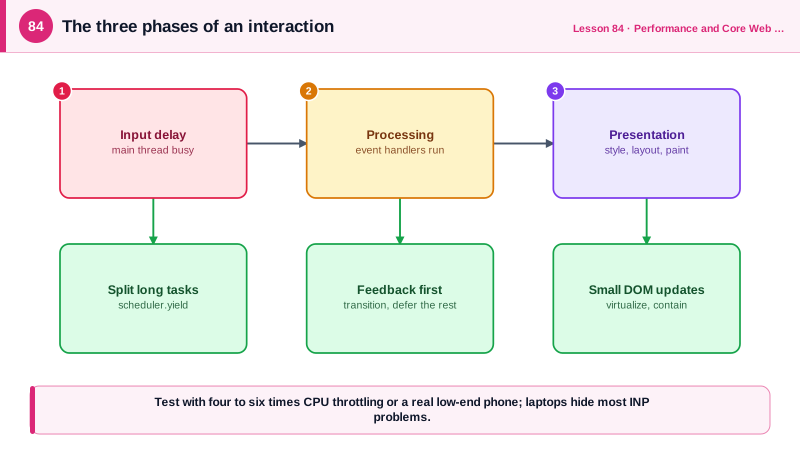
Interaction to Next Paint is a main thread problem. Every phase of an interaction competes for the one thread that runs JavaScript, style, layout and paint (Day 5). Input delay is time the interaction spends waiting because the main thread is busy with something else, often a long task from hydration, a third-party script, a timer or an earlier interaction. Processing time is the time spent running the event handlers for this interaction. Presentation delay is the time after handlers finish until the browser produces the next frame: style recalculation, layout, paint and compositing for whatever the handlers changed.
Input delay is reduced by breaking long tasks into smaller ones. A task of 300 milliseconds means any interaction arriving during it waits up to 300 milliseconds before its handler even starts. Splitting the work into chunks of under 50 milliseconds, with a yield to the event loop between chunks, lets pending input run in between. scheduler.yield, available in Chromium browsers with feature detection needed elsewhere, yields and then resumes the rest of the work with priority over other queued tasks; setTimeout with zero delay is the fallback, at the cost of going to the back of the queue. Reducing work during load, such as hydration (Day 72) and third-party scripts (Day 94), also reduces input delay for early interactions.
Processing time is reduced by doing only what is needed to show feedback in the handler and deferring the rest. Update the visible state first, then yield, then do expensive work such as analytics, saving to storage, recomputing derived data or sending network requests. In React, startTransition marks a state update as non-urgent, so React can render the urgent part, such as the typed character in an input, and interrupt the expensive part, such as filtering a large list, if more input arrives. useDeferredValue achieves the same for a value that drives expensive rendering. Debouncing helps for input that fires rapidly, and expensive pure computation can move to a Web Worker (Day 90).
Presentation delay is reduced by keeping rendering work small. Large DOMs make style and layout slower for every change, so keep the node count reasonable, virtualize long lists (Day 89), avoid layout thrashing in handlers (Day 7), use CSS containment and content-visibility, and avoid re-rendering large component trees for small changes. Updating thousands of nodes for one click will be slow however fast the JavaScript is.
Diagnosis starts in the field: RUM attribution from Day 81 shows which element and interaction type produce the worst INP and which phase dominates, and Long Animation Frame data shows which scripts were running. In the lab, the Performance panel's interactions track shows each interaction with its three phases, and CPU throttling of four to six times approximates a mid-range phone, where INP problems actually occur. Test on real low-end Android devices when you can, because a developer laptop hides most INP issues.
| Phase | Cause | Fix |
|---|---|---|
| Input delay | Long tasks from hydration, timers, third parties | Split tasks, yield, defer non-critical scripts |
| Processing | Heavy event handlers | Show feedback first, defer the rest |
| Processing | Expensive React re-renders | startTransition, useDeferredValue, memoization |
| Processing | CPU-heavy computation | Web Worker |
| Presentation | Large DOM, big style and layout cost | Smaller DOM, virtualization, containment |
| Presentation | Layout thrashing in handlers | Batch reads and writes |
| Measurement | Fast developer machines | CPU throttling, low-end devices, RUM |
Worked Example: A Slow Filter Fixed Three Ways
Typing in the filter box blocks the main thread because each keystroke filters and renders 10,000 rows and then does analytics. The fixed version yields, defers non-urgent work and uses a transition.
// Before: every keystroke does everything synchronously in one long task
function ProductFilterSlow({ products }: { products: Product[] }) {
  const [query, setQuery] = useState('');
  const visible = products.filter((p) => matches(p, query));      // 10,000 items, expensive
  return (
    <>
      <input value={query} onChange={(e) => {
        setQuery(e.target.value);
        localStorage.setItem('lastQuery', e.target.value);        // synchronous storage write
        analytics.track('filter', { query: e.target.value });      // heavy third-party call
      }} />
      <ProductTable rows={visible} />                               {/* renders 10,000 rows */}
    </>
  );
}

// After: urgent update first, expensive render as a transition, side work after a yield
const yieldToMain = () =>
  'scheduler' in globalThis && 'yield' in scheduler ? scheduler.yield() : new Promise((r) => setTimeout(r, 0));

function ProductFilter({ products }: { products: Product[] }) {
  const [query, setQuery] = useState('');
  const deferredQuery = useDeferredValue(query);                    // expensive work follows, interruptibly
  const visible = useMemo(() => products.filter((p) => matches(p, deferredQuery)), [products, deferredQuery]);

  async function onChange(e: React.ChangeEvent<HTMLInputElement>) {
    const value = e.target.value;
    setQuery(value);                                                // urgent: the input updates in the next frame
    await yieldToMain();                                            // let the browser paint first
    localStorage.setItem('lastQuery', value);
    analytics.track('filter', { query: value });
  }

  return (
    <>
      <input value={query} onChange={onChange} aria-label="Filter products" />
      <div style={{ opacity: query !== deferredQuery ? 0.6 : 1 }}>
        <VirtualizedTable rows={visible} />                         {/* only visible rows exist in the DOM */}
      </div>
    </>
  );
}

// Splitting a long non-React loop into yielding chunks
async function indexAll(items: Item[]) {
  let deadline = performance.now() + 40;
  for (const item of items) {
    index(item);
    if (performance.now() > deadline) { await yieldToMain(); deadline = performance.now() + 40; }
  }
}
With six times CPU throttling, the slow version shows keystroke interactions of 400 milliseconds or more in the Performance panel's interactions track; the fixed version keeps them under 100 milliseconds, because the input repaints before filtering, the table renders only visible rows and storage and analytics run after the frame.
Real-World Examples
- The Chrome team's INP case studies on web.dev include The Economic Times, which reported reducing INP from about 1 second to 257 milliseconds by cutting main thread work, and redBus, which reported improved sales after optimizing INP, alongside guidance on yielding and breaking up long tasks.
- The scheduler.yield API shipped in Chrome 129 in 2024 after an origin trial, giving developers a way to yield that resumes the remaining work ahead of other queued tasks instead of going to the back of the task queue as setTimeout does.
Review Questions & Answers
The main thread is busy with another task when the input arrives, often a long task from hydration, third-party scripts or other work. Breaking long work into chunks under about 50 milliseconds with yields between them, and reducing work during page load, lets interactions start quickly.
The interaction's latency ends when the next frame is painted. Updating the visible feedback, then yielding before analytics, storage and other side work lets the browser paint the response immediately instead of after all the work completes.
They mark expensive rendering as non-urgent, so React renders the urgent update, such as the typed character, first and processes the expensive update in an interruptible way, abandoning it if newer input arrives. The input stays responsive even when rendering results is slow.
Both give the browser a chance to handle input and render. setTimeout puts the continuation at the back of the task queue, behind any other queued tasks, while scheduler.yield resumes the continuation with priority, so long work still finishes promptly after yielding.