React useRef and useImperativeHandle Explained
On this page
Learning Objective
Use refs to access DOM nodes for focus, measurement, scrolling and media control, store mutable values that should not trigger re-renders, pass refs to child components, expose a limited imperative API, and recognize when imperative code is appropriate and when it is fighting the framework.
Concept Explanation
Declarative rendering covers most of an interface, but some things are inherently imperative: moving focus to an input, scrolling an element into view, measuring a node's size, playing a video, drawing on a canvas or handing a DOM node to a non-React library. Refs are the escape hatch for these cases. useRef returns a mutable object with a current property that persists across renders. Passing it to an element's ref attribute makes React set current to the DOM node after it mounts and reset it to null when it unmounts.
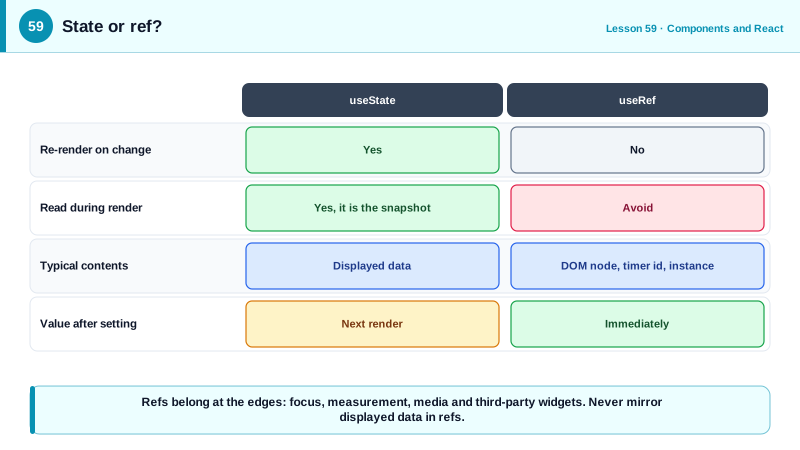
Refs have a second use: storing values that must persist between renders but should not cause a re-render when they change. Timer identifiers, the previous value of a prop, a flag that a request is in flight, a WebSocket instance or the latest version of a callback for use inside a long-lived subscription are all good candidates. The rule of thumb is that state is for information the screen displays, refs are for information the screen does not depend on. Changing ref.current never triggers a render, and reading refs during rendering is discouraged, because the value may not correspond to what is on screen.
Passing refs across components used to require forwardRef. Since React 19, ref is an ordinary prop for function components, so a design system Input can accept ref and attach it to its inner input element, which is essential for focus management and for form libraries that register fields through refs. When a component wants to expose a deliberately limited interface rather than its raw DOM node, useImperativeHandle defines what the parent receives, such as focus and scrollToBottom methods but not the whole node. Callback refs, functions passed to ref, run when a node attaches or detaches, which suits measuring or observing nodes that appear conditionally, and in React 19 they can return a cleanup function.
Integrating third-party libraries is a classic use. A chart, map or rich text editor written without React needs a DOM node to mount into and must be created and destroyed at the right times. The pattern combines a ref for the container, an effect that creates the instance with the ref's node and destroys it in cleanup, and further effects that push prop changes into the instance. React owns the container element; the library owns everything inside it.
The warning sign is using refs to do what state and props should do: reading an input's value through a ref and then manually setting other elements' text, toggling classes on nodes directly or querying the DOM for elements React rendered. That reintroduces imperative synchronization and all its bugs. Refs are for the edges of the system, not for its core logic.
| Use | Tool | Note |
|---|---|---|
| Focus, scroll, select text | ref on the element | Call methods in handlers or effects |
| Measure size or position | Callback ref or ResizeObserver | Nodes that appear conditionally |
| Mutable value, no re-render | useRef for timers, previous values | Do not read during render |
| Pass a ref to a custom component | ref as a prop (React 19) | forwardRef in older versions |
| Expose a limited API | useImperativeHandle | focus and scrollToBottom only |
| Third-party widget | Ref plus effect with cleanup | Library owns the container's children |
| Changing what is displayed | State, not refs | Refs do not trigger renders |
Worked Example: Focus Management, a Limited Handle and a Map Integration
The dialog focuses its first field, the message list exposes only scrolling, and a non-React map library is mounted and kept in sync.
// React 19: ref is a regular prop
function TextField({ label, ref, ...props }: { label: string; ref?: React.Ref<HTMLInputElement> } & React.InputHTMLAttributes<HTMLInputElement>) {
  const id = useId();
  return (<><label htmlFor={id}>{label}</label><input id={id} ref={ref} {...props} /></>);
}

function RenameDialog({ open, onClose }: { open: boolean; onClose: () => void }) {
  const inputRef = useRef<HTMLInputElement>(null);
  useEffect(() => { if (open) inputRef.current?.select(); }, [open]);   // imperative: focus and select
  return open ? <div role="dialog" aria-modal="true"><TextField label="Name" ref={inputRef} defaultValue="Untitled" /></div> : null;
}

// Exposing a limited imperative API instead of the DOM node
type MessageListHandle = { scrollToBottom: () => void };
function MessageList({ messages, ref }: { messages: Message[]; ref?: React.Ref<MessageListHandle> }) {
  const listRef = useRef<HTMLUListElement>(null);
  useImperativeHandle(ref, () => ({
    scrollToBottom: () => listRef.current?.lastElementChild?.scrollIntoView({ block: 'end' }),
  }), []);
  return <ul ref={listRef}>{messages.map((m) => <li key={m.id}>{m.text}</li>)}</ul>;
}

// Third-party library: React owns the container, the library owns its contents
function StoreMap({ center, zoom }: { center: [number, number]; zoom: number }) {
  const containerRef = useRef<HTMLDivElement>(null);
  const mapRef = useRef<MapInstance | null>(null);             // mutable, no re-render needed

  useEffect(() => {
    const map = createMap(containerRef.current!, { center, zoom });
    mapRef.current = map;
    return () => { map.destroy(); mapRef.current = null; };
  }, []);                                                      // create once

  useEffect(() => { mapRef.current?.setView(center, zoom); }, [center, zoom]);   // push prop changes

  return <div ref={containerRef} className="map" role="region" aria-label="Store locations" />;
}
The map's create effect intentionally runs once; later prop changes go through the second effect, which updates the existing instance instead of recreating the whole map.
Real-World Examples
- React 19, released in December 2024, made ref a regular prop for function components and announced that forwardRef would be deprecated in a future version, simplifying design system components that need to expose their underlying elements.
- React Hook Form registers uncontrolled inputs through refs instead of storing each keystroke in state, and its documentation credits this approach for re-rendering far less than fully controlled form solutions in large forms.
Review Questions & Answers
Updating state triggers a re-render and the new value is part of the next render's snapshot. Updating ref.current changes the value immediately without rendering. State is for information displayed on screen; refs are for values the rendering does not depend on, such as timer ids.
Rendering should be pure and based on props and state. A ref's value can change without a render, so reading it during render may produce output that does not match the current data and breaks under concurrent rendering.
It lets a component define exactly what a parent receives through a ref, such as a few methods like focus or scrollToBottom, instead of exposing the raw DOM node. This keeps the component's internals encapsulated while still allowing necessary imperative actions.
Render a container element with a ref, create the library instance in an effect using the ref's node and destroy it in the cleanup, store the instance in a ref, and use additional effects to pass prop changes to the existing instance. React owns the container and the library owns its contents.