Accessibility Testing with axe and Screen Readers
On this page
Learning Objective
Combine automated accessibility checks in development and CI with manual testing by keyboard, screen reader, zoom and other settings, understand what automation can and cannot detect, prioritize and track issues against WCAG 2.2, and build accessibility into the definition of done.
Concept Explanation
Phase 2 taught how to build accessible interfaces. Testing confirms that they stay accessible as the product changes. No single technique is enough: automated tools find a meaningful share of issues quickly and repeatably, while many important problems can only be found by a person using the interface the way people with disabilities do. A sustainable process uses both, at different stages.
Automated checks are the safety net. axe-core, the engine behind many tools, evaluates the DOM against rules for missing alternative text, missing form labels, insufficient color contrast, invalid ARIA attributes and roles, duplicate ids, missing document language and page titles, empty buttons and links, and more. It runs as a browser extension for manual inspection, in Lighthouse, inside component tests with jest-axe or vitest-axe, in Storybook with the accessibility addon, and in end-to-end tests with @axe-core/playwright. eslint-plugin-jsx-a11y catches some problems even earlier, in the editor (Day 50). Running these on every pull request prevents regressions in the issues they can detect, and because axe avoids false positives by design, failures can block merges.
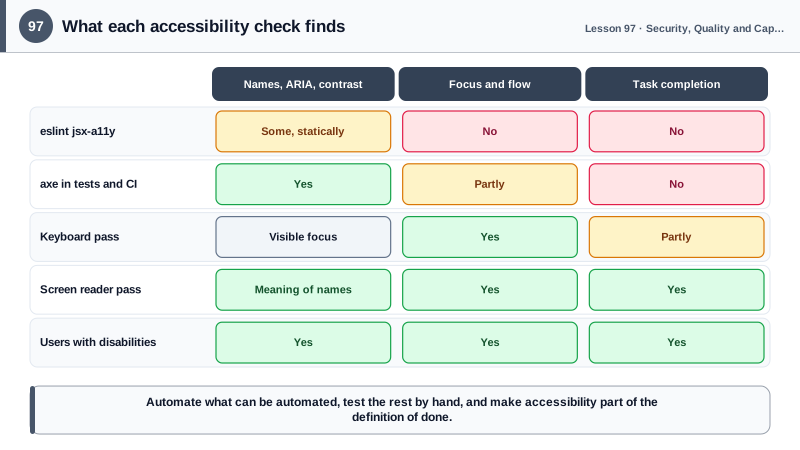
Automation finds a minority of real issues, though. Studies by Deque, the maker of axe, estimate that automated testing finds about 57 percent of issues by volume in real audits, and the share of WCAG success criteria that can be fully automated is smaller still. A tool can check that an image has alt text but not whether the text is meaningful, that a button has a name but not whether the name makes sense, that focus is visible on one element but not whether the tab order is logical, that a dialog has a role but not whether focus moves into it and returns correctly, or whether a screen reader user can complete the checkout.
Manual testing covers the rest, and a short routine catches most problems. Use the keyboard alone: tab through the page, check that everything interactive is reachable, the order makes sense, focus is always visible and never trapped, and Escape closes overlays. Use a screen reader for key flows: VoiceOver on macOS and iOS, NVDA with Firefox or Chrome on Windows, TalkBack on Android; listen to whether headings, landmarks, labels, states and announcements of dynamic changes make sense. Zoom to 200 and 400 percent and check reflow, increase text spacing, turn on reduced motion, forced colors and dark mode. Watch for timeouts, autoplay and content that depends on color alone.
Process makes the difference between a one-time audit and lasting accessibility. Map issues to WCAG 2.2 success criteria and prioritize by impact on users: blockers that prevent completing a task first. Include accessibility acceptance criteria in user stories and the definition of done, test components once in the design system so every product inherits the result, involve disabled users in research and usability testing, and publish an accessibility statement. Legal requirements are increasing too: the European Accessibility Act applies to many digital products and services from June 2025, and many jurisdictions reference WCAG levels in law.
| Method | Finds | Misses |
|---|---|---|
| eslint jsx-a11y | Static JSX mistakes in the editor | Anything decided at run time |
| axe in component tests | Missing names, invalid ARIA, contrast | Meaning, flow, focus order |
| axe in end-to-end tests | Issues on real pages and states | Whether tasks can be completed |
| Keyboard-only pass | Unreachable controls, traps, focus order | Screen reader semantics |
| Screen reader pass | Names, roles, states, announcements | Visual issues such as contrast |
| Zoom, spacing, preferences | Reflow, clipping, motion, forced colors | Semantics |
| Usability testing with disabled users | Real barriers and workarounds | Nothing replaces it |
Worked Example: axe in Component and End-to-End Tests Plus a Manual Checklist
Automated checks run on every pull request. A short manual checklist is part of the definition of done for any new interactive feature.
// Dialog.a11y.test.tsx: component-level check with vitest-axe
import { render, screen } from '@testing-library/react';
import userEvent from '@testing-library/user-event';
import { axe } from 'vitest-axe';

test('the rename dialog has no detectable violations and manages focus', async () => {
  const user = userEvent.setup();
  const { container } = render(<RenameButton />);
  await user.click(screen.getByRole('button', { name: 'Rename' }));

  const dialog = screen.getByRole('dialog', { name: 'Rename file' });
  expect(dialog).toContainElement(document.activeElement as HTMLElement);   // focus moved into the dialog
  expect(await axe(container)).toHaveNoViolations();

  await user.keyboard('{Escape}');
  expect(screen.getByRole('button', { name: 'Rename' })).toHaveFocus();     // focus returned
});// e2e/a11y.spec.ts: page-level scans of key states with @axe-core/playwright
import { test, expect } from '@playwright/test';
import AxeBuilder from '@axe-core/playwright';
for (const path of ['/', '/products/demo', '/cart', '/checkout']) {
test(`no WCAG A or AA violations on ${path}`, async ({ page }) => {
await page.goto(path);
const results = await new AxeBuilder({ page }).withTags(['wcag2a', 'wcag2aa', 'wcag21aa', 'wcag22aa']).analyze();
expect(results.violations.map((v) => `${v.id}: ${v.nodes.length} nodes`)).toEqual([]);
});
}Manual checklist for every new interactive feature (about 15 minutes):
[ ] Keyboard only: every control reachable, logical order, visible focus, no traps, Escape closes overlays
[ ] Screen reader (VoiceOver or NVDA): names, roles and states make sense; changes are announced
[ ] Zoom 200% and 400%: no lost content, no horizontal scrolling for text
[ ] Reduced motion, forced colors and dark mode: usable and visible
[ ] Errors: described in text, linked to fields, focus moves to themThe component test checks behavior axe cannot see, focus moving into the dialog and returning to the trigger, while axe covers names, roles and contrast. The manual checklist covers what neither can.
Real-World Examples
- Deque Systems analyzed more than 13,000 pages from real accessibility audits and reported that automated testing with axe-core identified about 57 percent of the total issues found, more than the commonly cited 20 to 30 percent of success criteria, while confirming that manual testing remains necessary for the rest.
- The European Accessibility Act began applying in June 2025 to many products and services sold in the EU, including e-commerce, banking services and e-books, with the harmonized standard EN 301 549 referencing WCAG, which made accessibility testing a legal requirement for many frontend teams.
Review Questions & Answers
Tools can check that attributes and relationships exist and that contrast meets thresholds, but not whether alternative text is meaningful, labels make sense, focus order is logical, dynamic changes are announced well or users can complete tasks. Those require human judgment and testing with assistive technology.
As early and often as possible: lint rules in the editor, axe in component tests and Storybook for components, and axe in end-to-end tests for whole pages in key states, all in CI on every pull request so regressions are blocked before merging.
That every interactive element can be reached and operated with the keyboard, the tab order follows the visual and logical order, focus is always visible, focus never gets trapped except inside modal dialogs, and overlays close with Escape and return focus to their trigger.
Components are reused across many screens and products. Making and testing them accessible once, including keyboard behavior and ARIA, means every product inherits correct behavior, while a bug in a shared component would otherwise be repeated everywhere.