What Is the DOM? JavaScript DOM Explained
On this page
Learning Objective
Understand the DOM as a tree of node objects that the browser keeps in sync with the rendered page, learn the core APIs for querying, traversing, creating and updating nodes, and know the difference between live and static collections, attributes and properties, and safe and unsafe ways of inserting content.
Concept Explanation
The Document Object Model is the browser's in-memory representation of the page. Every tag becomes an element node, the text between tags becomes text nodes, and comments become comment nodes. Each node has a parent, children and siblings, which is why the DOM is described as a tree. JavaScript does not edit the HTML source; it edits this tree, and the browser re-renders whatever changed. That is also why the Elements panel in DevTools can differ from View Source: one shows the live tree, the other shows the original bytes.
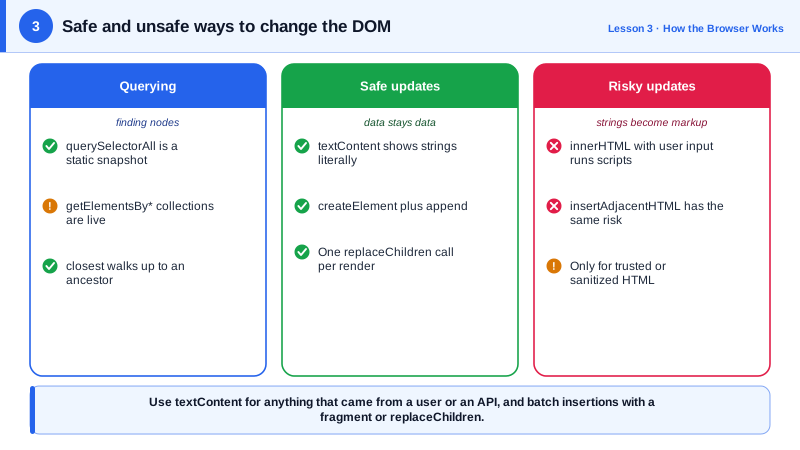
Querying the tree is mostly done with querySelector and querySelectorAll, which accept any CSS selector. querySelector returns the first match or null, and querySelectorAll returns a static NodeList, a snapshot that will not change if the DOM changes later. Older APIs such as getElementsByClassName and the children property return live HTMLCollections that update automatically as the DOM changes, which can surprise you if you remove items while looping over them. Prefer the static results unless you specifically want live behavior. Element.closest walks up from an element to find the nearest ancestor matching a selector, which is very useful in event handling (Day 6).
HTML attributes and DOM properties are related but not the same thing. The attribute is what was written in the markup, read with getAttribute. The property is the current state of the object. For an input, the value attribute is the initial value while the value property is what the user has typed. Classes are best managed through classList, and custom data through data attributes, which the dataset property exposes in camelCase.
There are several ways to change content, and they differ in safety. textContent sets plain text: whatever string you pass is shown literally, so it is safe for user data. innerHTML parses a string as HTML, which is convenient but executes the browser's HTML parser on whatever you pass, making it the classic route for cross-site scripting (Day 91) when the string contains user input. Creating elements with createElement and setting their properties is safe and explicit. When you need to insert many nodes, build them in a DocumentFragment or use append with several arguments, so the live document is touched once.
Each DOM mutation is cheap on its own, but the browser must eventually recalculate style and layout for whatever changed. Batching changes and avoiding interleaved reads and writes keeps that work small, which Day 7 covers. Frameworks such as React exist partly to manage this tree for you, but they still produce ordinary DOM operations in the end.
| API | Returns or does | Notes |
|---|---|---|
| querySelector(sel) | First matching element or null | Any CSS selector |
| querySelectorAll(sel) | Static NodeList | Does not update when the DOM changes |
| getElementsByClassName | Live HTMLCollection | Updates automatically, careful in loops |
| closest(sel) | Nearest matching ancestor or itself | Ideal with event delegation |
| textContent | Gets or sets plain text | Safe for untrusted strings |
| innerHTML | Parses a string as HTML | Unsafe with untrusted input |
| createElement and append | Build and insert nodes | Explicit and safe, batch with fragments |
| dataset | Reads data attributes | data-user-id becomes dataset.userId |
Worked Example: Rendering a List Safely and Efficiently
The function renders a list of comments from an API. It builds nodes in a fragment, uses textContent for user content, and stores the id in a data attribute for later event handling.
const comments = [
  { id: 1, author: 'Ana', body: 'Great article!' },
  { id: 2, author: 'Sam', body: '<img src=x onerror="alert(1)">' },  // hostile input
];

function renderComments(list, items) {
  const fragment = document.createDocumentFragment();
  for (const c of items) {
    const li = document.createElement('li');
    li.className = 'comment';
    li.dataset.commentId = String(c.id);              // becomes data-comment-id="2"

    const author = document.createElement('strong');
    author.textContent = c.author;                    // shown literally, never parsed

    const body = document.createElement('p');
    body.textContent = c.body;                        // the img tag appears as text

    li.append(author, body);
    fragment.append(li);
  }
  list.replaceChildren(fragment);                     // one change to the live DOM
}

const list = document.querySelector('#comments');
renderComments(list, comments);

// Static versus live collections
const staticItems = list.querySelectorAll('li');      // length stays 2
const liveItems = list.getElementsByTagName('li');    // follows the DOM
list.firstElementChild.remove();
console.log(staticItems.length, liveItems.length);    // 2 1
The hostile second comment is displayed as harmless text because textContent never invokes the HTML parser. Had the code used li.innerHTML with template strings, the image's onerror handler would have run in the user's session.
Real-World Examples
- Developer tools always show the live DOM rather than the source, which is why server-rendered pages that are modified by scripts, or invalid markup that the parser repaired, look different in the Elements panel than in View Source; HTML parsing rules in the WHATWG specification define exactly how browsers repair broken markup.
- Trusted Types, shipped in Chromium browsers, was designed after Google reported that DOM-based cross-site scripting through sinks such as innerHTML was one of the most common XSS classes in its applications; it locks down those sinks so only vetted values can be assigned (Day 92).
Review Questions & Answers
View Source shows the original HTML bytes the server sent. The Elements panel shows the current DOM, which includes any changes made by JavaScript and any repairs the HTML parser made to invalid markup, such as inserting a missing tbody or closing unclosed tags.
The attribute is the initial value written in the markup, read with getAttribute('value'). The property reflects the current state, including what the user has typed. Changing the property does not change the attribute, so reading the attribute after user input returns the original value.
textContent assigns text that is displayed literally, so characters such as angle brackets are never interpreted as markup. innerHTML runs the HTML parser on the string, so a value containing elements with event handler attributes, such as an image with onerror, creates real elements and can execute script.
Because it updates as the DOM changes, removing elements while iterating over it by index shifts the remaining elements down, so the loop skips items. Converting it to an array first, or using the static NodeList from querySelectorAll, avoids the problem.