React Context Explained: Avoid Prop Drilling
On this page
Learning Objective
Use context to provide values to deep descendants without prop drilling, understand how context updates trigger re-renders and how to limit them by splitting contexts and memoizing values, and recognize when composition or a dedicated store is a better choice than context.
Concept Explanation
Some values are needed by many components at many depths: the current theme, the signed-in user, the locale, a feature flag client, an API client. Passing them as props through every intermediate component, called prop drilling, adds noise to components that do not use the values and couples them to their descendants' needs. Context solves this. A provider component makes a value available to its whole subtree, and any descendant reads it with useContext, or the use API in React 19, however deep it is.
Context is best understood as dependency injection for the component tree. Like an injector in Angular or a DI container in .NET, it decouples a component from where its dependencies come from. That brings the same benefits: a test or a Storybook story can wrap a component in a provider with a fake API client or a different theme, and a subtree can override a value by rendering a nested provider, such as a dark section inside a light page.
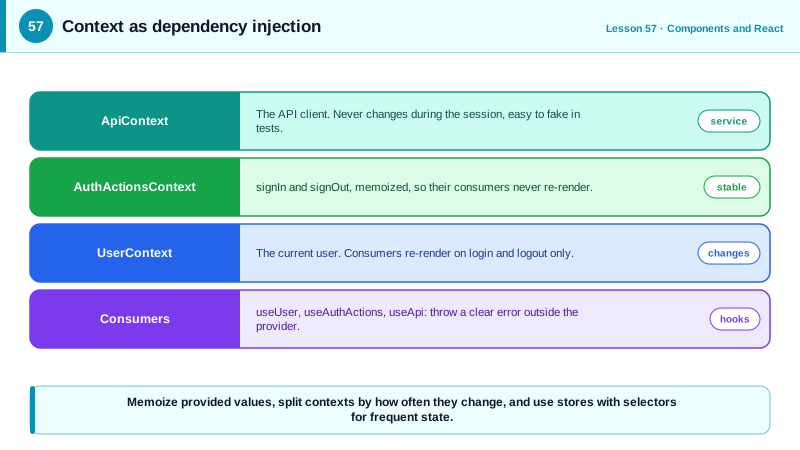
Context has a performance characteristic you must understand. When the provider's value changes, every component that reads that context re-renders, regardless of which part of the value it uses. A single context holding the user, the theme, the cart and a dozen settings re-renders every consumer whenever any of them changes. A provider that creates a new object on every render, value={{ user, setUser }}, changes its value on every render of the provider, even when nothing meaningful changed, and re-renders all consumers. The fixes are to memoize the provided value with useMemo, split unrelated values into separate contexts, and separate rarely changing values, such as action functions, from frequently changing data.
Context is not a state management library. It transports a value; it does not provide selective subscriptions, so it is not ideal for high-frequency, widely shared state such as a large normalized store or a live cursor position. For that, a store with selectors, such as Zustand or Redux, lets each component subscribe only to the slice it needs (Day 65). Server data belongs in a query cache (Day 63). Context remains excellent for low-frequency values and for injecting services.
Before reaching for context, consider composition. Prop drilling is often a sign that intermediate components are doing too much. If a page passes user through a Layout and a Sidebar only so that an Avatar can read it, the page can instead pass the rendered Avatar as a child or slot prop to the Layout. The Layout then never sees user at all. Composition removes the intermediate dependency without hiding where data comes from.
| Need | Tool | Note |
|---|---|---|
| Theme, locale, current user | Context | Low frequency, read widely |
| API client, analytics, feature flags | Context as dependency injection | Easy to replace in tests |
| Avoid passing props through layers | Composition first | Pass elements instead of data |
| Frequently changing shared state | Store with selectors | Components subscribe to slices |
| Server data | Query cache | Caching and invalidation built in |
| Override in a subtree | Nested provider | Dark section in a light page |
Worked Example: Split Contexts for Auth and a Testable API Client
The auth state and its actions are in separate contexts with memoized values, a custom hook gives a clear error outside the provider, and the API client is injected so tests can replace it.
type User = { id: string; name: string } | null;
const UserContext = createContext<User | undefined>(undefined);
const AuthActionsContext = createContext<{ signIn: (e: string, p: string) => Promise<void>; signOut: () => Promise<void> } | undefined>(undefined);
const ApiContext = createContext<ApiClient | undefined>(undefined);

export function AppProviders({ api, children }: { api: ApiClient; children: React.ReactNode }) {
  const [user, setUser] = useState<User>(null);

  // Actions never change, so their consumers never re-render on login or logout
  const actions = useMemo(() => ({
    signIn: async (email: string, password: string) => setUser(await api.signIn(email, password)),
    signOut: async () => { await api.signOut(); setUser(null); },
  }), [api]);

  return (
    <ApiContext.Provider value={api}>
      <AuthActionsContext.Provider value={actions}>
        <UserContext.Provider value={user}>{children}</UserContext.Provider>
      </AuthActionsContext.Provider>
    </ApiContext.Provider>
  );
}

function useRequired<T>(ctx: React.Context<T | undefined>, name: string): T {
  const value = useContext(ctx);
  if (value === undefined) throw new Error(`${name} must be used inside <AppProviders>`);
  return value;
}
export const useUser = () => useRequired(UserContext, 'useUser');
export const useAuthActions = () => useRequired(AuthActionsContext, 'useAuthActions');
export const useApi = () => useRequired(ApiContext, 'useApi');

// A sign-out button only reads actions: it does not re-render when the user changes
export function SignOutButton() {
  const { signOut } = useAuthActions();
  return <button onClick={signOut}>Sign out</button>;
}

// Tests inject a fake client
render(<AppProviders api={fakeApi({ user: { id: 'u1', name: 'Ana' } })}><Header /></AppProviders>);
Using undefined as the default and throwing in the hook turns a missing provider into an immediate, clear error instead of a confusing null deep inside a component.
Real-World Examples
- The React documentation's guidance on context recommends trying to pass props or use composition with children before reaching for context, and lists theming, the current account, routing and managing state as appropriate uses.
- React Redux and Zustand use context only to make the store available and then let components subscribe to selected slices outside of context, a design that exists specifically because context re-renders every consumer whenever its value changes.
Review Questions & Answers
Passing props through intermediate components that do not use them, only so deeper components can. It can be avoided by composition, passing rendered elements or children so intermediate components never see the data, or by context, which delivers the value directly to descendants.
A new object is created on every render of the provider, so the context value always appears changed, and every consumer re-renders even if user did not change. Memoizing the value with useMemo, or splitting the setter into its own context, fixes it.
Components ask for a dependency, such as an API client, by context type instead of creating or importing a specific instance. The provider decides which implementation to supply, so tests and different environments can inject fakes or alternatives without changing the components.
When shared state changes frequently and different components need different parts of it. Context re-renders every consumer on any change, while a store lets each component subscribe to its own slice and re-render only when that slice changes.