JavaScript Closures Explained with Examples
On this page
Learning Objective
Define a closure precisely, use closures for private state, function factories, memoization and configured callbacks, recognize stale closures in event handlers, timers and React hooks, and avoid memory leaks caused by closures that hold on to large objects.
Concept Explanation
A closure is a function together with the variables from the scope where it was created. Because JavaScript scope is lexical, a function defined inside another function can read and write the outer function's variables, and it keeps that ability even after the outer function has returned. The variables are not copied; the inner function keeps a live reference to them, so changes are visible to every closure that shares the same scope.
Closures are behind many everyday patterns. A function factory returns functions configured by its arguments, such as makeFormatter('EUR') returning a function that formats amounts in euros. A closure can hold private state that nothing else can reach: a counter, a cache or a connection, exposed only through the functions you return, which is how modules were written before ES modules existed. Event handlers, timer callbacks and promise callbacks are closures too: they remember the variables that were in scope when they were created, which is exactly why they are useful.
Memoization uses a closure to keep a cache between calls. A function such as memoize(fn) creates a Map in its own scope and returns a wrapper that checks the map before calling fn. Debounce and throttle, essential for search inputs and scroll handlers, are closures that keep a timer identifier or a last-run timestamp between calls. Once you can see the hidden variables these functions carry, their behavior becomes obvious.
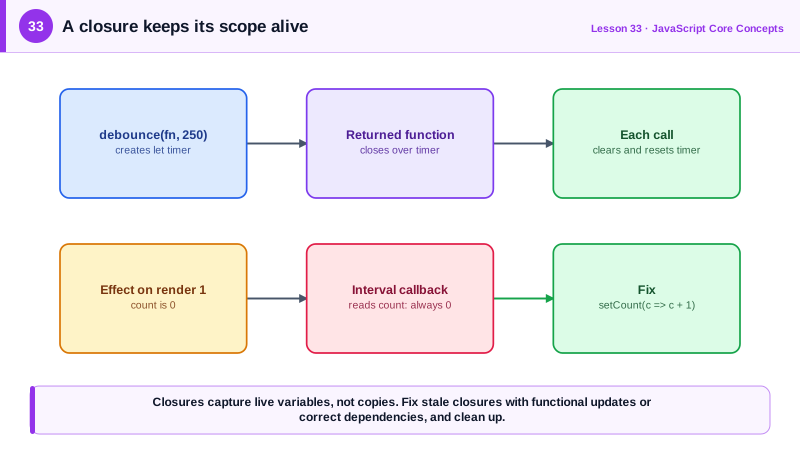
The most common closure bug is the stale closure. A closure captures the variables of the scope it was created in. If that scope belonged to a particular moment, such as one render of a React component, the closure keeps seeing values from that moment even after newer values exist. A setInterval callback created during the first render will read the first render's state forever. Fixes include reading the latest value through a ref, using functional updates that receive the current value, or recreating the closure when its inputs change, which is what the dependency arrays of useEffect and useCallback are for (Day 54).
Closures can also extend lifetimes unintentionally. Anything a closure references stays reachable, so the garbage collector cannot free it. A long-lived event listener that closes over a large data structure, or a cache that grows without bounds, keeps memory alive long after it is useful. Removing listeners when components are destroyed, bounding caches, and not capturing large objects you do not need prevent these leaks. The Memory panel in DevTools shows retainers, which reveals the closure keeping an object alive.
| Pattern | Hidden state in the closure | Typical use |
|---|---|---|
| Function factory | Configuration arguments | Formatters, validators, API clients |
| Private state | Counter, cache, connection | Encapsulated modules |
| Memoize | Map of past results | Expensive pure calculations |
| Debounce | Timer identifier | Search as you type |
| Throttle | Last run timestamp | Scroll and resize handlers |
| Event handler | Variables at creation time | UI callbacks |
| Stale closure bug | Outdated captured values | Intervals and effects in components |
Worked Example: Debounce, Memoize and a Stale Closure Fix
Two utility functions rely on closures to keep state between calls. The third snippet shows a stale closure in a React component and two fixes.
// Debounce: the timer id lives in the closure between calls
function debounce(fn, wait) {
  let timer;
  return function debounced(...args) {
    clearTimeout(timer);
    timer = setTimeout(() => fn.apply(this, args), wait);
  };
}
const search = debounce((q) => fetchResults(q), 250);
input.addEventListener('input', (e) => search(e.target.value));

// Memoize with a bounded cache so the closure cannot grow forever
function memoize(fn, max = 500) {
  const cache = new Map();
  return (key) => {
    if (cache.has(key)) return cache.get(key);
    const value = fn(key);
    cache.set(key, value);
    if (cache.size > max) cache.delete(cache.keys().next().value);   // drop the oldest
    return value;
  };
}
const slugify = memoize((s) => s.toLowerCase().trim().replace(/[^a-z0-9]+/g, '-'));// Stale closure: the interval callback captured count from the first render
function Ticker() {
const [count, setCount] = useState(0);
useEffect(() => {
const id = setInterval(() => setCount(count + 1), 1000); // always 0 + 1
return () => clearInterval(id);
}, []);
return <p>{count}</p>; // stuck at 1
}
// Fix: a functional update receives the current value, so nothing stale is read
function TickerFixed() {
const [count, setCount] = useState(0);
useEffect(() => {
const id = setInterval(() => setCount((c) => c + 1), 1000);
return () => clearInterval(id); // cleanup prevents a leak
}, []);
return <p>{count}</p>;
}In the broken Ticker, the effect runs once, so its interval callback forever sees the count from the first render. The functional update avoids reading count at all, and the cleanup function releases the interval and its closure when the component unmounts.
Real-World Examples
- Lodash's debounce and throttle functions, among the most downloaded utilities on npm, are implemented with closures that keep timers and timestamps between calls, and the same pattern appears in nearly every search box and infinite scroll implementation.
- The React documentation devotes guidance to stale values in effects and recommends functional state updates and correct dependency arrays, and the eslint-plugin-react-hooks exhaustive-deps rule exists specifically to catch closures that capture outdated values.
Review Questions & Answers
References to the variables of its enclosing scopes, not copies of their values. If those variables change, the closure sees the new values, and every closure created in the same scope shares the same variables.
debounce returns a new function that closes over a timer variable. Each call clears the existing timer and starts a new one, so the wrapped function only runs once the calls stop for the specified wait time. The timer variable persists between calls because the returned function keeps it alive.
It is a callback that keeps reading values from the render in which it was created, after newer values exist. Fixes include using functional state updates that receive the current value, listing the values in the effect's dependency array so the closure is recreated, or reading the latest value from a ref.
Anything a reachable closure references cannot be garbage collected. A listener or timer that is never removed keeps its closure alive, along with any large objects it captured, and an unbounded cache inside a closure grows forever. Removing listeners, clearing timers and bounding caches prevents this.