Client State vs Server State in React
On this page
Learning Objective
Classify every piece of frontend state by where it truly lives and who owns it: server state, client UI state, URL state, form state and persisted preferences. Choose the right tool for each category, and understand why treating server data as ordinary client state causes most data bugs.
Concept Explanation
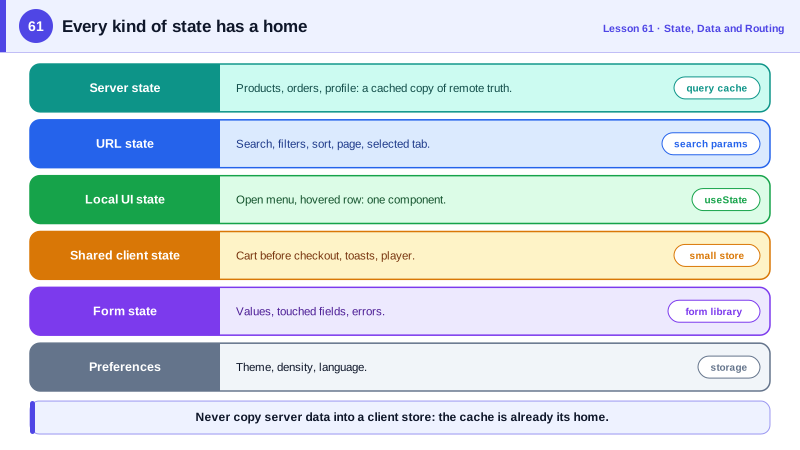
For years, frontend applications put almost everything into one global store: the current user, the list of products fetched from the API, whether a modal was open, the text in a search box. That made the store huge and the code around it repetitive, because every piece of fetched data needed loading flags, error flags, refetch logic and invalidation written by hand. The insight that changed the ecosystem was that these values are not the same kind of thing and should not be managed the same way.
Server state is data whose source of truth lives on a server. The frontend holds only a cached copy, which can become stale at any time because other users, other tabs and background jobs change the original. It is fetched asynchronously, can fail, is often shared by many components and must be kept fresh. The questions server state raises are about caching: when is a copy too old, when should it be refetched, how should components that need the same data share one request, what should happen after a mutation. Libraries such as TanStack Query, SWR, RTK Query and Apollo Client answer exactly those questions, which is why they replaced hand-written fetching in global stores.
Client state is data the frontend owns: whether a dropdown is open, which tab is selected, the contents of an unsaved draft, a multi-step wizard's progress, a theme choice. It is synchronous, always up to date and usually local to a component or a small subtree. Most of it belongs in component state with useState or useReducer, lifted only as far as needed. Truly global client state, such as a shopping cart before checkout or a notification queue, can live in context or a small store.
Three more categories deserve their own homes. URL state, such as the current page, search query, filters and sort order, belongs in the URL, so it survives reloads, can be shared and works with the back button (Day 67). Form state, values, touched fields and validation errors, is transient and best handled by the form itself or a form library (Day 68). Persisted preferences, such as a chosen language or layout, live in localStorage or on the server and are loaded into client state.
Classifying state before writing code prevents a whole family of bugs. Copying server data into a store creates a second source of truth that drifts from the cache. Storing filters only in memory breaks sharing and the back button. Lifting UI state into a global store causes needless re-renders across the app. A simple exercise for any screen is to list its data and label each item with its category and owner.
| Category | Source of truth | Typical tool | Example |
|---|---|---|---|
| Server state | The backend | TanStack Query, SWR, framework loaders | Products, orders, current user profile |
| Local UI state | One component | useState, useReducer | Open menu, hovered row |
| Shared client state | The frontend app | Context or a small store | Cart before checkout, toasts |
| URL state | The address bar | Router search params | Page, filters, sort, selected tab |
| Form state | The form | Native forms, React Hook Form | Field values and errors |
| Preferences | Storage or user settings | localStorage plus state | Theme, density, language |
Worked Example: Untangling an Overloaded Store
The first version keeps server data, UI flags and filters in one store with hand-written loading logic. The refactor moves each piece to its natural home.
// Before: everything in one global store, server data copied and managed by hand
const useStore = create((set) => ({
  products: [], productsLoading: false, productsError: null,
  filters: { q: '', category: 'all', page: 1 },
  isCartOpen: false,
  cart: [],
  async loadProducts() {
    set({ productsLoading: true });
    try { set({ products: await api.products(useStore.getState().filters), productsLoading: false }); }
    catch (e) { set({ productsError: e, productsLoading: false }); }   // no caching, no dedupe, no refetch
  },
}));// After: each category in its own home
// 1. URL state: filters in the address bar
function useProductFilters() {
const [params, setParams] = useSearchParams();
const filters = FiltersSchema.parse(Object.fromEntries(params)); // validated (Day 45)
const setFilters = (next: Partial<Filters>) =>
setParams((p) => ({ ...Object.fromEntries(p), ...next, page: String(next.page ?? 1) }));
return [filters, setFilters] as const;
}
// 2. Server state: cached, deduplicated, refetched by the query library
function useProducts(filters: Filters) {
return useQuery({ queryKey: ['products', filters], queryFn: () => api.products(filters) });
}
// 3. Shared client state: a tiny store for the cart
const useCart = create<CartState>((set) => ({
items: [],
add: (sku) => set((s) => ({ items: [...s.items, { sku, qty: 1 }] })),
}));
// 4. Local UI state: stays in the component
function CatalogPage() {
const [filters, setFilters] = useProductFilters();
const products = useProducts(filters);
const [isCartOpen, setCartOpen] = useState(false);
// render products.data, products.isPending, products.error ...
}The refactored page lost its loading flags, error flags and loader function entirely, gained caching and request deduplication, and its filters now survive reloads and can be shared as links.
Real-World Examples
- TanStack Query's documentation describes server state as remotely persisted data that you do not control or own, that can become out of date and that requires asynchronous APIs, and its creator Tanner Linsley has explained that the library was built after realizing most global state in apps was really a server cache.
- Redux's own documentation now recommends RTK Query or another data fetching library for server data instead of writing thunks and reducers for every request, reflecting how the ecosystem separated server cache from client state.
Review Questions & Answers
Its source of truth is remote, so the frontend only holds a copy that can become stale at any time because others change the original. It is fetched asynchronously, can fail and is shared. These properties make caching, deduplication, refetching and invalidation the central concerns, which client state does not have.
It creates a second source of truth separate from the server and any cache, and every load, refresh, error and invalidation must be written by hand. The copies drift, components show stale data, and the code is repetitive.
State that should survive a reload, be shareable as a link or work with the back button: the current page of results, search queries, filters, sort order, the selected tab or the item being viewed.
Locally in the component that renders the dropdown, with useState. It is client state used by one component, and putting it in a global store would cause needless re-renders and coupling.