React Testing Library Tutorial with Vitest and MSW
On this page
Learning Objective
Write fast, reliable unit and component tests that test behavior the way users experience it, using Vitest and Testing Library queries by role and label, simulate interactions with user-event, mock network requests at the boundary with Mock Service Worker, and decide what belongs in unit, component, integration and end-to-end tests.
Concept Explanation
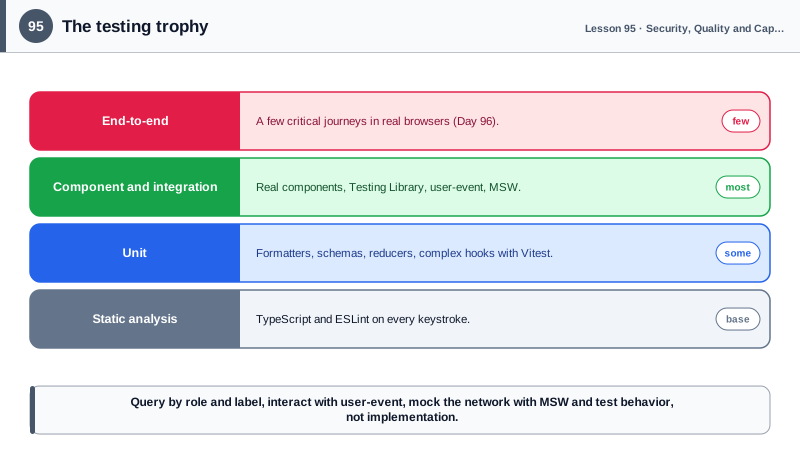
Tests give a team the confidence to change code. The useful question is not how many tests exist but how much confidence they provide per minute of writing and running them. Kent C. Dodds' testing trophy describes a balance that fits most frontends: static analysis with TypeScript and ESLint at the base, a solid layer of unit tests for pure logic, the largest share in integration or component tests that render real components together, and a smaller number of end-to-end tests through the real browser and backend (Day 96).
Unit tests suit pure logic: formatting, validation schemas, reducers, utility functions, hooks with complex state. They are fast and precise. Vitest has become a common choice because it shares Vite's configuration and transforms, runs tests in parallel and offers a Jest-compatible API. Component tests render components into a simulated DOM, such as jsdom or happy-dom, or into a real browser with Vitest's browser mode, and interact with them. They catch the bugs users actually notice: a button that does not submit, an error message that never appears, a list that does not update.
Testing Library's guiding principle is that the more your tests resemble the way your software is used, the more confidence they give you. Tests should find elements the way users and assistive technologies do: getByRole with an accessible name first, such as the button named Save, then getByLabelText for form fields, then getByText, with test ids only as a last resort. Querying by role has a useful side effect: if a test cannot find the button by its role and name, a screen reader user probably cannot either, so component tests double as accessibility checks. Tests should avoid implementation details such as component state, internal method calls or CSS class names, so refactoring does not break them.
Interactions should go through user-event, which simulates real browser sequences: a click includes pointer events and focus, typing fires keydown, input and keyup for each character, and tabbing moves focus. findBy queries and waitFor handle asynchronous updates, so tests wait for the UI rather than for arbitrary timeouts. Network calls should be mocked at the network boundary rather than by mocking your own modules: Mock Service Worker intercepts fetch requests and returns defined responses, so the component's real data fetching code, including error handling, runs in the test, and the same handlers can power local development and Storybook.
Good tests are deterministic and independent. Control time with fake timers when testing debounce and timeouts, reset handlers and state between tests, avoid testing third-party libraries themselves and keep each test focused on one behavior with a descriptive name. Coverage numbers are a weak goal on their own; covering the critical paths, edge cases, error states and accessibility of important components matters more than a percentage.
| Test type | Scope | Tools | Strength |
|---|---|---|---|
| Static analysis | Types and lint rules | TypeScript, ESLint | Catches whole classes of errors instantly |
| Unit | Pure functions, hooks, reducers | Vitest | Fast and precise |
| Component or integration | Components with children and data | Testing Library, user-event, MSW | Highest confidence per cost |
| End-to-end | Whole app in a real browser | Playwright | Real user journeys |
| Query priority | How tests find elements | getByRole, getByLabelText | Mirrors users and assistive tech |
| Network mocking | API responses | Mock Service Worker | Real fetch code runs |
Worked Example: Testing a Search Component Like a User
The test renders the real component, mocks the API at the network level with MSW, types like a user and asserts on what is visible and announced, including the error path.
// ProductSearch.test.tsx
import { render, screen } from '@testing-library/react';
import userEvent from '@testing-library/user-event';
import { http, HttpResponse } from 'msw';
import { setupServer } from 'msw/node';
import { QueryClient, QueryClientProvider } from '@tanstack/react-query';
import { ProductSearch } from './ProductSearch';

const server = setupServer(
  http.get('/api/products', ({ request }) => {
    const q = new URL(request.url).searchParams.get('q');
    return HttpResponse.json({ items: q === 'boots' ? [{ id: '1', name: 'Trail Boots', priceCents: 12900 }] : [] });
  }),
);
beforeAll(() => server.listen({ onUnhandledRequest: 'error' }));
afterEach(() => server.resetHandlers());
afterAll(() => server.close());

function renderWithClient(ui: React.ReactElement) {
  const client = new QueryClient({ defaultOptions: { queries: { retry: false } } });
  return render(<QueryClientProvider client={client}>{ui}</QueryClientProvider>);
}

test('shows matching products as the user types', async () => {
  const user = userEvent.setup();
  renderWithClient(<ProductSearch />);

  await user.type(screen.getByRole('searchbox', { name: /search products/i }), 'boots');

  expect(await screen.findByRole('link', { name: /trail boots/i })).toBeInTheDocument();
  expect(screen.getByRole('status')).toHaveTextContent('1 result');        // live region announcement
});

test('shows an empty state when nothing matches', async () => {
  const user = userEvent.setup();
  renderWithClient(<ProductSearch />);
  await user.type(screen.getByRole('searchbox', { name: /search products/i }), 'zzz');
  expect(await screen.findByText(/no products match "zzz"/i)).toBeInTheDocument();
});

test('shows a retry button when the API fails', async () => {
  server.use(http.get('/api/products', () => HttpResponse.json({ title: 'Down' }, { status: 503 })));
  const user = userEvent.setup();
  renderWithClient(<ProductSearch />);
  await user.type(screen.getByRole('searchbox', { name: /search products/i }), 'boots');

  expect(await screen.findByRole('alert')).toHaveTextContent(/could not load results/i);
  expect(screen.getByRole('button', { name: /try again/i })).toBeEnabled();
});
None of the tests mention component state, hooks or CSS classes. The component could be rewritten from scratch with a different state library and, as long as users see the same behavior, every test would still pass.
Real-World Examples
- Testing Library, created by Kent C. Dodds, is used by React, Vue, Angular, Svelte and other ecosystems, and Create React App, Next.js examples and many design systems adopted it because its role-based queries encourage accessible markup.
- Mock Service Worker intercepts requests at the network level in both browsers and Node, and its documentation highlights reusing the same request handlers across unit tests, integration tests, Storybook and local development so mocks stay consistent.
Review Questions & Answers
That is how users and assistive technologies find elements, so the tests reflect real usage, survive refactoring of markup and styles, and fail if the element is not accessible, for example if a button has no accessible name.
The component's real data fetching code runs in the test, including request building, response parsing and error handling, so bugs there are caught. The mocks describe the API contract instead of internal function calls, so refactoring internals does not break tests.
Internal aspects users cannot observe, such as component state, private functions, hook calls or CSS class names. Tests coupled to them break when the code is refactored even though behavior is unchanged, and they can pass while user-visible behavior is broken.
user-event simulates the full sequence of events a real interaction produces, such as pointer, focus, keyboard and input events for typing, so components are exercised as they are in a browser. Firing a single change event can skip behavior that depends on the other events.