How Vite Works: Bundlers and the Module Graph
On this page
Learning Objective
Explain what a bundler does with a module graph, why development and production builds are handled differently, how Vite serves native modules with on-demand transforms and pre-bundled dependencies in development, how hot module replacement works, and what a production build outputs.
Concept Explanation
Browsers can load ES modules natively, so why bundle at all? Because a real application's module graph can contain thousands of files. Loading each one as a separate request, discovering imports only after each file arrives, creates long waterfalls. Source code also needs transforming: TypeScript and JSX must be compiled, CSS modules and assets must be processed, and bare specifiers such as react must be resolved to files in node_modules. A bundler starts from entry points, follows every import to build the module graph, transforms each module with loaders or plugins, and writes a small number of optimized output files.
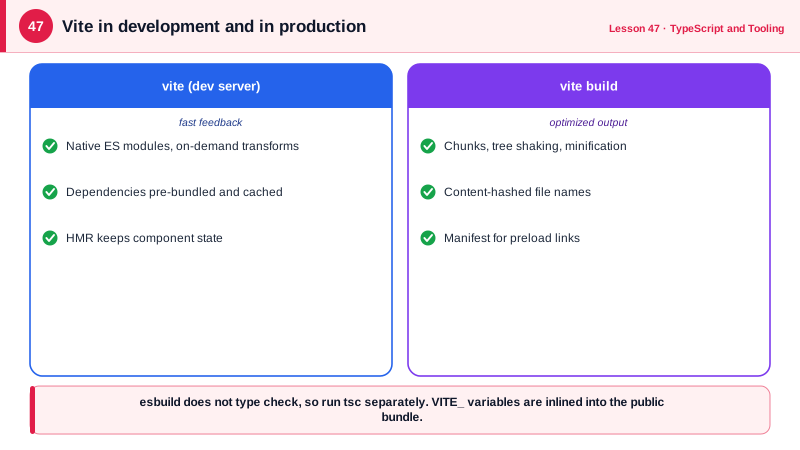
Older bundlers such as webpack bundled the whole application before the development server could serve anything, and rebundled on every change. As projects grew, startup took minutes and updates took seconds. Vite took a different approach in development. It serves your source files to the browser as native ES modules and transforms each file on request, so startup cost no longer grows with the size of the app; only the modules the current page imports are processed. Dependencies in node_modules are different: they change rarely and are often published as many small CommonJS files, so Vite pre-bundles them once with esbuild into a few ES module files and caches them.
Hot module replacement, HMR, is what makes editing feel instant. When you save a file, the dev server sends a message over a WebSocket, the browser fetches only the changed module and its HMR boundary, the nearest module that knows how to accept updates, and swaps it in without a full reload. Framework plugins such as the React plugin define those boundaries at the component level, so component state is preserved while you change markup or styles. When a change cannot be applied, for example in a module with side effects that is not accepted anywhere, Vite falls back to a full reload.
Production is a different problem: there you want the fewest, smallest requests and long-term caching. Vite's production build has used Rollup, with the newer Rust-based Rolldown designed to replace it, to bundle the graph into optimized chunks, minify code, split shared dependencies, inline small assets, and give every file a content hash in its name, such as index-4f9a2c.js, so it can be cached forever (Day 88). The build also writes a manifest describing which chunks each entry needs, which server frameworks use to emit preload links.
Configuration in Vite is mostly plugins and conventions. index.html is the entry, environment variables prefixed with VITE_ are exposed to client code and inlined at build time, so they must never contain secrets, and the dev server can proxy API requests to your backend to keep everything same-origin, as Day 10 recommended. Other modern tools, such as Rspack, Turbopack and esbuild directly, apply similar ideas, so understanding the module graph transfers between them.
| Stage | Development (Vite) | Production build |
|---|---|---|
| Your source files | Served as native ES modules, transformed on request | Bundled into chunks |
| Dependencies | Pre-bundled once with esbuild, cached | Bundled and split into vendor chunks |
| TypeScript and JSX | Transpiled per file, no type checking | Transpiled; type check separately |
| Updates | HMR over a WebSocket | Not applicable |
| File names | Original paths | Content-hashed for long caching |
| Optimizations | Minimal, for speed | Minify, tree shake, split, compress |
| Environment variables | VITE_ prefix exposed | Inlined into the bundle, public |
Worked Example: A Vite Configuration for a React App with an API Proxy
The configuration adds the React plugin, proxies API calls to the backend during development, splits a large vendor library into its own chunk and produces a manifest and hashed assets for production.
// vite.config.ts
import { defineConfig } from 'vite';
import react from '@vitejs/plugin-react';

export default defineConfig(({ mode }) => ({
  plugins: [react()],                               // JSX transform and component-level HMR
  server: {
    port: 5173,
    proxy: {
      '/api': { target: 'http://localhost:8080', changeOrigin: true },   // same-origin in dev
    },
  },
  build: {
    target: 'es2022',
    sourcemap: mode === 'production' ? 'hidden' : true,   // upload privately, do not publish
    manifest: true,
    rollupOptions: {
      output: {
        manualChunks: { charts: ['chart.js'] },     // a heavy library gets its own cacheable chunk
      },
    },
  },
}));// src/env.ts: only VITE_ variables reach the client, and they are public
const apiBase = import.meta.env.VITE_API_BASE ?? '/api';
export const config = { apiBase, isDev: import.meta.env.DEV };
// HMR: a plain module can accept its own updates
if (import.meta.hot) {
import.meta.hot.accept((mod) => console.log('format.ts updated', mod));
}Run vite and open the Network panel: you see your source files requested individually as modules and dependencies served from a pre-bundled cache directory. Run vite build and the dist folder contains a few hashed JavaScript and CSS files, the assets and a manifest.
Real-World Examples
- Vite was created by Evan You, the author of Vue, and released in 2020; within a few years it became the default build tool for Vue, SvelteKit, Astro, Remix and the React Router framework, and the React team recommended it as an option after deprecating Create React App in 2025.
- The State of JavaScript survey has shown Vite with the highest satisfaction ratings among build tools for several consecutive years, and its native module development server is the main reason cited for fast startup on large projects.
Review Questions & Answers
It does not bundle the application before serving it. It serves source files as native ES modules and transforms each only when the browser requests it, so startup work does not grow with the number of files, and dependencies are pre-bundled once and cached.
Packages in node_modules change rarely and are often made of many small files or CommonJS modules. Pre-bundling them with esbuild into a few ES modules reduces the number of browser requests and converts CommonJS into a format the browser can import.
The nearest module, walking up the importers of a changed file, that has declared it can accept updates. The changed code is swapped in at that boundary without a full page reload. Framework plugins make components boundaries so their state is preserved.
Its value is inlined into the JavaScript bundle at build time and shipped to every user, who can read it in the downloaded files. Secrets must stay on the server.