React Hook Form and Zod: Forms at Scale
On this page
Learning Objective
Build complex forms that stay fast and accessible: choose between native forms, form actions and a form library, share one validation schema between client and server, show field and summary errors accessibly, handle submission states and server errors, and manage dynamic fields, dependent fields and unsaved changes.
Concept Explanation
Day 12 covered the native building blocks of a form. Real applications push further: checkout flows with addresses and payment, settings pages with dozens of fields, multi-step onboarding, rows of line items that users add and remove, fields that appear depending on other answers. At this scale the questions are about architecture: where form state lives, how validation rules are defined once, how server errors return to the right fields and how the form stays responsive while typing.
There are three main approaches in React. The simplest is the native form with uncontrolled inputs read through FormData on submit, which needs almost no state. React 19 adds form actions: a form's action prop can be an async function that receives FormData, with useActionState holding the result such as errors and useFormStatus exposing pending state to buttons; in frameworks with server functions, the action can run on the server and the form works before JavaScript loads. The third is a form library such as React Hook Form or TanStack Form, which manages values, dirty and touched tracking, validation, field arrays and focus, while keeping re-renders low by subscribing each field separately.
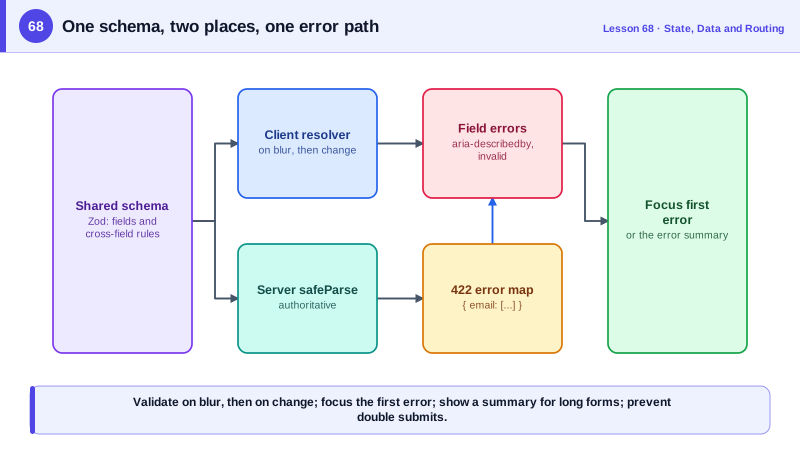
Validation should be defined once. A schema, for example with Zod, describes the rules, including cross-field rules such as password confirmation or an end date after the start date. The client uses it for instant feedback through a resolver, and the server uses the same schema to validate the submitted data authoritatively. If the backend is not JavaScript, a shared OpenAPI or JSON Schema contract can serve the same purpose. Timing matters for usability: validate a field when the user leaves it, not on every keystroke while they are still typing, then revalidate on change once it has shown an error, so messages disappear as soon as the problem is fixed.
Errors must be accessible and actionable. Each message appears next to its field, is associated through aria-describedby, and the field gets aria-invalid. On a failed submit, focus moves to the first invalid field, or, for long forms, to an error summary at the top listing every problem as a link to its field, a pattern from the UK Government Design System. Server errors, such as an email already in use, come back in a structured format, for example Problem Details with a field error map, and are set on the matching fields so they look identical to client errors. Errors that belong to no field appear in the summary.
Submission needs its own care. Show pending state and prevent double submission (Day 64), keep entered values when the request fails, and give clear confirmation on success. Dynamic field arrays need stable keys for each row (Day 55). Dependent fields should be unregistered or ignored when hidden so they do not block submission. Warn about unsaved changes before navigating away, through the router's blocking API and the beforeunload event, but only when the form is actually dirty.
| Concern | Approach | Tool |
|---|---|---|
| Simple forms | Uncontrolled inputs and FormData | Native form, form actions |
| Complex client forms | Field-level subscriptions | React Hook Form, TanStack Form |
| One set of rules | Shared schema on client and server | Zod with a resolver |
| Validation timing | On blur first, then on change | mode onTouched |
| Field errors | Message, aria-describedby, aria-invalid | Focus first invalid field |
| Long forms | Error summary with links | Focus the summary on submit |
| Server errors | Structured map back to fields | setError per field |
| Unsaved changes | Warn only when dirty | Router blocker, beforeunload |
Worked Example: A Shared Schema, React Hook Form and Server Errors
The schema is used on both sides. The form validates on blur, focuses the first error, maps server field errors back and handles a dynamic list of guests.
// shared/booking-schema.ts: imported by the client and the Node server
export const BookingSchema = z.object({
  email: z.string().email('Enter an email address like name@example.com'),
  checkIn: z.coerce.date(),
  checkOut: z.coerce.date(),
  guests: z.array(z.object({ name: z.string().min(1, 'Enter the guest name') })).min(1).max(6),
}).refine((b) => b.checkOut > b.checkIn, { path: ['checkOut'], message: 'Check-out must be after check-in' });
export type Booking = z.infer<typeof BookingSchema>;function BookingForm() {
const { register, control, handleSubmit, setError, formState: { errors, isSubmitting, isDirty } } =
useForm<Booking>({ resolver: zodResolver(BookingSchema), mode: 'onTouched', shouldFocusError: true,
defaultValues: { guests: [{ name: '' }] } });
const { fields, append, remove } = useFieldArray({ control, name: 'guests' });
useBlocker(isDirty && !isSubmitting); // warn before leaving a dirty form
const onSubmit = async (data: Booking) => {
const res = await fetch('/api/bookings', { method: 'POST', headers: { 'Content-Type': 'application/json' }, body: JSON.stringify(data) });
if (res.status === 422) {
const problem = await res.json(); // { errors: { email: ['Already booked'] } }
for (const [field, messages] of Object.entries(problem.errors ?? {}))
setError(field as keyof Booking, { message: (messages as string[])[0] }, { shouldFocus: true });
return;
}
if (!res.ok) { setError('root', { message: 'We could not save your booking. Please try again.' }); return; }
navigate('/bookings/confirmed');
};
return (
<form onSubmit={handleSubmit(onSubmit)} noValidate>
{errors.root && <p role="alert">{errors.root.message}</p>}
<Field label="Email" error={errors.email?.message}><input type="email" autoComplete="email" {...register('email')} /></Field>
<Field label="Check-in" error={errors.checkIn?.message}><input type="date" {...register('checkIn')} /></Field>
<Field label="Check-out" error={errors.checkOut?.message}><input type="date" {...register('checkOut')} /></Field>
<fieldset>
<legend>Guests</legend>
{fields.map((f, i) => (
<div key={f.id}> {/* stable id from the field array */}
<Field label={`Guest ${i + 1} name`} error={errors.guests?.[i]?.name?.message}><input {...register(`guests.${i}.name`)} /></Field>
{fields.length > 1 && <button type="button" onClick={() => remove(i)}>Remove guest {i + 1}</button>}
</div>
))}
{fields.length < 6 && <button type="button" onClick={() => append({ name: '' })}>Add guest</button>}
</fieldset>
<button type="submit" disabled={isSubmitting}>{isSubmitting ? 'Booking...' : 'Book'}</button>
</form>
);
}The Field component, not shown, renders the label, links the error with aria-describedby and sets aria-invalid, so every field gets accessible errors from one place. The server runs BookingSchema.safeParse on the same payload before doing anything else.
Real-World Examples
- The GOV.UK Design System's error summary and error message components, based on extensive research with users of government services, recommend listing all errors at the top of the page as links to the fields and moving focus to the summary when a form is submitted with errors.
- React Hook Form reports that its uncontrolled, subscription-based approach isolates re-renders to the fields that change, and its zodResolver integration made the shared schema pattern common in TypeScript projects that use Zod on both client and server.
Review Questions & Answers
The same rules then run on the client for fast feedback and on the server for enforcement, so they cannot drift apart, and types can be inferred from the schema for both sides. Changing a rule in one place updates validation everywhere.
Validating while the user is still typing shows errors for input that is simply incomplete, such as a half-typed email, which is distracting and discouraging. Validating when the field is left, then revalidating on change once an error is shown, gives timely feedback without nagging.
The server returns a structured response mapping field names to messages. The client sets each message on the matching field, so it appears in the same place and with the same accessibility as client-side errors, and moves focus to the first one. Errors without a field go into a summary at the top.
A box at the top of the form, shown after a failed submission, that lists every error as a link to its field and receives focus. It is especially useful for long forms, where the first invalid field might be far away and users need an overview of everything to fix.