Data Fetching in React: Race Conditions and Waterfalls
On this page
Learning Objective
Handle every state of a remote request, idle, loading, success, empty and error, with appropriate UI, avoid request waterfalls by fetching in parallel and as early as possible, prevent race conditions and stale responses, and choose between fetching in components, in route loaders and on the server.
Concept Explanation
A request is not a single value; it is a small state machine. Before it starts it may be idle, while in flight it is loading, and it ends in success or error. Success itself has an important sub-case: empty. Each state needs deliberate UI. Loading should usually show a skeleton that matches the final layout rather than a spinner that causes layout shift. Errors should say what happened in plain language, offer a retry and preserve whatever the user had already entered. Empty states should explain why there is nothing and what to do next. Skipping any of these leads to blank screens and stuck spinners.
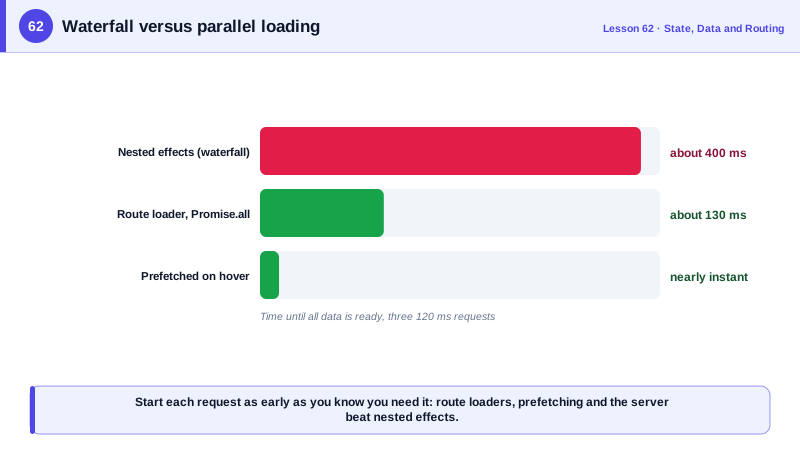
Waterfalls are the most common performance problem in data fetching. A waterfall happens when one request cannot start until another finishes: a component fetches the user, renders a child that fetches the user's team, which renders another child that fetches the team's projects. Three sequential round trips turn 100 milliseconds of latency into 300 or more. Causes include fetching in effects inside nested components, code splitting where the code that fetches only arrives after another chunk loads, and APIs that require an id returned by a previous call. Fixes include starting independent requests together, hoisting data needs up to the route so they start before components render, prefetching on hover and designing APIs that return what a screen needs in one response.
Race conditions happen when responses arrive in a different order from the requests. Day 37 showed the search box case; the same bug appears whenever an input changes faster than responses arrive: switching between product tabs, paging quickly, changing filters. The fix is to cancel or ignore every response that is not for the latest input, with AbortController or an ignore flag in an effect's cleanup. Query libraries key requests by their inputs and only show the data for the current key, so they avoid this by design.
Where to fetch matters as much as how. Fetching in a component's effect is the simplest but starts latest: after the JavaScript loads, after the component renders, after the effect runs. Route loaders, offered by React Router, TanStack Router, Remix and SvelteKit, start fetching as soon as navigation begins, in parallel with loading the route's code. Server rendering and server components fetch on the server, close to the data, and send HTML or serialized results, removing a client round trip entirely (Days 71 and 74). The rule of thumb is to start each request as early as you know you will need it.
Error handling has layers. Distinguish network failures, which are often transient and worth retrying with backoff, from client errors such as 404 or 403, which will not fix themselves, and from server errors. Show errors near the content that failed rather than replacing the whole page, use error boundaries to contain rendering failures (Day 98) and report unexpected errors to monitoring.
| Concern | Problem | Remedy |
|---|---|---|
| Loading | Layout jumps, blank screen | Skeletons that match the final layout |
| Empty | Confusing blank area | Explain why and offer a next step |
| Error | Lost input, dead end | Plain message, retry, keep user data |
| Waterfall | Sequential round trips | Parallel requests, route loaders, prefetch |
| Race condition | Older response overwrites newer | Abort or ignore stale responses |
| Retries | Transient failures | Backoff for network and 5xx, not for 4xx |
| Where to fetch | Late start in effects | Loaders or the server start earlier |
Worked Example: From a Waterfall to a Route Loader
The nested components fetch in sequence. The route loader starts all requests in parallel as navigation begins, and the component renders every state explicitly.
// Before: three effects in three nested components, each waiting for the previous render
function TeamPage({ teamId }) {
  const [team, setTeam] = useState(null);
  useEffect(() => { fetchTeam(teamId).then(setTeam); }, [teamId]);        // request 1
  return team ? <Members team={team} /> : <Spinner />;                      // Members fetches request 2
}

// After: a route loader starts everything at once, before the components render
export const teamRoute = {
  path: '/teams/:teamId',
  loader: async ({ params, request }) => {
    const signal = request.signal;                                          // aborted if the user navigates away
    const [team, members, projects] = await Promise.all([
      api.team(params.teamId, { signal }),
      api.members(params.teamId, { signal }),
      api.projects(params.teamId, { signal }),
    ]);
    return { team, members, projects };
  },
  errorElement: <TeamError />,
  Component: TeamPage,
};

function TeamPage() {
  const { team, members, projects } = useLoaderData();
  return (
    <>
      <h1>{team.name}</h1>
      {members.length === 0
        ? <EmptyState title="No members yet" action={<InviteButton teamId={team.id} />} />
        : <MemberList members={members} />}
      <ProjectGrid projects={projects} />
    </>
  );
}

function TeamError() {
  const error = useRouteError();
  if (isRouteErrorResponse(error) && error.status === 404) return <p>This team does not exist.</p>;
  return (<div role="alert"><p>We could not load this team.</p><button onClick={() => location.reload()}>Try again</button></div>);
}
The request signal from the router aborts all three requests if the user navigates elsewhere before they finish, which prevents a slow, abandoned page from updating anything.
Real-World Examples
- Remix popularized route loaders that fetch data in parallel for all nested routes when navigation begins, and those APIs were merged into React Router version 7, making the loader pattern available to a very large share of React applications.
- The React documentation's guide to fetching data in effects lists the downsides of that approach, including network waterfalls, no caching and race conditions, and recommends frameworks with built-in data fetching or client-side caching libraries instead.
Review Questions & Answers
A chain of requests where each one starts only after a previous one finishes, often because nested components fetch in their own effects. Total time becomes the sum of the round trips instead of the longest one, which multiplies the impact of network latency.
A loader runs as soon as navigation begins, in parallel with downloading the route's code. An effect runs only after the code has loaded, the component has rendered and the commit has happened, so the request starts much later.
Cancel the previous request with AbortController when inputs change, or mark it as ignored in the effect cleanup, so only the response for the latest input updates the UI. Query libraries do this by keying data by its inputs.
Network failures and server errors such as 503 that may succeed later, with exponential backoff and a limit. Client errors such as 400, 401, 403 and 404 will not succeed on retry and should be shown or handled immediately.