Cache-Control and CDN Caching for HTML
On this page
Learning Objective
Understand how CDNs and edge runtimes reduce latency, configure Cache-Control for HTML and data with max-age, s-maxage, stale-while-revalidate and no-store, use Vary and cache keys correctly, decide what can run at the edge, and avoid caching personalized responses in shared caches.
Concept Explanation
Physics sets a floor on web performance: light in fiber takes roughly 70 milliseconds for a round trip between Europe and the United States, and a page load needs several round trips. Content delivery networks put servers, called points of presence or edges, in hundreds of cities, so most users are only a few milliseconds from one. Static assets have long been served from CDNs. The more interesting question for frontend architecture is how much of the HTML and data can also be served or generated close to users.
The first tool is HTTP caching. The Cache-Control header tells browsers and shared caches what they may store. max-age sets how long any cache may reuse a response. s-maxage overrides it for shared caches such as CDNs, so a page can be cached at the edge for minutes while browsers revalidate every time. stale-while-revalidate allows a cache to serve a stale copy while it fetches a fresh one in the background, the same idea as Day 63 at the HTTP level. private restricts storage to the browser, and no-store forbids storage anywhere. ETag and Last-Modified enable conditional requests, where the server answers 304 Not Modified instead of resending an unchanged body.
Caches key responses by URL, and that is where most caching bugs come from. If the response varies by something other than the URL, such as a cookie, the Accept-Language header or a device type, the cache must be told, or every user receives whatever was cached first. The Vary header lists request headers that change the response, and CDNs let you configure custom cache keys. The safest rule is that personalized responses, anything containing user-specific data, must be marked private or no-store and never cached in shared layers. Web cache deception attacks trick caches into storing a user's private page under a URL that looks static, such as /account/profile.css, so private responses should send explicit no-store headers whatever the path.
Edge runtimes go further by running code at the CDN. Cloudflare Workers, Vercel and Netlify Edge Functions, Fastly Compute and Deno Deploy run JavaScript or WebAssembly in lightweight isolates that start in milliseconds near the user. They suit work that needs low latency and little data access: redirects and rewrites, A/B test assignment, geolocation-based routing, authentication checks on a session cookie, header manipulation, personalization of a cached shell and rendering pages whose data is itself available at the edge. They provide web-standard APIs such as fetch, Request and Response, but not the full Node.js API, and they have limits on execution time and memory.
The trap is data distance. Rendering at the edge in Sydney does not help if every render makes three sequential queries to a database in Virginia; that is often slower than rendering next to the database. Edge rendering pays off when the data is cached, replicated or itself distributed, or when the work needs no data. A common, effective architecture is a cached static or ISR shell served from the edge, edge middleware for redirects and auth checks, and server rendering or API calls near the database for personalized parts, streamed into the shell.
| Directive or tool | Effect | Typical use |
|---|---|---|
| max-age=31536000, immutable | Cache for a year, never revalidate | Hashed static assets |
| s-maxage=300 | Shared caches keep 5 minutes | Public HTML at the CDN |
| stale-while-revalidate=60 | Serve stale while refreshing | Smooth updates of public pages |
| private, no-cache | Browser only, revalidate each time | Logged-in HTML |
| no-store | Never store anywhere | Account, payment, tokens |
| ETag and 304 | Skip resending unchanged bodies | APIs and HTML |
| Vary | Response depends on these headers | Accept-Language, Accept-Encoding |
| Edge function | Code near the user | Redirects, auth checks, A/B tests |
Worked Example: Headers per Response Type and Edge Middleware
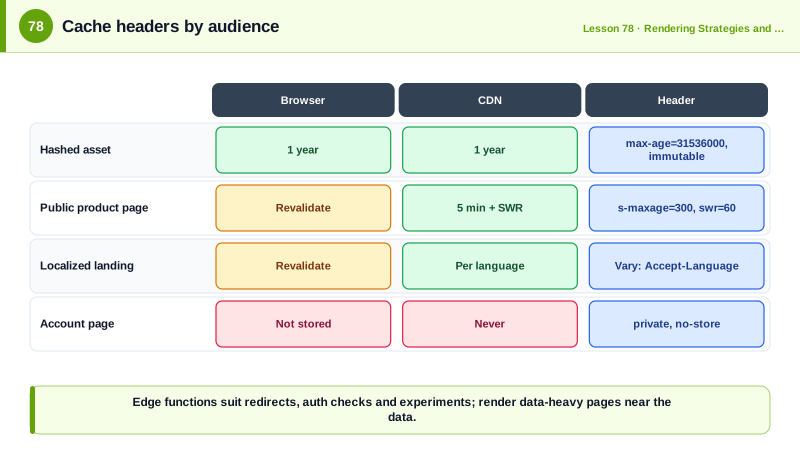
The middleware assigns an A/B bucket and protects account pages at the edge. Each response type gets caching headers that match its audience.
// middleware.ts (runs at the edge before routing)
import { NextResponse, type NextRequest } from 'next/server';

export function middleware(req: NextRequest) {
  const res = NextResponse.next();

  // A/B assignment at the edge: sticky cookie, no origin round trip
  if (!req.cookies.get('ab-hero')) res.cookies.set('ab-hero', Math.random() < 0.5 ? 'a' : 'b', { maxAge: 60 * 60 * 24 * 30, sameSite: 'lax', secure: true });

  // Cheap auth gate: redirect anonymous users before rendering account pages
  if (req.nextUrl.pathname.startsWith('/account') && !req.cookies.get('session')) {
    return NextResponse.redirect(new URL(`/login?next=${encodeURIComponent(req.nextUrl.pathname)}`, req.url));
  }
  return res;
}
export const config = { matcher: ['/', '/account/:path*'] };# Hashed asset: cache forever, the file name changes when content changes
GET /assets/app-4f9a2c.js
Cache-Control: public, max-age=31536000, immutable
# Public product page: CDN keeps 5 minutes, serves stale for 1 more minute while refreshing
GET /products/trail-runner-2
Cache-Control: public, max-age=0, s-maxage=300, stale-while-revalidate=60
Vary: Accept-Encoding
# Localized landing page: the cache must key on language too
GET /
Cache-Control: public, s-maxage=600
Vary: Accept-Encoding, Accept-Language
# Personalized account page: never in a shared cache, whatever the URL looks like
GET /account/orders
Cache-Control: private, no-storeCheck the CDN's response headers, such as Age and cache status headers like cf-cache-status or x-vercel-cache: a public page should show HIT after the first request, while the account page should always show a bypass or MISS and never be served to another user.
Real-World Examples
- Omer Gil's 2017 research on web cache deception, presented at Black Hat USA, demonstrated against PayPal how an attacker could make a caching layer store a victim's private account page under a static-looking URL and then read it, and PortSwigger's later research showed the problem remained widespread across CDNs and frameworks.
- Cloudflare Workers, launched in 2017, popularized running JavaScript in V8 isolates at hundreds of edge locations with cold starts measured in milliseconds, and its documentation recommends placing compute close to data or using Smart Placement when an application makes many requests to a single backend region.
Review Questions & Answers
max-age applies to all caches, including the browser. s-maxage applies only to shared caches such as CDNs and overrides max-age there, so a response can be cached at the edge for a while but revalidated by browsers on every use.
A shared cache keys responses mainly by URL. If a personalized response is cacheable, the next user requesting the same URL can receive the first user's page, exposing private data. private limits storage to the user's browser, and no-store prevents storage entirely.
It tells caches that the response depends on the listed request headers, such as Accept-Language, so the cache stores and serves separate versions for different values instead of returning one version to everyone.
When rendering requires several round trips to a database or API far away from the edge location. The edge saves latency between the user and the server, but each data request then crosses the long distance, which can make the page slower than rendering next to the data.