Stale-While-Revalidate Caching with TanStack Query
On this page
Learning Objective
Explain the stale-while-revalidate model behind TanStack Query and SWR, configure query keys, stale time and garbage collection time, understand automatic refetching triggers, request deduplication and prefetching, and invalidate cached data correctly after changes.
Concept Explanation
A query library is a client-side cache for server state. Each piece of data is stored under a query key, an array such as ['product', id] or ['products', filters] that uniquely describes the request. Any component that asks for the same key shares the same cache entry and the same in-flight request, so ten components needing the current user trigger one request, not ten. Because the key includes every input, changing filters automatically switches to a different cache entry, and going back to earlier filters shows their cached data instantly.
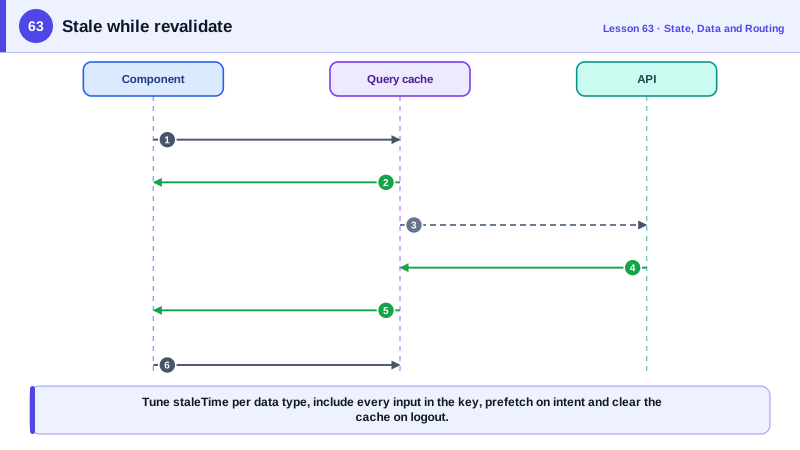
The caching strategy is stale-while-revalidate, a term borrowed from the HTTP Cache-Control extension. When a component asks for data that is in the cache, the library returns the cached copy immediately, even if it is stale, and if it is stale it refetches in the background, updating the screen when fresh data arrives. Users see something instantly and see current data shortly after, instead of a spinner on every visit. Only the very first load of a key shows a loading state.
Two timers control the behavior. staleTime is how long data is considered fresh; during that time it is served without refetching. TanStack Query defaults it to zero, treating everything as immediately stale, which is safe but chatty; most apps raise it to tens of seconds or minutes for data that changes slowly. gcTime, formerly cacheTime, is how long unused data stays in memory after the last component using it unmounts, five minutes by default, so navigating back is instant. Data that never changes during a session, such as a list of countries, can use an infinite stale time.
Stale queries refetch automatically on several triggers: when a component using them mounts, when the browser window regains focus and when the network reconnects. Window focus refetching surprises developers in development but is valuable for users who return to a tab after an hour. Polling with refetchInterval keeps dashboards current. Prefetching fills the cache before data is needed, for example on hovering a link or in a route loader, and placeholder data can show list information on a detail page while full details load.
After a mutation, the cache must learn that data changed. Invalidation marks matching queries as stale and refetches the active ones. Keys are hierarchical, so invalidating ['products'] marks every products list and every product detail whose key starts with that prefix. Designing keys in a consistent hierarchy, often through a key factory object, makes precise invalidation easy. Alternatively, when the server response contains the updated entity, you can write it directly into the cache with setQueryData and skip a refetch. One more rule: keys must include everything the query depends on, including the user id for user-specific data, and the cache must be cleared on logout so one user never sees another's cached data on a shared device.
| Concept | Meaning | Typical setting |
|---|---|---|
| Query key | Unique description of the request | ['products', filters] |
| Deduplication | Same key shares one request | Automatic |
| staleTime | How long data counts as fresh | 0 by default, raise for slow data |
| gcTime | How long unused data stays in memory | 5 minutes by default |
| Background refetch | Mount, window focus, reconnect | On for stale queries |
| Prefetch | Fill the cache before it is needed | On hover, in loaders |
| Invalidation | Mark stale and refetch matches | invalidateQueries({ queryKey: ['products'] }) |
| Logout | Remove all cached user data | queryClient.clear() |
Worked Example: Query Keys, Freshness and Prefetching
A key factory keeps keys consistent, queries set freshness by how often data changes, links prefetch on hover and logout clears the cache.
import { QueryClient, QueryClientProvider, useQuery, useQueryClient, keepPreviousData } from '@tanstack/react-query';

const queryClient = new QueryClient({
  defaultOptions: { queries: { staleTime: 30_000, retry: 2 } },   // 30 s fresh by default
});

// One place that defines the key hierarchy
export const productKeys = {
  all: ['products'] as const,
  lists: () => [...productKeys.all, 'list'] as const,
  list: (filters: Filters) => [...productKeys.lists(), filters] as const,
  detail: (id: string) => [...productKeys.all, 'detail', id] as const,
};

export function useProductList(filters: Filters) {
  return useQuery({
    queryKey: productKeys.list(filters),
    queryFn: ({ signal }) => api.products(filters, { signal }),   // aborted when the key changes
    placeholderData: keepPreviousData,                              // keep page 1 visible while page 2 loads
  });
}

export function useProduct(id: string) {
  return useQuery({ queryKey: productKeys.detail(id), queryFn: ({ signal }) => api.product(id, { signal }) });
}

export function useCountries() {
  return useQuery({ queryKey: ['countries'], queryFn: api.countries, staleTime: Infinity });   // never changes
}

// Prefetch on intent so the detail page opens instantly
function ProductLink({ id, children }: { id: string; children: React.ReactNode }) {
  const qc = useQueryClient();
  const prefetch = () => qc.prefetchQuery({ queryKey: productKeys.detail(id), queryFn: () => api.product(id) });
  return <Link to={`/p/${id}`} onMouseEnter={prefetch} onFocus={prefetch}>{children}</Link>;
}

// Never leak one user's cache to the next person on this device
export async function logout() {
  await api.logout();
  queryClient.clear();
}
Open the TanStack Query Devtools while using the page: hovering a product creates its detail entry, opening it shows data instantly, and returning to the tab after the stale time triggers a background refetch while the cached list stays on screen.
Real-World Examples
- The stale-while-revalidate directive was defined for HTTP in RFC 5861 in 2010, and Vercel named its SWR data fetching library after it, applying the same serve-stale-then-refresh idea to client-side data in React.
- TanStack Query version 5, released in 2023, renamed cacheTime to gcTime to clarify that it controls garbage collection of unused data rather than freshness, a common source of confusion that its documentation had previously addressed in a dedicated guide.
Review Questions & Answers
Cached data is shown immediately, even if it may be outdated, while a background request fetches fresh data and updates the screen when it arrives. Users rarely see loading states after the first visit, yet still end up seeing current data.
staleTime is how long data is considered fresh and is served without refetching. gcTime is how long data that no component is using stays in memory before it is removed. Data can be stale but still cached, which is exactly when stale-while-revalidate applies.
The key identifies the cache entry. If an input such as a filter or the user id is missing, different requests share one entry, so components show data for the wrong filters or, worse, another user's data.
Invalidation matches keys by prefix. With a hierarchy where list keys and detail keys both start with 'products', invalidating that prefix marks all of them stale and refetches those currently in use.