Playwright Tutorial: E2E and Visual Regression Tests
On this page
Learning Objective
Write reliable end-to-end tests with Playwright that exercise critical user journeys in real browsers, use resilient locators and web-first assertions, control test data and authentication, mock or isolate external services, add visual regression screenshots, and run the suite in CI without flakiness.
Concept Explanation
Component tests prove that pieces behave correctly; end-to-end tests prove that the whole system works together: the real frontend build, routing, the real or realistic backend, authentication, cookies and the browser itself. They are slower and more expensive to maintain, so they should cover the few journeys that matter most: signing up and signing in, the purchase or core conversion flow, creating and editing the primary object of the product, and anything where a failure would cost real money or trust.
Playwright has become a leading tool for this. It drives Chromium, Firefox and WebKit with one API, runs tests in parallel in isolated browser contexts, records traces with screenshots, DOM snapshots and network logs for every step, and includes a test runner, code generation and a UI mode for debugging. Cypress is a popular alternative with a different architecture; the principles below apply to both.
Flakiness, tests that sometimes pass and sometimes fail without code changes, is the main enemy of end-to-end suites, because a suite nobody trusts gets ignored. Most flakiness comes from timing and from brittle selectors. Playwright's locators and web-first assertions address timing: locators are evaluated lazily and actions auto-wait until the element is attached, visible, stable and enabled, and assertions such as toBeVisible or toHaveText retry until they pass or time out. Fixed sleeps should never be needed. For selectors, use the same priority as Testing Library: getByRole with a name, getByLabel, getByText, and data-testid only when nothing user-facing is suitable. CSS selectors tied to layout or generated class names break with every redesign.
Test data and state need deliberate design. Each test should create the data it needs, through an API or seed script, rather than depending on data left by other tests, so tests can run in parallel and in any order. Authentication through the UI in every test is slow; Playwright's storage state lets a setup project sign in once and reuse the saved cookies for later tests, while a dedicated test still covers the login flow itself. External services that are slow, costly or not under your control, such as payment providers or email, should be replaced by test modes, sandboxes or network routing with page.route, while your own backend should ideally be real to catch integration bugs.
Visual regression testing catches what functional assertions miss: broken layouts, overlapping elements, missing styles and unintended design changes. Playwright's toHaveScreenshot compares a screenshot with a stored baseline and fails if pixels differ beyond a threshold. To keep screenshots stable, run them in a consistent environment such as a Docker image in CI, mask dynamic content such as dates and avatars, disable animations and wait for fonts to load. Review baseline updates in pull requests like code. In CI, run the suite on every pull request against a preview deployment, shard it across machines for speed, retry failures once only to collect traces, never to hide flakiness, and upload traces and reports as artifacts so failures can be debugged without reproducing them locally.
| Practice | Why | Playwright feature |
|---|---|---|
| Cover critical journeys only | Slow, costly tests | Projects, tags such as @critical |
| User-facing locators | Survive redesigns | getByRole, getByLabel |
| No fixed sleeps | Timing flakiness | Auto-waiting, web-first assertions |
| Independent test data | Parallel, order-free runs | API seeding in fixtures |
| Sign in once | Speed | storageState from a setup project |
| Control external services | Determinism, cost | page.route, provider test modes |
| Visual baselines | Catch layout regressions | toHaveScreenshot with masks |
| Debuggable failures | Fix flakiness fast | Traces, reports as CI artifacts |
Worked Example: A Checkout Journey with Seeded Data, Saved Auth and a Screenshot
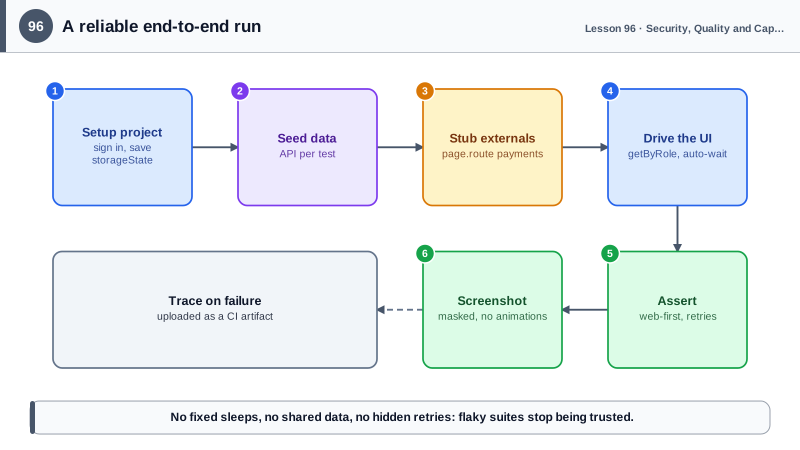
A setup project signs in once. The checkout test seeds its own product through the API, routes the payment provider to a stub and checks the confirmation page visually.
// playwright.config.ts
import { defineConfig, devices } from '@playwright/test';
export default defineConfig({
  testDir: 'e2e',
  fullyParallel: true,
  retries: process.env.CI ? 1 : 0,
  use: { baseURL: process.env.BASE_URL ?? 'http://localhost:4173', trace: 'on-first-retry' },
  projects: [
    { name: 'setup', testMatch: /auth\.setup\.ts/ },
    { name: 'chromium', use: { ...devices['Desktop Chrome'], storageState: 'e2e/.auth/user.json' }, dependencies: ['setup'] },
    { name: 'mobile-safari', use: { ...devices['iPhone 14'], storageState: 'e2e/.auth/user.json' }, dependencies: ['setup'] },
  ],
});

// e2e/auth.setup.ts: sign in once through the real UI
import { test as setup, expect } from '@playwright/test';
setup('sign in', async ({ page }) => {
  await page.goto('/login');
  await page.getByLabel('Email').fill(process.env.E2E_USER!);
  await page.getByLabel('Password').fill(process.env.E2E_PASSWORD!);
  await page.getByRole('button', { name: 'Sign in' }).click();
  await expect(page.getByRole('link', { name: 'Account' })).toBeVisible();
  await page.context().storageState({ path: 'e2e/.auth/user.json' });
});

// e2e/checkout.spec.ts
import { test, expect } from '@playwright/test';

test('a signed-in customer can buy a product @critical', async ({ page, request }) => {
  const product = await (await request.post('/api/test/products', { data: { name: 'E2E Mug', priceCents: 1500 } })).json();
  await page.route('https://payments.example.com/**', (route) => route.fulfill({ json: { status: 'approved', id: 'pay_test' } }));

  await page.goto(`/products/${product.slug}`);
  await page.getByRole('button', { name: 'Add to cart' }).click();
  await expect(page.getByRole('status')).toHaveText(/added to cart/i);       // retries until true

  await page.getByRole('link', { name: /cart/i }).click();
  await page.getByRole('button', { name: 'Checkout' }).click();
  await page.getByRole('button', { name: 'Pay $15.00' }).click();

  await expect(page.getByRole('heading', { name: 'Thank you for your order' })).toBeVisible();
  await expect(page).toHaveScreenshot('order-confirmation.png', {
    mask: [page.getByTestId('order-number'), page.getByTestId('order-date')],   // dynamic values
    animations: 'disabled',
  });
});
When this test fails in CI, the trace from the retry shows each step with a DOM snapshot, the network calls and console output, so the failure can be understood without rerunning it locally.
Real-World Examples
- Playwright was released by Microsoft in 2020 by engineers who had previously built Puppeteer at Google, and the State of JavaScript survey shows it overtaking older tools in usage and satisfaction for end-to-end testing in recent years.
- Google's testing blog has written about flaky tests at scale, reporting that a significant portion of its tests had shown some flakiness and that flaky results cost developer time and trust, which is why techniques such as hermetic test data and quarantining flaky tests became standard practice.
Review Questions & Answers
They are slower, more expensive and more prone to flakiness than unit and component tests. Concentrating them on the flows where failure would be most costly, such as sign-in and checkout, gives the most confidence for the maintenance effort, while lower layers cover the detail.
They retry automatically until the condition is met or a timeout expires, so the test waits exactly as long as the application needs instead of failing on a transient state or relying on fixed sleeps that are either too short or wastefully long.
Tests that depend on shared or leftover data fail when run in parallel, in a different order or after another test changes that data. Creating data per test through an API makes tests independent and deterministic.
Running them in a consistent environment such as the same Docker image, disabling animations, waiting for fonts and images, and masking dynamic content such as dates, ids and avatars, so that pixel differences only appear when the layout actually changed.