Transpiling vs Polyfills and Browserslist
On this page
Learning Objective
Distinguish syntax transforms from polyfills, define supported browsers with a browserslist query or Baseline, understand what TypeScript, Babel, SWC and esbuild do in the build, avoid shipping unnecessary transforms and polyfills to modern browsers, and use feature detection for progressive enhancement.
Concept Explanation
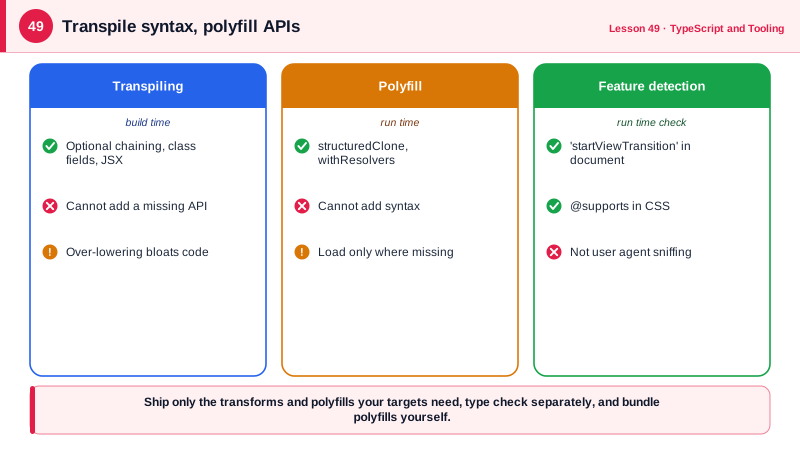
Code you write today may use language features and APIs that some of your users' browsers do not support. Two different tools close the gap, and they solve different problems. Transpiling, or syntax lowering, rewrites new syntax into older equivalent syntax: optional chaining into conditional checks, class fields into constructor assignments, or JSX into function calls. It happens at build time and changes the code's shape. A polyfill adds a missing API at run time by implementing it in JavaScript: a structuredClone, Array.prototype.at or Promise.withResolvers for browsers that lack them. Syntax cannot be polyfilled and APIs cannot be transpiled, so you need to know which you are dealing with.
Which transforms and polyfills you need depends entirely on which browsers you support. A browserslist query, such as "> 0.5%, last 2 versions, not dead", or a Baseline target describes your audience, and tools read it to decide what to transform. Baseline, an initiative of the major browser vendors and the WebDX community group, labels web features as newly available once they work in all core browsers and widely available thirty months later. Targeting Baseline widely available features is a simple, defensible default for many products. Your own analytics should be the final word: a public government service and an internal dashboard for one company have very different audiences.
Several tools perform transforms. The TypeScript compiler can emit JavaScript, but in modern setups it is used only for type checking, with noEmit. Babel is a highly configurable transformer with a large plugin ecosystem, and its preset-env reads browserslist to apply only needed transforms. SWC, written in Rust, and esbuild, written in Go, are much faster transpilers used by Next.js and Vite respectively. They strip types and transform syntax but do not type check, which is why projects run tsc --noEmit separately in CI.
Over-transpiling is common and costly. Lowering modern syntax such as async functions, classes or spread for old browsers produces larger, slower code, and including polyfills for features every supported browser already has wastes bandwidth. Since all modern browsers support ES2020 and beyond, many teams now target es2020 or later and drop legacy support, or use a differential approach: a modern bundle for modern browsers and a legacy bundle, loaded with nomodule, only for old ones. Polyfill only what your targets lack, ideally through an automatic tool that inspects usage, rather than importing a full polyfill library.
At run time, feature detection lets you use new APIs progressively without breaking older browsers. Check whether an API exists before using it, as in if ('startViewTransition' in document), and provide a simpler fallback. In CSS, @supports does the same. Feature detection is preferable to user agent sniffing, which guesses from a browser's name and version string and breaks whenever browsers change.
| Tool or concept | Does | Note |
|---|---|---|
| Transpiling | Rewrites new syntax into old | Build time, cannot add APIs |
| Polyfill | Implements a missing API | Run time, cannot add syntax |
| browserslist | Declares supported browsers | Read by Babel, Autoprefixer, others |
| Baseline | Cross-browser availability status | Newly and widely available labels |
| tsc --noEmit | Type checks only | Separate step in CI |
| esbuild and SWC | Fast transpiling, no type checking | Used by Vite and Next.js |
| Feature detection | Checks support at run time | Prefer over user agent sniffing |
| Differential loading | Modern and legacy bundles | type module and nomodule |
Worked Example: Targets, Transforms and Progressive Enhancement
The project declares its audience once, builds for it and uses feature detection for APIs that some supported browsers still lack.
// package.json
{
  "browserslist": [
    "baseline widely available",
    "not dead"
  ],
  "scripts": {
    "typecheck": "tsc --noEmit",
    "build": "vite build"
  }
}// vite.config.ts: syntax target matches the audience, no legacy lowering
export default defineConfig({ build: { target: ['es2022', 'chrome111', 'safari16.4', 'firefox115'] } });// Progressive enhancement with feature detection, not browser sniffing
export function navigateWithTransition(update: () => void) {
if (!('startViewTransition' in document)) { update(); return; } // older browsers: instant
document.startViewTransition(update);
}
// A targeted polyfill, loaded only where needed
export async function ensureWithResolvers() {
if (typeof Promise.withResolvers !== 'function') {
await import('./polyfills/promise-with-resolvers'); // separate chunk for old browsers only
}
}
// Syntax cannot be polyfilled: if a target lacked it, the build must transform it
const city = user?.address?.city ?? 'Unknown';/* CSS feature detection */
.layout { display: grid; grid-template-columns: 1fr 1fr; }
@supports (grid-template-rows: subgrid) {
.card { grid-template-rows: subgrid; grid-row: span 3; }
}The polyfill is loaded with a dynamic import inside a check, so modern browsers never download it. Building for es2022 keeps async functions, classes and optional chaining as written, producing smaller and faster code than lowering them to ES5.
Real-World Examples
- The Baseline initiative, announced at Google I/O in 2023 together with Mozilla, Apple and Microsoft through the W3C WebDX Community Group, now appears on MDN pages and caniuse, and browserslist added support for Baseline queries so build tools can target it directly.
- In 2024 the polyfill.io domain, which served polyfills to more than 100,000 websites through a script tag, was acquired by a new owner and began injecting malicious code; Cloudflare and Fastly published safe mirrors and security teams advised removing the script, a lesson in why polyfills should be bundled from audited sources rather than loaded from third-party CDNs.
Review Questions & Answers
It is syntax. A browser that does not understand it fails to parse the whole file, so no run-time code can help. It must be transformed at build time into equivalent older syntax if the target browsers lack support.
A feature has been supported in all core browsers, Chrome, Edge, Firefox and Safari on desktop and mobile, for at least thirty months after becoming newly available in all of them. It is a convenient signal that a feature is safe for most audiences without polyfills.
Vite uses esbuild, which only strips types and transforms syntax for speed; it does not check types. Type errors would therefore not fail the build, so a separate tsc --noEmit step, usually in CI and the editor, performs the actual type checking.
Feature detection tests whether the needed API actually exists, so it stays correct as browsers add features and works for unknown browsers. User agent strings are unreliable, frequently spoofed or frozen, and checks based on them break when browsers change.