JavaScript Bundle Size: Budgets and Analysis
On this page
Learning Objective
Explain why JavaScript is the most expensive resource byte for byte, set a JavaScript budget per route, analyze bundles to find large and duplicated dependencies, replace heavy libraries with lighter ones or platform features, and keep the budget enforced over time.
Concept Explanation
Not all bytes cost the same. A 200 kilobyte image is downloaded and decoded, often off the main thread. A 200 kilobyte JavaScript bundle is downloaded, then parsed, compiled and executed on the main thread, and its execution usually creates more work: rendering, hydration, event listeners and memory. On a mid-range phone, those steps can take several times longer than on a developer laptop. That is why JavaScript is the resource most directly linked to poor INP (Day 84), slow hydration (Day 72) and delayed LCP for client-rendered pages.
A performance budget turns this into a constraint the team can manage. A common approach sets a limit on compressed JavaScript per route for the initial load, chosen by working backward from a target, such as interactivity within a few seconds on a mid-range phone on a 4G connection, and from what competitors ship. Many teams start somewhere between 150 and 300 kilobytes compressed for the initial route, then tighten. The budget is useful only if it is visible and enforced: in CI with tools such as size-limit or bundlesize, in Lighthouse CI resource summaries (Day 82) and in pull request comments that show how a change affects size.
Bundle analysis shows where the bytes come from. Treemap visualizers, such as rollup-plugin-visualizer, webpack-bundle-analyzer, Vite's and Next.js's analyzer plugins, or source-map-explorer, display each module's contribution. Typical findings are a large library used for one function, such as a full date library for formatting a date, moment-style locale data for every language, an icon library imported wholesale, several copies of the same package at different versions, polyfills for features every supported browser already has (Day 49), development-only code included in production, and code that should be lazy loaded because it serves one rare feature.
Each finding has a standard fix. Import only what you use from libraries that tree shake (Day 48). Replace heavy libraries with smaller ones or with platform features: Intl.DateTimeFormat and Intl.RelativeTimeFormat instead of date formatting libraries, Intl.NumberFormat for currency, fetch instead of an HTTP client library, the native dialog element instead of a modal library, CSS for animations that used a JavaScript animation library. Deduplicate versions with the package manager's dedupe command or overrides. Load rare features on demand with dynamic import. Before adding any dependency, check its cost on a site such as bundlephobia or pkg-size and ask whether the platform already provides it.
Third-party scripts deserve a separate budget, because they are often the largest source of main thread work and are added outside engineering's normal review: tag managers, analytics, chat widgets, A/B testing tools and ad scripts. Day 94 covers loading them safely. Finally, remember that the budget applies to what users run, so measure the coverage of loaded code too: the DevTools Coverage panel shows how much of each file executed during a session, and a large unused percentage on the initial route indicates code that should be split or removed.
| Finding | Typical cause | Fix |
|---|---|---|
| Huge date library | Formatting a few dates | Intl.DateTimeFormat, a small library |
| All locales bundled | Library imports every locale | Import only needed locales |
| Whole icon set | Barrel import of icons | Import individual icons or SVG sprites |
| Duplicate packages | Different version ranges | Dedupe, overrides, align versions |
| Unneeded polyfills | Old browser targets | Update browserslist targets |
| Rare feature in main chunk | Static import | Dynamic import on demand |
| Heavy third-party tags | Marketing and analytics scripts | Separate budget, defer, remove unused |
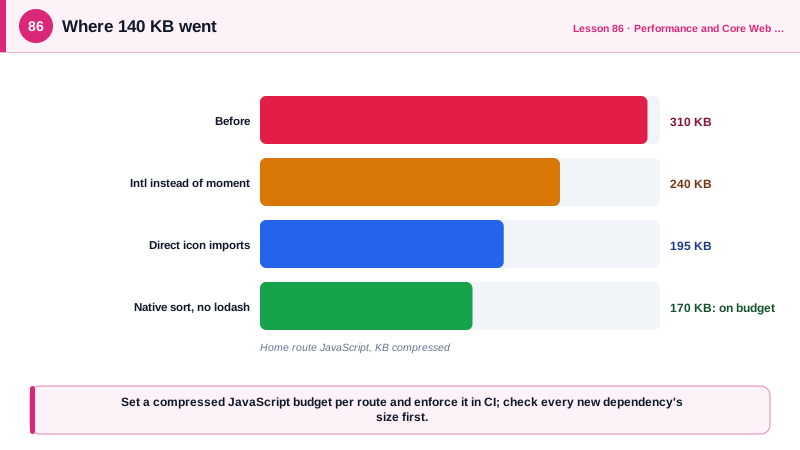
Worked Example: Finding and Removing 140 KB
The analyzer shows a date library with all locales, a full icon package and two copies of a utility library. The fixes use platform APIs, direct imports and a size check in CI.
// Before
import moment from 'moment';                       // about 70 KB compressed with locales
import * as Icons from 'some-icon-library';        // the whole icon set
import _ from 'lodash';                            // CommonJS, entire library

export const formatDate = (iso: string) => moment(iso).format('MMM D, YYYY');
export const Trash = Icons.Trash;
export const sortByName = (xs: User[]) => _.sortBy(xs, 'name');

// After
const dateFmt = new Intl.DateTimeFormat('en-US', { month: 'short', day: 'numeric', year: 'numeric' });
export const formatDate = (iso: string) => dateFmt.format(new Date(iso));   // 0 KB: built into the browser

export { Trash } from 'some-icon-library/icons/trash';                    // one icon

export const sortByName = (xs: User[]) => xs.toSorted((a, b) => a.name.localeCompare(b.name));// package.json: enforce the budget on every pull request
{
"scripts": { "size": "size-limit" },
"size-limit": [
{ "name": "home route", "path": "dist/assets/index-*.js", "limit": "170 KB" },
{ "name": "product route", "path": "dist/assets/product-*.js", "limit": "60 KB" }
]
}npx vite-bundle-visualizer # treemap of the production build
npm dedupe && npm ls lodash # check for duplicate versionsThe size-limit check runs in CI and reports the compressed size of each entry; a pull request that pushes the home route over 170 KB fails with the exact difference, which prompts a conversation before the regression ships.
Real-World Examples
- The HTTP Archive Web Almanac's JavaScript chapter has repeatedly found that the median mobile page loads several hundred kilobytes of compressed JavaScript, and that the amount has grown year over year, while Alex Russell's analyses of the performance inequality gap argue that budgets must be set for the median low-end Android device rather than for developer hardware.
- The Moment.js project placed itself in maintenance mode in 2020 and its documentation recommends alternatives such as Luxon, Day.js, date-fns and the built-in Intl APIs, noting that Moment's mutable design and large size, especially with locales, make it unsuitable for modern bundles.
Review Questions & Answers
An image is downloaded and decoded, often off the main thread. JavaScript must be downloaded, parsed, compiled and executed on the main thread, and executing it usually triggers more work such as rendering, hydration and memory allocation, all of which delay interactivity, especially on slow devices.
Automatically, in CI, with tools such as size-limit or Lighthouse CI resource assertions that fail a pull request when a route's compressed JavaScript exceeds its limit, and with visible reporting of size changes so regressions are discussed before they merge.
A large library used for one feature, replaced by a platform API such as Intl or a smaller library; whole-package imports such as an entire icon set, replaced by direct imports of what is used; and duplicate versions of a dependency, fixed by deduplication or aligning versions.
How much of each loaded JavaScript and CSS file actually executed or applied during the recorded session. A high percentage of unused code on the initial route indicates code that should be split into lazy chunks or removed.