Reflow vs Repaint and Layout Thrashing Explained
On this page
Learning Objective
Recognize the operations that force synchronous layout, explain why interleaving DOM reads and writes causes layout thrashing, and restructure code to batch reads and writes, use cheaper properties, and contain the scope of layout and paint.
Concept Explanation
Browsers are lazy about layout on purpose. When you change a style, the browser marks part of the tree as dirty and waits, hoping to batch many changes into one layout pass just before the next frame. That works well until your code asks a question that requires up-to-date geometry, such as an element's offsetHeight or getBoundingClientRect. To answer correctly the browser must run style and layout immediately, in the middle of your JavaScript. This is called forced synchronous layout.
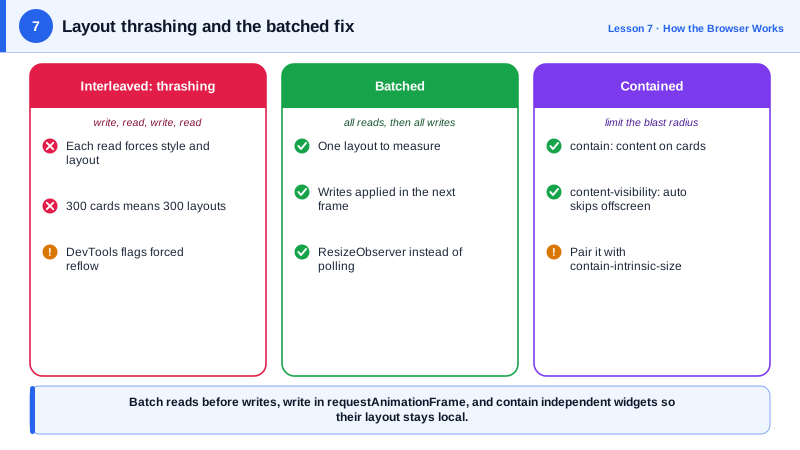
One forced layout is usually fine. The problem is a loop that writes, reads, writes, reads. Each write invalidates layout and each read forces it again, so a loop over a hundred elements can trigger a hundred layouts in a single frame. This pattern is called layout thrashing, and in the Performance panel it appears as a long run of purple Layout blocks with warnings about forced reflow. The fix is to separate the phases: read everything first, then write everything. Two layouts at most, instead of one per element.
Many properties and methods force layout when read: offsetTop, offsetWidth, clientHeight, scrollTop, getBoundingClientRect, getComputedStyle for layout-dependent values, innerText, and scrolling methods such as scrollIntoView. Writing styles is cheap; reading geometry after writing is what costs. Libraries such as fastdom formalized the read and write batching pattern, and requestAnimationFrame gives a natural place to do the writes once per frame.
The second lever is choosing properties that skip stages. Moving an element with transform instead of top avoids layout. Changing opacity instead of visibility toggling with layout changes avoids layout too. Even box-shadow and filter are paint costs that can be large on big areas. Day 8 explains how compositing makes transform and opacity cheapest of all.
The third lever is scope. CSS containment tells the browser that a subtree is independent. contain: layout means changes inside cannot affect layout outside; contain: paint clips painting to the box; contain: content combines the common ones. content-visibility: auto goes further and skips rendering work entirely for off-screen sections until they approach the viewport, while contain-intrinsic-size reserves their space so scrollbars do not jump. For long pages such as feeds, documentation or comment threads this can cut initial rendering time dramatically.
| Technique | What it avoids | Example |
|---|---|---|
| Batch reads, then writes | Repeated forced layouts | Measure all rows, then size all rows |
| Write in requestAnimationFrame | Layout mid-task | Apply style changes once per frame |
| transform instead of top or left | Layout on every frame | Sliding panels, drag and drop |
| contain: content | Layout and paint leaking outward | Widgets, cards, list items |
| content-visibility: auto | Rendering off-screen sections | Long articles, feeds |
| ResizeObserver | Polling sizes in loops | React to element size changes |
Worked Example: Removing Layout Thrashing from an Equal-Height Card Grid
The first version reads and writes inside one loop and forces a layout for every card. The second batches reads and writes and contains each card.
const cards = [...document.querySelectorAll('.card')];

// Before: write then read in each iteration -> one forced layout per card
function equalizeSlow() {
  for (const card of cards) {
    card.style.height = 'auto';                         // write: invalidates layout
    const h = card.getBoundingClientRect().height;      // read: forces layout now
    card.style.height = Math.ceil(h / 40) * 40 + 'px';  // write again
  }
}

// After: all writes, one layout, all reads, then all writes
function equalizeFast() {
  for (const card of cards) card.style.height = 'auto';                       // writes
  const heights = cards.map((c) => c.getBoundingClientRect().height);         // one layout
  requestAnimationFrame(() => {
    cards.forEach((c, i) => { c.style.height = Math.ceil(heights[i] / 40) * 40 + 'px'; });  // writes
  });
}

// React to size changes without polling or reading in a loop.
const ro = new ResizeObserver((entries) => {
  for (const entry of entries) entry.target.dataset.size = entry.contentRect.width > 400 ? 'wide' : 'narrow';
});
cards.forEach((c) => ro.observe(c));.card { contain: content; } /* layout and paint stay inside the card */
.comments-section {
content-visibility: auto; /* skip rendering while far off screen */
contain-intrinsic-size: auto 800px; /* reserve an estimated height */
}With 300 cards, the Performance panel shows the slow version as one long task full of layout events marked as forced reflow, while the fast version shows a single layout during the reads and a single layout in the next frame.
Real-World Examples
- Paul Irish maintains a widely cited list, "What forces layout and reflow", that enumerates the element properties, methods and window properties that trigger synchronous layout in Blink, and it is the reference most performance guides link to.
- In a web.dev case study, the Chrome team reported that applying content-visibility: auto to chunked sections of a travel blog page reduced its initial rendering time from 232 milliseconds to 30 milliseconds, roughly a sevenfold improvement.
Review Questions & Answers
When JavaScript reads a geometry value such as offsetHeight or getBoundingClientRect after styles have changed, the browser must run style and layout immediately to return a correct answer, instead of waiting for the next frame. Doing this once is acceptable, but it becomes expensive when repeated.
Thrashing happens because each write invalidates layout and each following read forces it again, so the number of layouts equals the number of iterations. Performing all reads first needs at most one layout, and performing all writes afterward invalidates layout only once more, to be recomputed in the next frame.
It lets the browser skip style, layout and paint for an element's contents while it is far from the viewport, and render them as it approaches. Because skipped content has no measured size, contain-intrinsic-size gives an estimated size so the page height and scrollbar stay stable.
offsetHeight or offsetWidth, getBoundingClientRect, and scrollTop are common examples. Others include clientWidth, getComputedStyle for layout-dependent values, innerText and scrollIntoView.