Render-Blocking Resources: Defer vs Async Scripts
On this page
Learning Objective
Identify which resources block rendering and which block HTML parsing, understand how the defer, async and type module attributes change script behavior, and choose the right loading strategy for stylesheets, application scripts and third-party scripts.
Concept Explanation
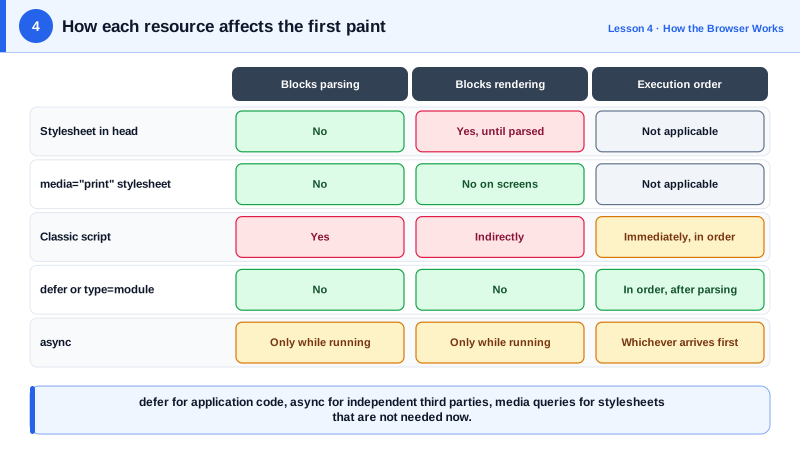
Stylesheets and scripts can stop the browser from showing the page, but they do so in different ways. CSS is render blocking: the browser will not paint content until it has downloaded and parsed the stylesheets in the head, because painting first and restyling later would cause a flash of unstyled content and wasted work. CSS does not stop the HTML parser, though. The parser keeps building the DOM while the stylesheet downloads.
A classic script, written as a plain script tag with a src and no attributes, is parser blocking. When the parser reaches it, parsing stops, the script is downloaded if necessary, and it runs before parsing continues. The reason is historical: a script might call document.write and insert markup at that point. There is a second, subtler cost: if a stylesheet is still loading, the script also waits for the CSS, because the script might read computed styles. So a synchronous script in the head can be blocked by a stylesheet, and in turn block the parser, before any content appears.
The defer attribute tells the browser to download the script in parallel without pausing the parser and to run it only after the document has been parsed, just before the DOMContentLoaded event. Deferred scripts run in the order they appear in the document, which makes defer the right default for application code that depends on the DOM and on other scripts. The async attribute also downloads in parallel, but runs the script as soon as it arrives, pausing the parser at that moment, and in whatever order downloads finish. That suits independent scripts such as analytics that do not depend on anything else.
Module scripts, written with type module, are deferred by default and can also take async. They are fetched with CORS and run in strict mode, and their imports are fetched as a graph. Inline scripts ignore defer, so an inline module behaves like a deferred script while an inline classic script runs immediately.
For CSS, the levers are different. Keep the critical CSS small, load the rest without blocking where possible, and use the media attribute so a print stylesheet or a wide-screen stylesheet does not block rendering on devices where it does not apply. Fonts, images and other resources do not block rendering at all, although late-arriving fonts and images can shift the layout (Day 85). The goal is simple: nothing that is not needed for the first meaningful paint should stand between the HTML and the pixels.
| Resource | Blocks parsing | Blocks rendering | Execution order |
|---|---|---|---|
| Stylesheet in head | No | Yes, until parsed | Not applicable |
| Stylesheet with non-matching media | No | No | Not applicable |
| Classic script | Yes | Yes, indirectly | Document order, immediately |
| Script with defer | No | No | Document order, after parsing |
| Script with async | Only while it runs | Only while it runs | Whichever downloads first |
| Script with type module | No | No | Deferred by default, async allowed |
Worked Example: Fixing a Head That Blocks the First Paint
The original head forces the browser to download and run two scripts and a print stylesheet before showing anything. The fixed version keeps only the critical stylesheet blocking.
<!-- Before: everything blocks the first paint -->
<head>
  <link rel="stylesheet" href="/css/app.css">
  <link rel="stylesheet" href="/css/print.css">
  <script src="https://cdn.example-analytics.com/tag.js"></script>
  <script src="/js/vendor.js"></script>
  <script src="/js/app.js"></script>
</head>

<!-- After: only the CSS needed for the first paint blocks -->
<head>
  <link rel="stylesheet" href="/css/app.css">
  <link rel="stylesheet" href="/css/print.css" media="print">     <!-- not render blocking on screens -->

  <!-- Independent third party: run whenever it arrives -->
  <script async src="https://cdn.example-analytics.com/tag.js"></script>

  <!-- Application code: parallel download, ordered execution after parsing -->
  <script defer src="/js/vendor.js"></script>
  <script defer src="/js/app.js"></script>                         <!-- runs after vendor.js -->

  <!-- Or as ES modules, which are deferred by default -->
  <!-- <script type="module" src="/js/main.js"></script> -->
</head>// app.js can rely on the parsed DOM without waiting for DOMContentLoaded,
// because deferred scripts run after parsing has finished.
document.querySelector('#search').addEventListener('input', onSearch);After the change, a Lighthouse audit no longer lists the scripts under render blocking resources, and the Performance panel shows the parser running straight through the document while the scripts download in the background.
Real-World Examples
- Lighthouse includes an "Eliminate render-blocking resources" audit that lists the stylesheets and synchronous scripts delaying First Contentful Paint and estimates the savings, and it is one of the most frequently flagged opportunities on real sites.
- Google Tag Manager and Google Analytics snippets load their main library with async by default, precisely so that a slow analytics server cannot block the parsing and rendering of the page that includes it.
Review Questions & Answers
Painting content before its styles are known would show a flash of unstyled content and then require restyling and repainting everything. Images do not change how other content is styled, so the browser can paint the rest of the page and fill images in later, although it should reserve space to avoid layout shifts.
Use async for scripts that are independent of the DOM and of other scripts, such as analytics or a performance monitoring beacon, where running as soon as possible matters and order does not. Use defer for application code that depends on the parsed document or on other scripts running first.
A classic script might read computed styles, so the browser will not run it until stylesheets that precede it have loaded and been parsed. A slow stylesheet therefore delays the script, and because the script blocks the parser, it also delays everything after the script in the document.
The browser still downloads the stylesheet, but at a low priority, and it does not block rendering on screens because the media query does not match. The styles are applied only when printing, so the first paint no longer waits for that file.