React Error Boundaries and Sentry Monitoring
On this page
Learning Objective
Contain rendering failures with error boundaries, handle errors in event handlers and async code, capture unhandled errors and rejections, report them with source maps, context and privacy safeguards to an error monitoring service, correlate frontend errors with releases and backend traces, and turn signals into alerts and fixes.
Concept Explanation
Every application fails in production in ways tests did not predict: an API returns an unexpected shape, a browser extension modifies the DOM, an old browser lacks an API, a deploy removes a chunk, a third-party script throws, a user follows a link with odd parameters. Users rarely report these problems; they leave. So the frontend must do two things: fail gracefully for the user, and tell the team what happened with enough context to fix it.
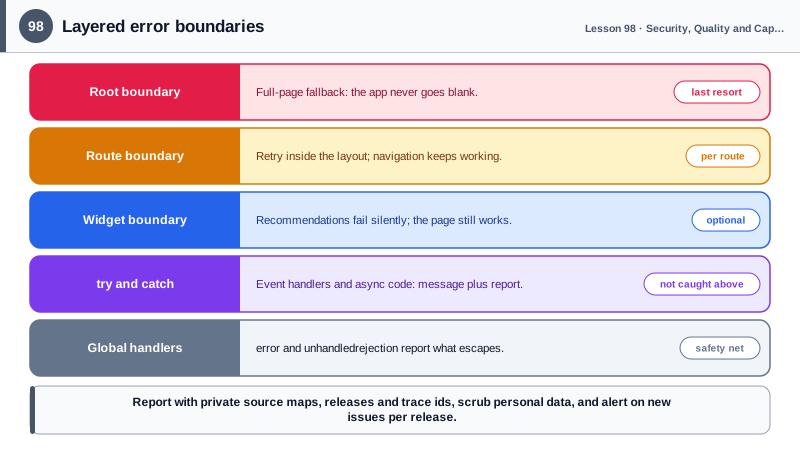
In React, error boundaries are the mechanism for graceful rendering failures. A boundary is a component that catches errors thrown while rendering its children, in lifecycle methods and in constructors, shows a fallback UI and reports the error. Without boundaries, an error in one small widget unmounts the entire application and leaves a blank page. With boundaries at sensible levels, the root, each route and independent widgets such as a recommendations panel, a failure stays contained: the rest of the page works, and the broken part offers a retry. Routers provide route-level error elements built on the same idea (Day 62). Error boundaries do not catch errors in event handlers, timers or async code, so those need try and catch with explicit handling, typically showing a message and reporting the error.
Some errors escape everything. The window error event and the unhandledrejection event catch uncaught exceptions and unhandled promise rejections globally, and they are the last line of defense for reporting. Resource loading failures, such as a script or image returning 404, appear as error events on the element. Chunk load errors after deploys (Day 88) deserve special handling, and so do errors from cross-origin scripts, which appear only as "Script error." with no details unless the script is loaded with crossorigin and served with CORS headers.
Reporting needs context to be useful. Error monitoring services such as Sentry, Datadog, Bugsnag and others collect errors with stack traces, group similar errors into issues, and track how many users each affects. Production bundles are minified, so upload source maps privately to the monitoring service at build time, keeping them off the public site, so stack traces map back to original files and lines. Attach the release version so errors can be tied to deploys, breadcrumbs of recent navigation, clicks and requests, and a trace id that links the frontend error to the backend request, using standards such as W3C Trace Context and OpenTelemetry. Session replay products can show what the user saw, but must mask inputs and personal data.
Privacy and noise need active management. Scrub personal data, tokens and form values from error payloads before they leave the browser, respect consent requirements and set retention limits. Filter noise from browser extensions, bots and known harmless errors, and sample high-volume events. Then act on the data: alert on new issues introduced by a release and on spikes in error rates, not on every individual error, assign owners, link issues to tickets and track crash-free session rates alongside the Core Web Vitals from Day 81. Monitoring that nobody looks at is just storage.
| Concern | Tool or technique | Note |
|---|---|---|
| Rendering errors | Error boundaries at root, route and widget levels | Contain failures, offer retry |
| Event handler and async errors | try and catch with user feedback | Boundaries do not catch these |
| Uncaught errors | window error and unhandledrejection | Last line of defense |
| Readable stack traces | Private source map upload | Never publish source maps publicly |
| Context | Release, breadcrumbs, user agent, route | Group and prioritize issues |
| Frontend to backend correlation | Trace ids, OpenTelemetry | Follow one request end to end |
| Privacy | Scrub personal data, mask replays | Consent and retention limits |
| Action | Alerts on new issues and spikes, owners | Crash-free session rate |
Worked Example: Boundaries, Global Handlers and Sentry with Privacy Scrubbing
Monitoring is initialized with the release and scrubbing rules, the app has layered error boundaries, and async handlers report errors explicitly.
// monitoring.ts
import * as Sentry from '@sentry/react';

Sentry.init({
  dsn: import.meta.env.VITE_SENTRY_DSN,                  // public by design; it only allows sending events
  release: import.meta.env.VITE_RELEASE,                 // ties errors to a deploy; source maps uploaded for it in CI
  environment: import.meta.env.MODE,
  tracesSampleRate: 0.1,                                 // performance traces for 10 percent of sessions
  tracePropagationTargets: [/^\/api\//],                 // adds trace headers so backend spans link up
  ignoreErrors: ['ResizeObserver loop completed with undelivered notifications'],
  denyUrls: [/extensions\//i, /^chrome-extension:\/\//i],
  beforeSend(event) {
    if (event.request?.url) event.request.url = event.request.url.replace(/([?&](token|email)=)[^&]+/gi, '$1[redacted]');
    delete event.user?.email;
    return event;
  },
});// App.tsx: layered boundaries so one failure does not blank the page
export function App() {
return (
<Sentry.ErrorBoundary fallback={<FullPageError />}>
<Layout>
<Sentry.ErrorBoundary fallback={({ resetError }) => <SectionError onRetry={resetError} />}>
<Routes />
</Sentry.ErrorBoundary>
<Sentry.ErrorBoundary fallback={null}> {/* recommendations may fail silently */}
<Recommendations />
</Sentry.ErrorBoundary>
</Layout>
</Sentry.ErrorBoundary>
);
}
// Event handlers and async code: boundaries do not see these, so handle and report
async function onSave(values: Settings) {
try {
await api('/settings', { method: 'PUT', body: JSON.stringify(values) });
toast.success('Settings saved');
} catch (err) {
toast.error('We could not save your settings. Please try again.');
Sentry.captureException(err, { tags: { feature: 'settings' }, extra: { fields: Object.keys(values) } }); // keys, not values
}
}# CI: upload source maps privately for this release, then remove them from the deploy
npx @sentry/cli sourcemaps upload --release "$RELEASE" dist/assets
find dist -name '*.map' -deleteThe extra context records which fields were being saved but never their values. Layered boundaries mean a crash in recommendations removes only that panel, while a crash in a route shows a retry inside the layout.
Real-World Examples
- Sentry's documentation and many engineering blogs recommend tying errors to releases and alerting on regressions introduced by a specific deploy, and Sentry reports crash-free session and user rates per release so teams can decide quickly whether to roll back.
- The W3C Trace Context specification standardized the traceparent header used by OpenTelemetry and observability vendors, so a trace started in the browser can follow a request through the API and backend services and connect a frontend error to the server-side failure that caused it.
Review Questions & Answers
They catch errors thrown during rendering, in lifecycle methods and in constructors of components below them. They do not catch errors in event handlers, asynchronous code such as promises and timers, server-side rendering or errors thrown in the boundary itself, which must be handled with try and catch or global handlers.
Public source maps hand anyone a readable copy of your original source code and comments. Uploading them only to the monitoring service still lets stack traces map to original files and lines, without exposing the code.
Browsers hide details of errors from scripts loaded from other origins unless the script tag has the crossorigin attribute and the server sends appropriate CORS headers. Without both, the error message, file and line are withheld for privacy.
Alerting on new issues introduced by a release and on significant spikes in error rates, with errors grouped and tied to releases, owners assigned and known harmless or extension-generated errors filtered, instead of notifying on every individual error event.