Where to Store JWT Tokens: Cookies vs localStorage
On this page
Learning Objective
Configure session cookies with HttpOnly, Secure, SameSite and prefixes, understand cross-site request forgery and the defenses that still matter with SameSite, compare token storage options for single page apps, and explain why a backend-for-frontend with cookie sessions is the recommended architecture for browser-based apps.
Concept Explanation
Authentication in a browser comes down to one question: after the user signs in, how does the frontend prove who they are on later requests, without letting an attacker do the same? The two common answers are a session cookie that the browser sends automatically, and a bearer token, such as a JWT access token, that JavaScript attaches to requests. Each has risks, and the frontend's job is to manage them.
Cookies have attributes that make them strong when set correctly. HttpOnly prevents JavaScript from reading the cookie, so even an XSS payload cannot steal it. Secure sends it only over HTTPS. SameSite controls cross-site sending: Strict never sends it on requests initiated by other sites, Lax sends it only on top-level navigations with safe methods such as following a link, and None sends it everywhere but requires Secure. Chromium-based browsers treat cookies without a SameSite attribute as Lax, but not every browser does, so always set it explicitly. The __Host- prefix forces Secure, path / and no Domain attribute, so the cookie cannot be set or overridden by subdomains. A session cookie with all of these is very hard to steal.
Cross-site request forgery is the attack that automatic cookie sending enables. A malicious page causes the victim's browser to send a request to your site, such as a hidden form that posts to /account/email, and the browser attaches the victim's cookies, so the server performs the action as the user. SameSite Lax or Strict blocks most CSRF, because cookies are not sent on cross-site POSTs. But defense in depth still matters: same-site attacks from compromised subdomains are not blocked, older browsers and misconfigurations exist and some flows need SameSite None. Standard additional defenses are anti-CSRF tokens tied to the session and sent in a header or form field, checking the Origin or Sec-Fetch-Site headers on state-changing requests, and never changing state with GET requests.
Bearer tokens avoid CSRF, because nothing is sent automatically, but they must be stored somewhere JavaScript can reach. localStorage and sessionStorage are readable by any script on the page, so any XSS or compromised dependency can steal the token and use it from anywhere until it expires. Keeping the token only in memory reduces exposure but loses it on reload and still lets injected code use it while the page is open. Refresh tokens in the browser make this worse, since they are long-lived.
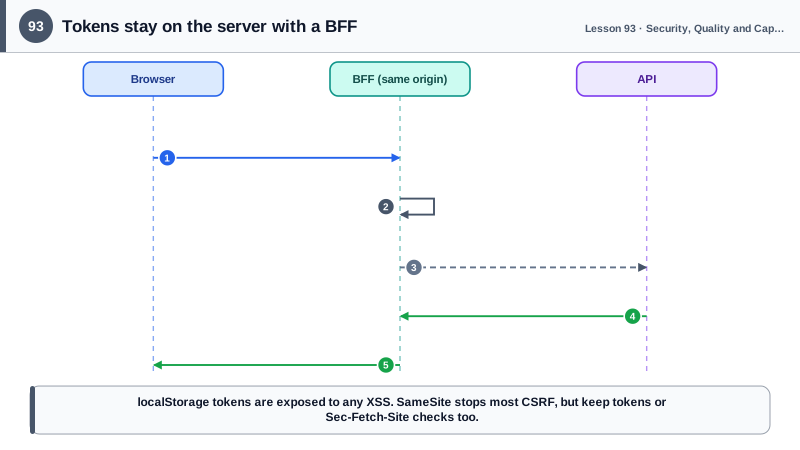
That is why current guidance for browser-based applications, including the IETF's OAuth 2.0 for Browser-Based Applications best practice, recommends the backend-for-frontend pattern. A small server component, the BFF, performs the OAuth flow, keeps access and refresh tokens on the server and gives the browser only an HttpOnly, Secure, SameSite session cookie. The frontend calls the BFF on its own origin, and the BFF attaches tokens when calling APIs. Tokens never touch JavaScript, CSRF is handled with SameSite plus a CSRF token or header check, and session expiry, revocation and token refresh happen on the server. Whatever the architecture, XSS remains the most serious threat, since injected script can act as the user inside the page, which is why Days 91 and 92 come first.
| Option | Stolen by XSS | CSRF exposure | Notes |
|---|---|---|---|
| HttpOnly, Secure, SameSite cookie | No, not readable | Low with SameSite, add tokens | Recommended with a BFF |
| Token in localStorage | Yes, easily | None | Persistent, high risk |
| Token in memory only | While page is open | None | Lost on reload |
| Refresh token in the browser | Yes if readable | Depends | Long-lived, avoid |
| BFF with server-side tokens | Tokens never in browser | Mitigated with SameSite and CSRF token | IETF recommendation |
| __Host- prefix | Not applicable | Prevents subdomain overrides | Secure, path /, no Domain |
Worked Example: A BFF Session Cookie with CSRF Protection
The BFF sets a hardened session cookie after login. The frontend sends a CSRF header with every state-changing request, and the BFF checks both the token and the Fetch Metadata headers.
// BFF (Node/Express): after a successful OAuth callback
res.cookie('__Host-session', sessionId, {
  httpOnly: true,                     // scripts cannot read it
  secure: true,                       // HTTPS only
  sameSite: 'lax',                    // not sent on cross-site POSTs
  path: '/',
  maxAge: 8 * 60 * 60 * 1000,         // the server also enforces idle and absolute timeouts
});
// Access and refresh tokens are stored server-side in the session, never sent to the browser

// CSRF protection for state-changing requests
app.use((req, res, next) => {
  if (['GET', 'HEAD', 'OPTIONS'].includes(req.method)) return next();
  const site = req.get('Sec-Fetch-Site');
  if (site && site !== 'same-origin') return res.status(403).json({ title: 'Cross-site request blocked' });
  if (req.get('X-CSRF-Token') !== req.session.csrfToken) return res.status(403).json({ title: 'Invalid CSRF token' });
  next();
});

app.get('/bff/csrf', (req, res) => res.json({ token: req.session.csrfToken })); // same-origin read only// Frontend fetch wrapper: same origin, cookies automatic, CSRF header on unsafe methods
let csrfToken: string | null = null;
export async function api<T>(path: string, init: RequestInit = {}): Promise<T> {
const method = (init.method ?? 'GET').toUpperCase();
const headers = new Headers(init.headers);
if (!['GET', 'HEAD'].includes(method)) {
csrfToken ??= (await (await fetch('/bff/csrf', { credentials: 'same-origin' })).json()).token;
headers.set('X-CSRF-Token', csrfToken!);
}
const res = await fetch(`/bff/api${path}`, { ...init, headers, credentials: 'same-origin' });
if (res.status === 401) { window.location.assign(`/bff/login?next=${encodeURIComponent(location.pathname)}`); throw new Error('Signed out'); }
if (!res.ok) throw new ApiError(res.status, await res.json().catch(() => null));
return res.json();
}In DevTools, the Application panel shows the __Host-session cookie as HttpOnly and Secure, and document.cookie in the console does not include it. A form on another site that posts to the BFF is rejected by the Sec-Fetch-Site check even before the CSRF token check.
Real-World Examples
- The IETF OAuth working group's "OAuth 2.0 for Browser-Based Applications" best current practice draft describes the backend-for-frontend pattern as the most secure option for browser apps, because tokens stay on the server and the browser only holds an HttpOnly session cookie.
- Chrome changed the default for cookies without a SameSite attribute to Lax in 2020, which closed many CSRF holes in sites that had never set the attribute, although not every browser adopted the same default, and OWASP's CSRF cheat sheet still recommends tokens or Fetch Metadata checks as additional defenses.
Review Questions & Answers
HttpOnly prevents JavaScript, including XSS payloads, from reading the cookie. Secure ensures it is only sent over HTTPS, so it cannot be intercepted on plain HTTP. SameSite limits sending the cookie on cross-site requests, which blocks most cross-site request forgery.
A malicious site causes the victim's browser to send a request to the target site, such as an auto-submitting form. The browser automatically attaches the victim's cookies, so the target performs an action as the victim, such as changing their email, without their knowledge.
Any script running on the page can read localStorage, including code injected through XSS or a compromised third-party library. The stolen token can then be used from the attacker's own machine until it expires, without the user being present.
A server component on the same site as the frontend handles the OAuth flow and keeps access and refresh tokens server-side. The browser receives only an HttpOnly, Secure, SameSite session cookie, and the BFF attaches tokens when it calls APIs on the frontend's behalf.